EasyManua.ls Logo

LiteHawk Click Auto - Drone Control Operations

LiteHawk Click Auto
18 pages
Print Icon
To Next Page IconTo Next Page
To Previous Page IconTo Previous Page
Loading...
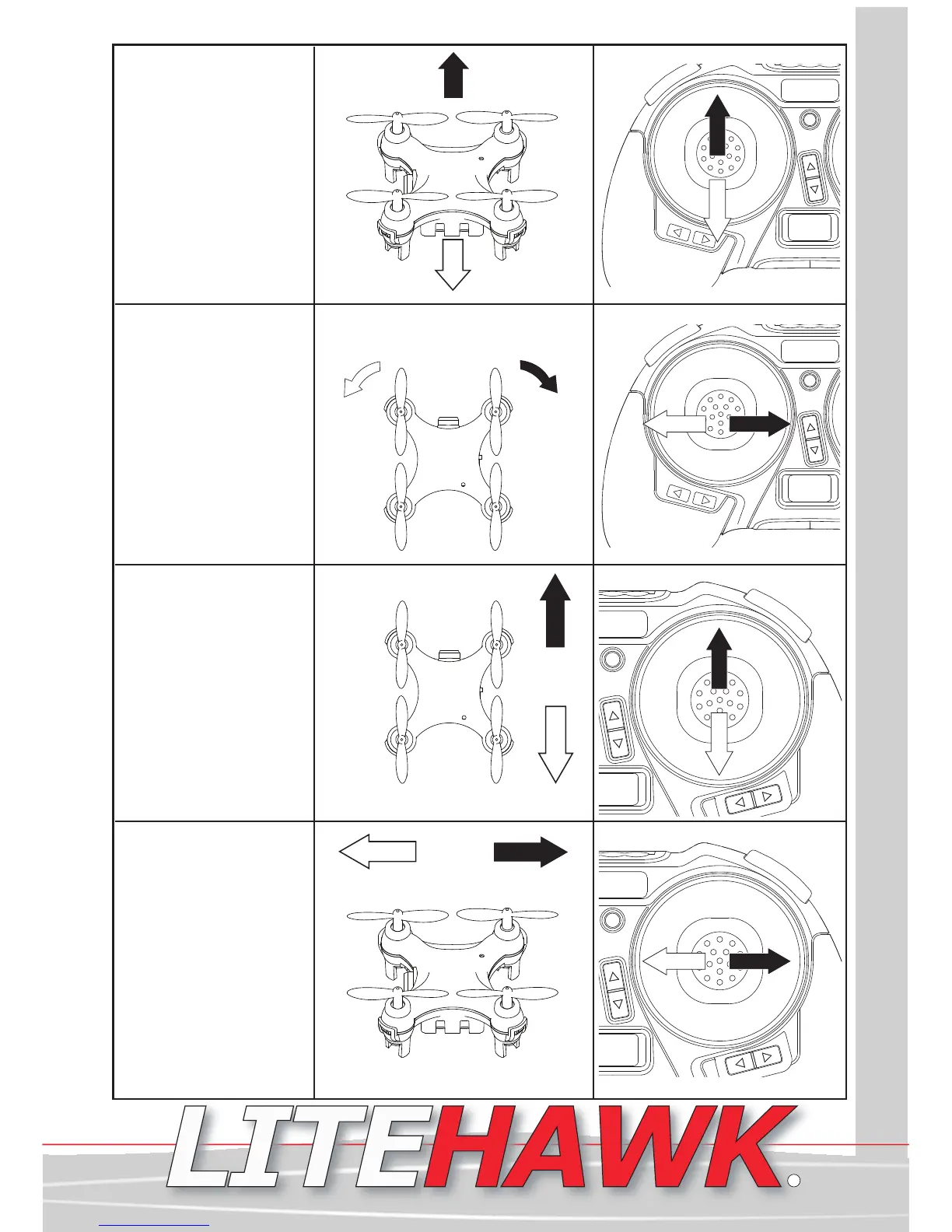
Throttle control:
Moving the stick up
increases power and
will result in more lift.
Lowering the throttle
stick or decreasing
power will result in less
lift.
TIP: This is the same
stick you will use to
“sync” your quadcopter
Up
Down
Rotate control:
Moving the stick to
the left will rotate the
quadrocopter left or
counter-clockwise.
Moving the stick to
the right will rotate
the quadrocopter
right or clockwise.
Left
Rotation
Right
Rotation
Pitch Control:
Moving the right
stick up will make
the quadrocopter go
forward. Moving the
right stick down will
make the
quadrocopter go
backwards.
Forward
Backward
Roll Control:
Moving the stick left
will make the
Quadrocopter roll left
(move sideways).
Moving the stick to
the right will make
the Quadrocopter roll
right(move
sideways).
Left
Right
LiteHawk CLICK AUTO Instruction Manual 4
www.litehawk.ca
R

Related product manuals