EasyManua.ls Logo

Lithonia Lighting OMS 1000 User Manual

Lithonia Lighting OMS 1000
18 pages
To Next Page IconTo Next Page
Page #1 background imageLoading...
Page #1 background image
page 1
Protect yourself. Before installing, read the entire
instructions carefully and save them for future
reference. Date installed:_____________
INSTALLATION INSTRUCTIONS
UOMS1000_Rev 1/14
Specications MODEL # OMS 1000
Power Requirements:.......120VAC, 60 Hz
Switching Capacity: .........8 A, Resistive
1.25A General Purpose (LED Driver)
500 watts Incandescent
250 watts Fluorescent
150 watts Ballast
Sensing Angle: .................Up to 180°
Range: ............................Up to *70 feet (21m)
*varies with surrounding temperature
Time Adjustment: ....................1, 5 or 10 min
Power Consumption:.........<1 watt
Surge protection:............... up to 6kV
UL Listing: .........................Wet location
Requirements
• The light control requires 120 volts AC
• To comply with California Energy Commission, it is required that the
control is wired through a switch.
• If you want to use the Manual Override mode, the control must
be wired through a switch. Note: Do not use with light dimmer or
timecontroled circuits.
• This product is intended for use with a junction box marked for use in
wet locations.
• Do not install on the same circuit with an electic motor.
• For best performance, mount 6-10ft high.
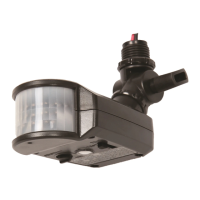
Motion Sensor
HOW DOES THE MOTION SENSOR WORK?
The Motion Sensor’s infrared sensor “sees” small temperature
changes caused by the motion of objects within its detection zone
and turns on the lights automatically. Large animals or a strong
infraredsourcesuchasvehicleheadlightsorsunlightreectingoff
a surface can also trigger the sensor.
HOW LONG DO THE LIGHTS STAY ON?
Lights remain on as long as there is movement within the detection
zone. Once the zone is vacated, lights can be adjusted to remain
on for approximately 1 to 10 minutes.
WHAT IS THE SIZE OF THE DETECTION ZONE?
Sensors can detect motion up to 70’ away in a 180° detection range.
As the distance from the sensor increases, larger movement will be
required for detection. For example at 10’ a single step across the
detection pattern may be enough to trigger the light, while at 50’
several steps may be necessary for detection.
Sensors function best when the direction of expected movement is
across its detection pattern, not towards the sensor. Mount 6-10 ft
high for optimum range and detection.
Model Number: OMS 1000
CAN THE LIGHTS STILL BE TURNED ON/OFF
WITH A LIGHT SWITCH?
At night lights can be turned on or off manually with a wall switch
or circuit breaker.

Questions and Answers:

Lithonia Lighting OMS 1000 Specifications

General IconGeneral
BrandLithonia Lighting
ModelOMS 1000
CategoryAccessories
LanguageEnglish

Summary

Motion Sensor Overview

How the Motion Sensor Works

Explains how the infrared sensor detects temperature changes to activate lights.

Detection Zone Size

Details the 180° detection range and how movement requirements change with distance.

Light Duration Control

Explains that lights stay on as long as motion is detected, with adjustable timers.

Manual Light Switch Control

Confirms manual control is possible via a wall switch or circuit breaker.

Important Safety Instructions

Risk of Electric Shock

Advises to turn off power before installation/servicing and verify voltage.

Risk of Fire

Warns to keep combustible materials away and avoid operation near them.

Risk of Product Damage

Details precautions for wiring, ventilation, ambient temperature, and ESD.

Risk of Injury

Recommends wearing protective gear and avoiding direct eye exposure to light.

Risk of Burn

Advises allowing the fixture to cool before handling and not exceeding wattage.

Warranty Information

Provides information on warranty registration and terms.

Installation and Wiring

Basic Wiring Diagram

Illustrates the basic connections for power input and sensor wiring.

Motion Sensor Wiring Steps

Step-by-step guide for connecting wires, ensuring power is off.

Wiring with Backplate

Shows wiring configuration using a backplate for the sensor.

Multiple Fixture Wiring

Depicts how to wire multiple fixtures to a single sensor.

Setting the Motion Sensor

Photo Eye Component

Refers to the light sensor component of the motion detector.

Sensitivity Adjustment

Explains how to adjust the sensor's sensitivity to detect motion.

Time/Test Switch Function

Details the function of the switch for testing and time adjustment.

Aiming the Motion Sensor Head

Guides on positioning the sensor head for optimal detection.

Testing Motion Detection Zone

Describes how to walk through the coverage area to test detection.

Motion Sensor Configuration and Override

Setting On-Time Duration

Explains how to set the duration the lights stay on after motion is detected.

Manual Override Functionality

Details how to manually turn lights on/off and reset to security mode.

Troubleshooting Guide

Lights Not Coming On

Lists causes and solutions for the lights not activating.

Lights On During Daylight

Provides reasons and fixes for lights activating during daytime.

Lights On for No Apparent Reason

Addresses causes like false triggers and sensitivity settings.

Lights Stay On Continuously

Explains why lights remain on and how to reset.

Lights Strobing Effect

Offers solutions for intermittent light activation.

Limited Detection Range

Details causes and adjustments for reduced detection range.

No Motion Trigger

Lists issues and solutions when motion doesn't activate lights.