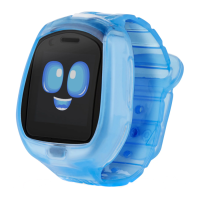
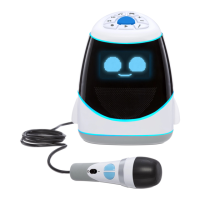
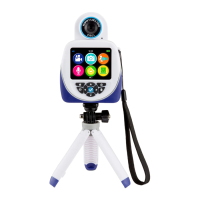
The Tobi Robot Smartwatch is an interactive wearable device designed for children, offering a blend of entertainment, educational activities, and practical features. It functions as a smartwatch with a vibrant, animated character, Tobi, that responds to user interaction and guides them through various activities.
Function Description:
The Tobi Robot Smartwatch serves multiple purposes:
- Interactive Companion: Tobi is an animated character that lives on the smartwatch screen. It expresses emotions, reacts to touch and movement, and engages with the user through various prompts and animations. This creates a sense of companionship and encourages active play.
- Gaming Platform: The smartwatch includes a variety of games designed to be fun and educational. These games often have multiple difficulty levels, allowing children to progress and unlock new features and rewards as they improve.
- Fitness Tracker: Tobi encourages physical activity through interactive fitness games and allows users to set and track activity goals.
- Messaging Device: When paired with other Tobi devices, the smartwatch enables children to send and receive pictures, emojis, and voice messages, fostering communication among friends or family members who also have a Tobi device.
- Camera: Equipped with dual cameras (P.O.V. and selfie), the smartwatch allows children to take photos and record videos, encouraging creativity and self-expression.
- Time Management Tool: It includes practical features like an alarm clock, calendar, timer, and stopwatch, helping children learn about time and manage their daily activities.
- Personalization and Rewards System: Users can earn stars by playing games and engaging in activities. These stars can be used to unlock photo stickers, decorations for Tobi's "room" on the watch, food to feed Tobi, and new animations, providing a sense of achievement and encouraging continued engagement.
Usage Features:
The Tobi Robot Smartwatch is designed for intuitive interaction, primarily through touch, gestures, and movement:
- Interacting with Tobi:
- Poking Tobi's Face: Poking Tobi's face on the screen causes it to shake its arms and legs, indicating a playful reaction.
- Tickling Tobi: Swiping right on the screen will tickle Tobi, eliciting a happy response.
- Annoying Tobi: Swiping left on the screen will make Tobi appear annoyed, demonstrating its range of emotions.
- Feeding Tobi: Pressing and holding on Tobi's mouth on the screen allows users to "feed" Tobi, which is part of the reward system where food can be unlocked.
- Listening Mode: Swiping up puts Tobi into listen mode, where it will react when it hears the user speak, promoting interactive conversation.
- Making Tobi Dizzy: Shaking the smartwatch causes Tobi to get dizzy, adding a fun, physical interaction.
- Making Tobi Sleep: Rocking the smartwatch back and forth will make Tobi fall asleep, simulating a care-taking action.
- Navigation and Settings:
- Status Bar: Swiping down on the screen reveals Tobi's status bar, which provides information about the device.
- Volume Control: Tapping the volume icon in the status bar allows for quick adjustment of the volume.
- Settings Menu: A dedicated settings menu allows users to customize the device, including setting the date, time, language, volume, and brightness. Users can also update Tobi's software and name their Tobi device.
- Games Menu:
- Tobi Time: Helps children learn to tell time by reading an analog clock and entering the correct time.
- A-Maze-Ing Balance: Requires users to move the Tobi device to guide colored balls into the correct holes, promoting hand-eye coordination and balance.
- Smash Math: Challenges users to solve math problems within a time limit, enhancing mathematical skills.
- Tic-Tac-Tobi™: A digital version of Tic-Tac-Toe, allowing users to challenge Tobi to a game.
- Fitness Menu:
- A-B-Seek: An augmented reality game where users match letters to objects found in their environment, encouraging exploration and letter recognition. For example, Tobi might prompt for the letter 'A', and the user would need to find an alligator on screen.
- Freeze Dance: Users dance along with Tobi but must freeze when the music stops, promoting listening skills and physical activity.
- Tobi Says: A memory game where users copy Tobi's moves, testing their memory and observation skills.
- Activity Goals: Users can set weekly activity goals and track their progress, encouraging a healthy lifestyle.
- Messaging Features:
- Sending Messages: Users can send pictures, emojis, and voice messages to other paired Tobi devices. Voice messages can also include silly voice effects, adding a fun element to communication.
- Camera Features:
- Taking Photos: Utilizes dual P.O.V. (point-of-view) and selfie cameras for taking pictures.
- Viewing Photos: Allows users to view their captured photos and add silly stickers for personalization.
- Recording Videos: Enables video recording using both cameras.
- Watching Videos: Users can watch their recorded videos directly on the device.
- Calendar and Timer Features:
- Alarm Clock: Allows setting up to three different alarms with custom wake-up sounds.
- Calendar: Displays the current day and allows users to add stickers to mark special occasions.
- Timer: Offers preset timers or the option to create custom timers.
- Stopwatch: For timing activities, promoting an understanding of duration.
- Stats Menu:
- Tobi's Feelings: Users can check how Tobi is feeling, reinforcing the interactive companion aspect.
- Decorating Tobi's Room: Users can decorate Tobi's virtual room with rewards and other unlocked decorations, providing a creative outlet.
- Earning Stars: Stars are earned by playing games and engaging in activities, which can then be used to unlock various in-game items and animations.
Maintenance Features:
The Tobi Robot Smartwatch includes basic maintenance features to ensure its functionality and longevity:
- Software Updates: The device supports software updates, allowing for new features, improvements, and bug fixes to be installed over time. This ensures the smartwatch remains current and provides an optimal user experience.
- Pairing with Other Devices: The ability to pair with other Tobi devices facilitates communication and potentially shared activities, enhancing the social aspect of the device.
- Customization of Settings: Users can adjust various settings such as date, time, language, volume, and brightness to suit their preferences and ensure comfortable use. This also helps in adapting the device to different environments or user needs.
Overall, the Tobi Robot Smartwatch is designed to be a comprehensive, engaging, and educational tool for children, combining the fun of an interactive toy with the practicality of a smartwatch.

 Need help?
 General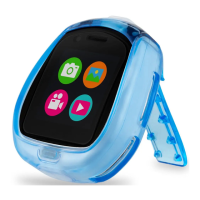

 To Next Page