2
BASICS
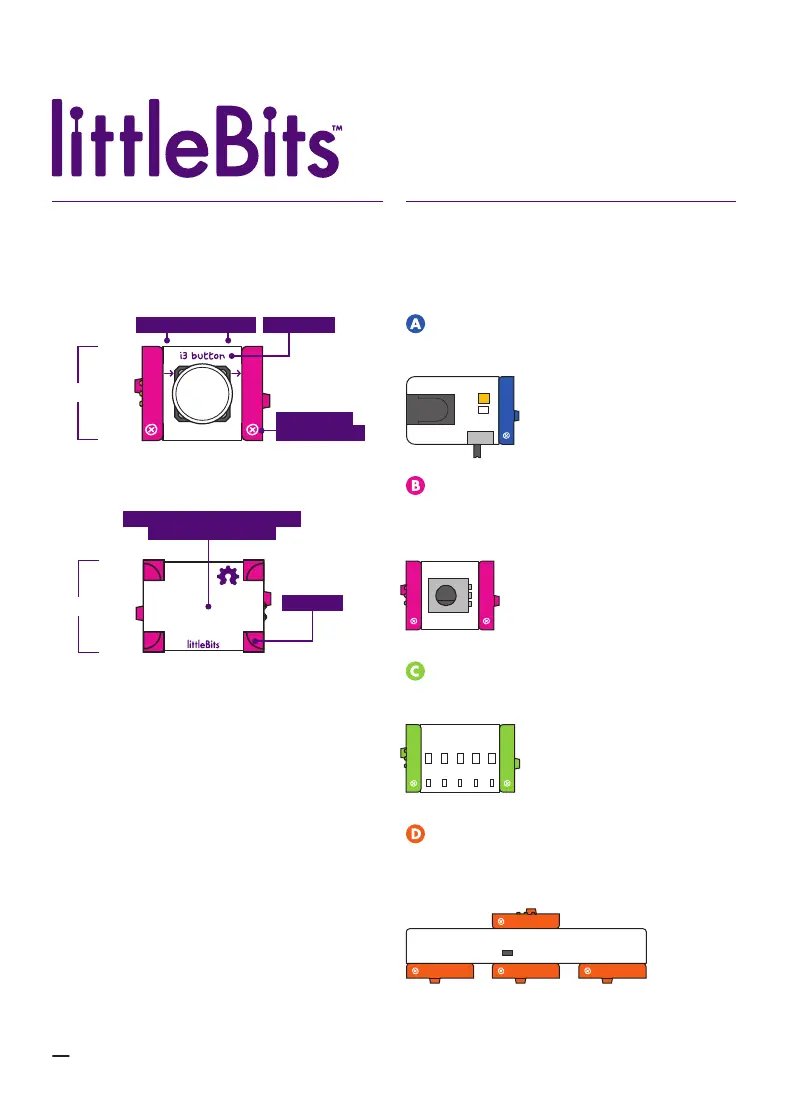
ANATOMY OF A BIT
Learn how you can tell top from bottom.A
BOTTOM
TOP
OPEN HARDWARE SYMBOL
& LITTLEBITS LOGO
COLOR-CODED BY FUNCTION
Bits
TM
are grouped into four dierent
categories, which are color-coded.
B
BUILD DIRECTION BIT NAME
BIT FEET
BITSNAPS
(“X” ICONS)
POWER (BLUE): Power Bits, plus a power
supply, run power through your circuit.
INPUT (PINK): Input Bits accept input
from you or the environment and send
signals that aect the Bits that follow.
OUTPUT (GREEN): Output Bits do some-
thing – light up, buzz, move…
WIRE (ORANGE): Wire Bits connect to
other systems and let you build circuits in
new directions.


 To Next Page