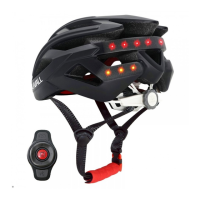
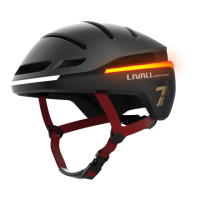
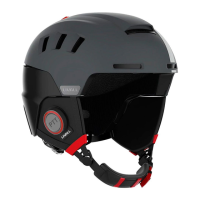
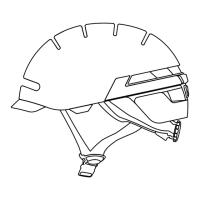
This document provides a user guide for LIVALL smart cycling helmets, specifically the BH6X&MT and BH6X&MT Neo models. These helmets are designed to redefine safety for cyclists by integrating smart features.
Function Description
The LIVALL smart cycling helmets offer a range of integrated functionalities to enhance safety and user experience during cycling. Key features include:
- Smart Warning Lightings: These lights activate automatically to increase visibility, especially in low-light conditions or when deceleration is detected.
- LED Turn Signals: Users can activate left or right turn signals using a remote controller, clearly indicating their intentions to other road users.
- Make a Call Via Bluetooth: The helmet integrates Bluetooth connectivity, allowing users to make and receive phone calls hands-free while riding.
- Listen to Music Via Bluetooth: Cyclists can stream music wirelessly from their smartphone to the helmet's built-in speakers.
- PTT Walkie-Talkie: This Push-to-Talk feature enables communication with other riders in a group, provided they are also connected via the LIVALL App.
- SOS Alert: In the event of a severe impact, the helmet's impact detection devices can trigger an SOS alert through the LIVALL App, sending messages to pre-set emergency contacts. This feature requires the helmet to be connected to the LIVALL App and ride mode to be active.
- Battery Status: The helmet provides an indication of the remaining battery level, typically shown by a row of LEDs when the helmet is turned on.
- Brake Warning Lights: An integrated accelerometer sensor detects significant deceleration, activating enhanced rear lights for a few seconds to warn surrounding traffic.
- Auto On/Off: The helmet automatically enters a sleep mode to save power after being stationary for a while and wakes up when shaken.
- Anti-Loss Alarm: If the helmet, connected to the LIVALL riding app, exceeds a distance of 15m from the smartphone, both devices will trigger an alarm.
- One-Click Voice Command: After successful connections (remote control to helmet, helmet to smartphone), clicking the intercom button on the remote control activates the smartphone's voice assistant.
Important Technical Specifications
- Charging Port: Magnet USB Charging cable.
- Electricity Parameter: DC 5V/0.5A.
- Charging Time: Approximately 3-4 hours.
- Waterproof Class: IPX4, meaning it is protected against splashing water from any direction.
- Battery Life:
- Max. battery life for lights: 10 hours.
- Listening time for music: 3-6 hours.
- Temperature:
- Storage Temperature: -20°C ~ 45°C.
- Operating Temperature: 0°C ~ 40°C.
- Charging Temperature: 0°C ~ 40°C.
- Performance Standards:
- USA: 16 CFR 1203
- Europe: EN 1078:2012+A1:2012
- Australia: AS/NZS 2063:2008
Usage Features
Wearing Instructions:
Proper fit is crucial for safety. The helmet should be positioned to protect the forehead, with the chinstrap adjusted to leave a gap as thick as one finger. The buckle must be properly fastened and positioned away from the jawbone.
Start-Up:
To power on, press and hold the function button for 3-5 seconds. A "POWER ON" voice prompt will be heard, and the rear lights will illuminate.
Connecting to Devices:
- First-time Connection: Turn on the device (e.g., remote controller) within 5 meters of the helmet. It will automatically connect, confirmed by two "beeps" (if Bluetooth speakers are present) and the taillight.
- Replacing Device: Place an already ON device near the helmet's main control. When the warming light flashes and two "beeps" are heard, press the helmet's function button within 10 seconds to confirm connection.
- Connecting to Phone: With the helmet off, press and hold the function button until "Pairing..." is heard. Enable Bluetooth on your phone, scan for "Helmet Phone," and click to connect. "Connected" will be heard from the speakers.
Music and Call Control:
- Play/Pause Music: Press the helmet's function button or the handlebar remote control.
- Adjust Volume: Use the "up/down" buttons on the handlebar remote control or "</>" buttons on the helmet.
- Previous/Next Song: Use "up/down" buttons on the remote or press and hold "</>" buttons on the helmet.
- Answer/Reject Calls: Press the function button to answer, or press and hold to hang up.
- Dial Back: Two quick presses of the function button on the helmet or remote redial the last outgoing call.
Power Off:
Press and hold the function button for 3 seconds. "POWER OFF" will be heard, and the rear lights will turn off.
Bling Remote Controller Instructions:
- Photo-shooting: One press pulls up camera mode; another press snaps a photo (requires LIVALL App connection).
- Direction-up: Increases volume; hold down to play the previous song.
- Direction-Left: Signals a left turn.
- Direction-Right: Signals a right turn.
- Confirm (Middle Key): Play/pause music, answer/end calls. Hold down to reject calls. Double-click to redial the last outgoing number.
- Direction-bottom: Decreases volume; hold down to play the next song.
- Intercom: Hold down to communicate with team riders (requires LIVALL App Grouping mode).
LIVALL Riding Phone App:
Connecting to the LIVALL App enables SOS alert, LED light indicators, and Walkie-Talkie functions. The app automatically connects for Android, while iOS users follow the app guide.
Maintenance Features
Charging:
- Plug the magnet USB charging cable into the helmet's USB port.
- The tail charging indicator light will illuminate red, indicating charging.
- Charging is complete when the charging indicator light turns off.
- The front indicator light also shows charging status and turns off when fully charged.
- Recommended charger power is no less than 0.5A.
Troubleshooting:
- If issues like inability to charge, abnormal turn-off, lights/microphone/speakers not working, or automatic power-off occur, first try charging the product (resetting during charging may help).
- If problems persist, contact the after-sales service center at riding@livall.com.
General Considerations:
- The helmet contains electronic parts; avoid long rides in heavy rain, though it can prevent splashing.
- Water droplets in the tail LED lights after rain will disappear in a ventilated environment within 1-2 days.
- Battery capacity varies with temperature; low temperatures can reduce battery life.
- Do not clean charging plug contacts with metal or hard tools; use cotton swabs with clean water or alcohol.
- If electronic functions fail, charge for 3 hours and recheck.
- For efficient battery life, fully charge the helmet before long-term storage (6 months to 1 year).
- Signal stability for connection is best when the mobile phone is not placed directly against the body.

 Need help?
 General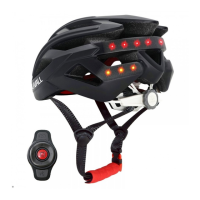

 To Next Page