Need help?
Do you have a question about the Livall MT1 and is the answer not in the manual?
Guides on proper helmet fit, strap adjustment, and positioning for safety.
Details the steps to power on the helmet and confirm readiness.
Initial steps for pairing the helmet with a new device.
Instructions to connect the helmet to a different device.
Steps for pairing the helmet with a smartphone for calls and music playback.
Instructions on how to properly shut down the smart cycling helmet.
Details on how to charge the helmet, indicators, and completion status.
Guide to connect the helmet with the LIVALL Riding app for full functionality.
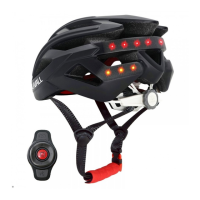
Explains the functions and usage of the remote controller for various operations.
Details advanced features like battery status, brake warning, and auto on/off.
Lists technical parameters including charging, battery life, and environmental resistance.
Addresses common electronic faults and suggests solutions or contact points.
 General
| Type | Smart Helmet |
|---|---|
| Battery Life (lighting) | 10 hours |
| Built-in Speakers | Yes |
| Built-in Microphone | Yes |
| Charging Time | Approx. 3 hours |
| Features | SOS Alert, Music |
| Compatibility | iOS & Android |


 To Next Page