Need help?
Do you have a question about the Livall PikaBoost and is the answer not in the manual?
Guidance on understanding the manual and safety for children.
Information on regulations for e-bike conversion kits varying by jurisdiction.
Explains the use of warning boxes and their importance for safety.
Risks of injury and what to do after an accident.
Advice on understanding and staying within personal cycling capabilities.
Information on product durability, wear, and replacement needs.
Precautions for handling vulnerable PikaBoost components to prevent damage.
Emphasis on situational awareness and avoiding unsafe modifications.
Details about the PikaBoost's battery pack and handling precautions.
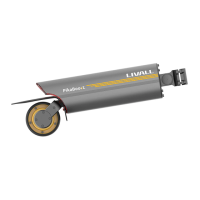
Identifies and describes the different parts of the PikaBoost device.
Details on compatible bicycle seat posts and tire considerations.
Explains the impact of tire tread on noise and performance.
Technical specifications like weight, speed, power, range, and waterproofing.
Lists all items included in the PikaBoost package.
Instructions for inserting the battery case into the PikaBoost housing.
Guide on how to download and install the companion app.
Instructions to change the default password for security.
How to rename the PikaBoost device in the app for easy identification.
How to select the country/region in the app for appropriate speed limits and modes.
Guidance on selecting the correct screw size for bracket installation based on seat post diameter.
Detailed instructions on how to attach the bracket to the bicycle's seat post.
Steps to securely attach the PikaBoost unit to the installed bracket.
Instructions on how to use the device lock feature via the app.
Method to check if the PikaBoost is properly fitted to the rear tire for optimal performance.
How to calibrate the PikaBoost for accurate assistance on different road sections.
Instructions on how to charge the PikaBoost and its power indicator states.
Information on using the PikaBoost to power other devices and its indicator states.
Introduces Smart Assist Ride and Auto Assist Ride categories.
Covers Standby, Assistance, Exercise modes, and their settings like damping and braking.
Covers ECO, Free Cruise, and Cruise Control modes for automatic assistance.
How to change modes using the mobile application.
How to change modes using the physical remote controller.
How to mount the remote controller on the handlebar.
Explanation of how the remote controller detects braking and riding.
Steps to pair the remote controller with the PikaBoost via the app.
How to mount the receiver, magnet, and other parts of the remote controller.
How to check and adjust the mounting position for optimal brake signal detection.
Technical details of the remote controller.
Steps for removing the PikaBoost from the bicycle after riding.
Instructions on how to remove the battery case from the PikaBoost housing.
Detailed steps for safely dismantling the battery cells from the battery case.
Step-by-step instructions for correctly installing battery cells into the battery case.
Detailed technical specifications for the PikaBoost battery pack.
 General
| Category | Bicycle Accessories |
|---|---|
| Type | E-bike Conversion Kit |
| Motor Power | 250W |
| Charging Time | 3 hours |
| Waterproof Rating | IP65 |
| Max Speed | 25 km/h |
| Range | Up to 30 km (18.6 miles) |
| Weight | 3 kg |
| Features | Regenerative braking |
| Assistance Levels | 3 |
| Compatibility | Most Bicycles |


 To Next Page