EasyManua.ls Logo

Live Fine LVFPDBTC - User Manual

Live Fine LVFPDBTC
11 pages
Print Icon
To Next Page IconTo Next Page
Loading...
Bluetooth® Automatic
Pill Dispenser
User Guide
LVFPD BTC
®
Question and Answer IconNeed help?

Do you have a question about the Live Fine LVFPDBTC and is the answer not in the manual?

Summary

Safety Precautions

Medication Organization & Pharmacist Consultation

User's responsibility for correct dosage and times. Consult pharmacist for medication specifics.

Low Battery Indicator

A low battery icon appears on the LCD. Promptly replace batteries to ensure proper function.

Physical Handling and Environment

Keep unit stable, avoid dropping, heat, flames, direct sunlight, and liquids.

Dosage Rings and Battery Installation

Battery Installation Procedure

How to insert four AA batteries, warning against mixing types or brands.

Dispenser Setup and App Integration

Carousel Loading Procedure

Guide on inserting dosage rings and filling compartments correctly.

Bluetooth Pairing and Medication Management

Smartphone Pairing Process

Steps to connect the dispenser to a smartphone via Bluetooth and GPS.

Setting Alarms and Medication Plans

How to program alarm times, add notes, and use early dose functionality.

Advanced Settings and Medication Dispensing

Dispensing Medication

Steps for taking pills when an alarm sounds, including rotating and pouring.

Manual Alert Programming Guide

Programming Alarm Times

Setting multiple daily alarm notifications for medication intake.

Limited Warranty Terms

Overview

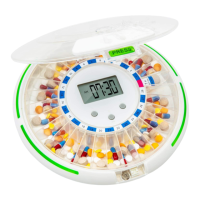
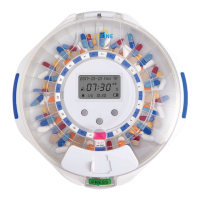
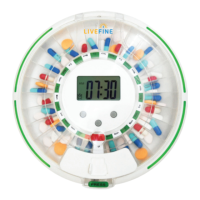
The LiveFine Bluetooth® Automatic Pill Dispenser is a smart medication management device designed to help users organize and track their medications, vitamins, and supplements. It provides audible and visual alerts, as well as smartphone notifications, to remind users when to take their doses. The device can be programmed manually or via a dedicated smartphone app, offering flexibility and convenience for users and their caregivers.

Function Description:

The primary function of the LiveFine Automatic Pill Dispenser is to dispense pills at programmed times and provide reminders. It features a carousel with 28 compartments, allowing for up to 28 days of medication storage, depending on the dosage frequency. The device supports dispensing pills from one to nine times daily, catering to various medication schedules. When a dose is due, the carousel automatically rotates to position the correct pill compartment under the dispenser door, and the device emits an audible and visual alert. Users can then slide open the dispenser door, turn the unit upside down, and pour the pills into their hand. The alert stops once the unit is turned upside down, signaling that the dose has been taken.

The dispenser integrates with a smartphone app (HealBox app) via Bluetooth®, enabling users to program dosage times, track medication records, and receive phone alerts. Caregivers can also access the app to monitor dosages, promoting better adherence and peace of mind. The app allows for adding notes or pictures for each alarm, which can be helpful for tracking specific medications. The device also includes a locking system with a key to prevent unauthorized access or accidental double-dosing, enhancing safety.
Important Technical Specifications:

  • Power Source: 4 AA batteries (included).
  • Connectivity: Bluetooth®.
  • Compatibility: iOS version 8.1 and later; Android™ 4.4 and later.
  • Dimensions: 9.25" (23.5 cm) diameter.
  • Capacity: Up to 28 medication compartments.
  • Dosage Frequency: Can be set to dispense pills from one to nine times daily.
  • Display: Large, easy-to-read LCD display.
  • Alerts: Visual (alert light), audible (adjustable volume), and phone notifications.
  • Security: Locking system with a key.

Usage Features:

  • Manual and App Programming: Dosage times can be set manually using the device's buttons (A, B, C) or conveniently through the HealBox smartphone app.
  • Time Format: Users can choose between 12-hour and 24-hour time formats for the device display. The app's time format can also be adjusted independently.
  • Volume Control: The audible alert volume can be adjusted (mute, low, high) via the app or manually on the device.
  • Bell Duration: The duration of the audible alarm can be set from one minute to 60 minutes.
  • Early Dose Function: If a dose needs to be taken before the scheduled alarm time, users can press "Early Dose" in the app.
  • Record Keeping: The app provides a "Record" feature to view daily and monthly records of previous doses, aiding in medication adherence tracking.
  • Device Management: The app's "Device Management" section allows users to access parameter settings, Bluetooth connection help, and unbind the device from their phone.
  • Battery Indicator: A low battery symbol appears on the LCD display when battery power is low, prompting users to replace batteries to ensure continuous operation.
  • Power Saving: The screen automatically shuts down when not in use to conserve battery. Tapping the screen or gently moving the dispenser wakes it up.
  • Dosage Rings: The dispenser comes with nine different dosage rings, each corresponding to a specific number of doses per day (1 to 9). These rings help organize the medication compartments for different daily frequencies, determining the programmable time period (e.g., 1 dose/day for 28 days, 9 doses/day for 3 days).
  • Locking Mechanism: A key-operated lock secures the cover, preventing accidental spills or unauthorized access to medications.

Maintenance Features:

  • Battery Replacement: The device uses four AA batteries, which should be replaced promptly when the low battery indicator appears. It is important not to mix different types or brands of batteries, or old and new batteries.
  • Cleaning: The exterior of the unit can be wiped with a damp cloth. Harsh cleaning agents should not be used. The medication carousel should be washed by hand only and allowed to dry completely before reassembly and use.
  • Reset to Factory Settings: The device can be reset to its factory default settings via the app.
  • Restart Device: The device can be restarted through the app's "Device Restart" option.

Live Fine LVFPDBTC Specifications

General IconGeneral
BrandLive Fine
ModelLVFPDBTC
CategoryDispenser
LanguageEnglish

Related product manuals