VEP QUICK REFERENCE GUIDE
Quesons? We are here for you. Send
us an email at support@lkc.com or call
+1(301) 840-1992
1. SET UP
1
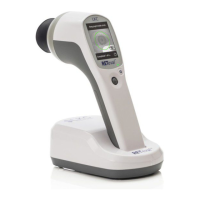
Unpack device and press the power buon
near the boom right of the screen.
• TIP: Only press the power buon
once shortly. Do not hold down.
2
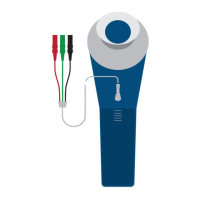
Connect the RETeval adapter cable for
DIN electrodes as shown to the right
(cable towards the top of device).
1
Choose the tesng protocol you’d like to use:
• Go to “Protocol” then “Change”
• Choose the protocol “ISCEV Flash VEP” from the list,
then press “Save”
• TIP: Candela protocols (ending in –cd.s/m
2
) should be
used with DILATED paents. Troland protocols (ending
in –td.s) can be used with either NON- DILATED or
DILATED paents.
2
Select “New Test” on the main menu.
3
Use the joysck
or paent data
barcode applicaon
(www.lkc.com/
download)
to enter the paent
ID and birthdate.
4
Conrm that the protocol, paent
ID, and birthdate are correct. Select
“Next” to proceed, or select “Change
Protocol” to choose a dierent
protocol if needed.
5
Select the appropriate electrode.
Select gold cup if used, otherwise
select “Other”.
2. CONFIGURE DEVICE FOR TESTING
1
Prior to beginning the test, the paent’s eyes should NOT
be dark adapted.
2
The test should take place in a dimly lit room.
3
Clean the forehead in the middle and one earlobe using
NuPrep skin preparaon gel.
4
Idenfy the Oz posion, part the paents hair and clean
with a skin cleanser pad.
• For an adult with a normal-sized head, the Oz is
located about 2.5 cm above the inion on the midline.
• For children the Oz point is located on the midline,
10 % of the distance above the inion towards the nasion.
3. PATIENT PREPARATION
4. CONNECT ELECTRODES
1
Connect the electrode as follows:
a
Acve recording electrode
Place the recording electrode to the idened Oz
posion (posive).
• In case of a gold cup electrode, apply electrode
conducve adhesive gel inside the gold cup.
• Use this gel to separate the hair away from the
recording site; hair touching the gold cup electrode
adds noise to the signal.
b
Reference electrode
Place reference electrode on the forehead (usually an
ECG electrode with a ground reference lead aached).
c
Ground electrode
Apply electrode gel to the ear clip and place it on the
earlobe.
2
The screen will present opons prior to connecng
the electrodes to the RETeval adapter cable for DIN
electrodes. “Cancel” will cancel the enre test. “Done OD/
OS” will skip all tests of the specied eye. “Skip” allows the
user to skip current test step.
The electrodes and supplies required for VEP tesng are not included with
the RETeval
®
device package. Please order the RETeval Flash VEP Electrode
& supply kit from your distributor or from LKC direct store.lkc.com.
ISCEV Flash VEP: 24 Td•s
73219872
2/29/72
Select electrode type
Disc
DTL
ERG-jet
Gold cup
Gold foil
Henkes
HK-loop
Other
a
c
Ear clip
electrode
(ground)
Reference
electrode
position
b
Alternate reference
electrode position
Nasion


 To Next Page
 Need help?
 General