Art. ELEV36
Art. ELEV36
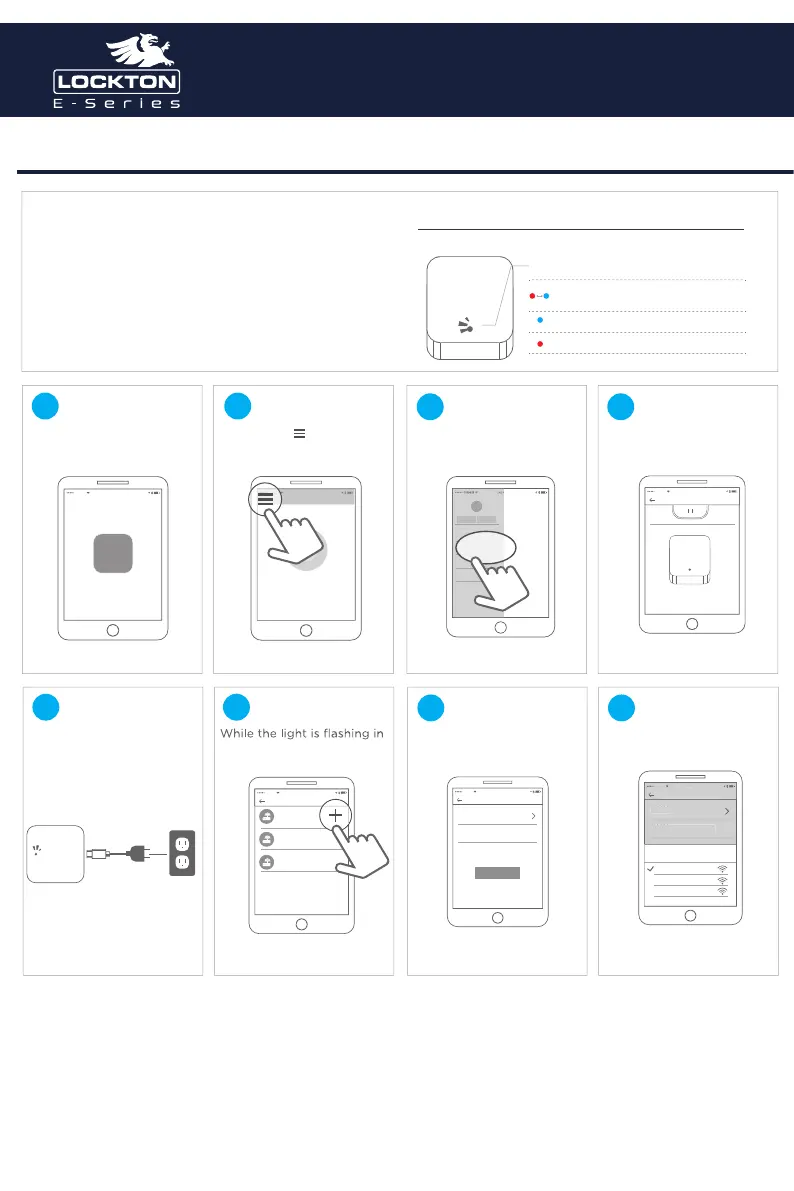
Optional gateway set up
GATEWAY G2
Model :
Dimensions :
Network :
IEEE standard :
Power interface :
Power input :
G2
70mm x 70mm x 26mm
WiFi 2.4G
802.11 b/g/n
Type-C USB
5V/500mA
Light Status
WhentheGatewayispoweredon:
Flashing Red/Blue lights:
Stand-by mode - Ready to Pair
Red light: Network failure
Blue light: Normal mode
Open the APP
中国电信 16:59
APP
Touch the “ ”icon on
the top left of the screen
中国电信 16:59
6:59
国电
Addlock
Message
Customerservice
settings
Gateway
Select [Gateway] Select G2
中国电信 16:59
Gateway
G2
Plug in the Gateway and
power it on
red and blue, press"+" sign
中国电信 16:59
AddGateway
AIDJDNV62SJ
Online
AIDJDNV62SJ
Online
AIDJDNV62SJ
Online
Add Gateway
中国电信 16:59
AddGateway
WIFI
WiFipassword
Gatewayname
Next
Select the network and
input your WiFi password
中国电信 16:59
AddGateway
WIFI
WiFipassword
Gatewayname
确定
国电
6:59
AddGatewa
WiFi
asswor
Gatewa
nam
network
cancel
sciener
mywifi
sciener-x
1 2
3 4
5 6
7 8
Gateway type



 To Next Page