

EasyManua.ls Logo

Logan F500-2 - User Manual

Logan F500-2
4 pages
Print Icon
To Next Page IconTo Next Page
Loading...
Logan Graphic Products Inc. 1100 Brown Street, Wauconda, IL 60084 1-847-526-5515 1-800-331-6232
LoganGraphic.com
Adjustment Screw
Point Loading Cover
Point Depth Adjustment
Cover Release Button
Nose
Identification
N1329 1-15
Fig. 3
Fig. 2
3.
2.
1.
Fig. 4
3.
2.
1.
Fig. 1
Model F500-2
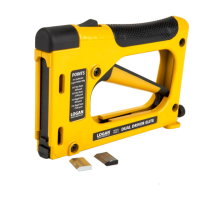
Dual DrivE Elite Point Driver
PICTURE FRAMING
Instruction Sheet
Operating Instructions
Loading Points
1. Press release button
2. Pull up cover
3. Install point strips with point facing
forward
NOTE:
Make sure points are inserted
down into nose piece.
4. Slide cover closed (Fig. 1)
Operation
1. Hold outside of frame
2. Press driver nose against inside frame
3. Keep drive flat on material - DO NOT
LIFT OR ANGLE
4. Squeeze trigger to insert point
5. Space points 6” apart, 3” from corners
(Fig. 2)
Adjust Point Depth
1. Turn adjustment screw to increase
tension for hardwoods or decrease
tension for softwoods.
(Fig. 3)
Troubleshooting
IF GUN JAMS & NO LONGER FIRES POINTS
Keep 1” or higher stack of points in gun at all times
Make sure you are using authentic Logan rigid or flexible points (F53, F54, F55, F56).
Make sure points are loaded and seated correctly. Try removing and re-loading the point strip.
To remove a point jammed in the nose piece, reference the instructions to remove the nose piece, clear
it and re-install it.
If point does not leave the gun, try reducing or tightening tension.
Check to see that main body screws holding two halves of the tool together are not loose. If necessary,
re-tighten with Phillips screwdriver.
IF THE POINT BENDS
If flexible inserts are bending or not staying in the wood, try increasing the tension or switch to rigid
points.
Try reducing the tension if handle is hard to pull.
Point Jammed
1. Remove points
2. Remove nose screw and nut
3. Remove nose piece and discard
jammed point (Fig. 4)
Replacement Points
Use only authentic Logan Points
F53 - Flex (600) F54 - Rigid (600)
F55 - Flex (2500) F56 - Rigid (2500)
Question and Answer IconNeed help?

Do you have a question about the Logan F500-2 and is the answer not in the manual?

Summary

Dual Drive Elite Point Driver Operation

Loading Points

Instructions for loading point strips into the driver, ensuring correct insertion down into the nose piece.

Point Driver Operation

Steps for holding the frame, positioning the driver nose, and squeezing the trigger to insert points.

Adjusting Point Depth

Guidance on using the adjustment screw to control point depth for different wood types.

Clearing Jammed Points

Procedure to remove a jammed point by disassembling the nose piece.

Replacement Point Types

Information on compatible Logan point models for the driver.

Dual Drive Elite Point Driver Troubleshooting

Troubleshooting Gun Jams

Steps to resolve issues where the gun jams or no longer fires points, including checking point type and tension.

Troubleshooting Bent Points

Advice for when points bend or fail to stay in the wood, suggesting tension adjustments or different point types.

Dust Cover Trimmer Operation

Blade Installation

Instructions for determining hand usage and installing the trimmer blade correctly.

Applying Dust Cover

Step-by-step guide to applying dust cover using tape, paper, water, and trimming.

Hanging Wire and Bumper Pads Installation

Installing D-Rings

Procedure for positioning and attaching D-rings to picture frames, with screw installation guidance.

Installing Hanging Wire

Steps to attach the hanging wire to D-rings and secure it tautly across the frame.

Attaching Bumper Pads

Instructions for applying self-adhesive bumper pads to the frame corners for wall protection.
Logan F500-2 Specifications

General IconGeneral
BrandLogan
ModelF500-2
CategoryNail Gun
LanguageEnglish