
 Need help?
Do you have a question about the Logicom Home Cammy and is the answer not in the manual?
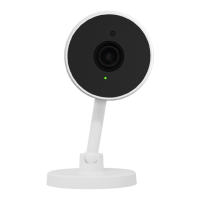
Details the Cammy smart camera, its Wi-Fi control, and key features like night vision and two-way audio.
Essential safety rules: indoor use, no manipulation, handling damage, avoiding heat, and liquid protection.
How to turn the camera on/off, identify configuration mode, and reset to factory settings.
Guide to downloading the Tuya app and creating a user account for remote control.
Steps to add the 'Smart Camera' device within the Tuya app interface.
Process of inputting Wi-Fi password to connect the camera to the Tuya cloud.
Instructions for scanning a QR code from the phone with the camera for synchronization.
Details the pairing process duration and the green LED indicator upon successful connection.
Guidance on renaming the device and assigning it to a room within the Tuya app.
How to tap the paired device in the Tuya app to open its control screen.
Describes main screen, actions menu, and private mode for camera operation.
Details on using zoom, taking pictures, recording videos, speaking, and listening via the camera.
How to retrieve past events by browsing recordings chronologically or by date.
Information on cloud storage subscriptions for events like motion detection.
Instructions for replaying recordings stored on an inserted SD card.
Prerequisites and introduction to connecting the camera with Amazon Alexa.
Step-by-step guide to link TuyaSmart account with Amazon Alexa for voice control.
How Alexa discovers devices and examples of voice commands for control.
Steps to resolve issues if Echo Show cannot find devices linked via TuyaSmart.
Examples of voice commands to show or hide the camera using Alexa.
Prerequisites for controlling devices with Google Assistant and Chromecast.
Guide to link TuyaSmart account with Google Home for voice control.
Steps for setting up and managing devices within the Google Home app.
Examples of voice commands for Google Assistant to control the camera.
Details on model name, power, Wi-Fi frequency, and encryption type.
Information on operating temperature and humidity limits for the product.
Explanation of CE, Green Point, WEEE, and IEC 60417 symbols.
Statement on Tuya Smart App compliance with GDPR.
Lists trademarks for Google, Amazon, IFTTT, and Tuya.
Declaration that the product complies with EU Directive 2014/53/UE.
Details on what is covered by the LOGICOM supplier warranty and how to get support.
 General
| Connectivity | Wi-Fi |
|---|---|
| Features | Motion detection, Night vision |
| Two-Way Audio | Yes |
| Compatibility | Android, iOS |
| Type | Indoor |
| Resolution | HD 720p |
| Storage | MicroSD card |
| Power Supply | 5V |

 To Next Page