 Need help?
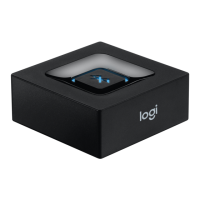
Do you have a question about the Logitech Bluetooth Audio Adapter and is the answer not in the manual?
Connect the power supply to the adapter and then connect the adapter to your speaker system via RCA or 3.5mm cable.
Press the pairing button on the adapter. The LED will blink, indicating pairing mode.
Enable Bluetooth on your device, scan for 'Logitech BT Adapter', and select it to connect.
The LED turns steady blue, signaling a successful wireless music connection.
Ensure both devices are connected to the adapter as per setup instructions.
Start playing music from the first connected device.
Stop music on device 1 and start playing music on device 2 for automatic switching.
Adapter reconnects automatically. Manually select 'Logitech BT Adapter' if disconnected.
The adapter stores up to eight devices. Follow setup instructions for each new device.

 To Next Page

 General