Need help?
Do you have a question about the Logitech C-UR37 and is the answer not in the manual?
Specifies the typical power consumption of the presenter and the dongle.
Lists the specific radio transceivers and functionality ICs used in the presenter and dongle.
Describes the USB 1.1 connector type and its conductors for the nano-dongle.
Explains the bind function, connection process, and auto-connection for wireless operation.
Details the 9 buttons on the presenter and their mapping to HID functions.
Explains LCD operation, stopwatch, buzzers, and battery indication.
Describes how to activate the laser pointer and its automatic sleep mode.
Provides FCC cautions on modifications and outlines radiation exposure limits.
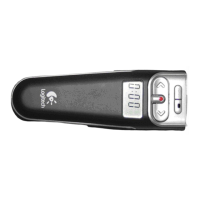
This document describes the R-RB5;C-UR37, a 2.4GHz radio presenter specifically designed for Logitech. The complete package includes a wireless presenter and a USB nano-dongle, which acts as a bridge to a PC system, functioning as a human input device, particularly useful for presentations.
The device utilizes WirelessUSB 2.4GHz radio solution from Cypress, offering superior radio performance with two-way and multi-channel communication via 2.4GHz DSSS. Its design prioritizes portability, featuring a palm-sized wireless presenter and a thumb-sized nano-dongle. The presenter also includes a storage space for the nano-dongle when not in use. A low power consumption design means the presenter only requires two AAA batteries for operation.
Beyond its primary function of controlling PowerPoint presentations, the product offers several additional user-friendly features. These include a presentation timer display, vibration alerts, a laser pointer, and a low battery indication. The USB nano-dongle complies with the USB version 1.1 specification.
The presenter operates on 3 VDC (two AAA batteries), while the dongle requires 5 VDC. The USB dongle typically draws 18mA when powered by 5 VDC, and consumes 1mA in PC system suspend mode. During pairing, the maximum current can reach 80mA. The laser pointer draws between 25-45mA, with an output beam power of under 1mW. The typical power consumption of the presenter is less than 40mW, and the dongle's typical power consumption is less than 100mW.
The circuitry of the presenter includes a Cypress LS RADIO TRANSCEIVER CYWUSB6934 (QFN-48 pin) and a CY8C27443 PROGRAMMABLE IC (28 pin SSOP). The USB dongle also uses a Cypress LS RADIO TRANSCEIVER CYWUSB6934 (QFN-48 pin) and a Cypress USB controller, CY8C27643 QSOP. The USB 1.1 connector on the dongle is a low-speed Series 'A' plug, featuring four conductors: one for power, one for GND, two for signals, and an overall shield.
The device incorporates an intelligent auto-channel switching function to ensure the best radio connection at all times. It supports two-way radio communication and a maximum transmission baud rate of 64k. Low power consumption design and a low battery indication function are also integrated.
A key feature is the "Bind" function, similar to Bluetooth pairing, which allows multiple identical radio products to be used simultaneously in the same location without interference. This function must be completed before the wireless device is used for the first time, though it is typically done at the manufacturer's site.
To perform the Bind function, first plug the nano-dongle into a PC and turn on the system, or attach the device via hot-plugging. Then, run the bind AP on the PC (Windows 2000 or above). The "bind window" will appear, showing the initial values for the wireless and sub-channel numbers, indicating successful USB enumeration and readiness for binding. Next, activate the bind button on the "bind window" and simultaneously press the bind button on the back of the presenter (assuming batteries are installed). During binding, the "wireless" and "Sub Channel" numbers will vary as the device scans. Binding is complete when the scanning numbers quickly settle to a stable value. If the numbers return to their initial value or take over 10 seconds to settle, binding may have failed, requiring a re-bind.
For auto-connection, the radio connection (wireless function on line) between the presenter and nano-dongle will be established automatically when both the presenter and dongle are turned ON, and the HID function is enabled (by stroking any key of the presentation function).
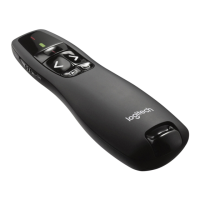
The presenter features a total of nine buttons. Six buttons (SW1-SW6) are for HID functions, one button (SW7) for LCD control, one button (SW8) for the laser pointer, and another button (SW9) on the back for the bind function.
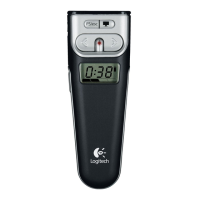
The LCD display offers stopwatch and battery level features. The stopwatch functionality is programmable via the Set button. To turn on the LCD, press the Set button from the Off state. The LCD will flash "0:00" for 5 seconds; if the Set button is not pressed again within this time, the LCD turns off. To set the stopwatch time, each press of the Set button adds 10 minutes. The LCD number display flashes while time is being added. Once the presentation time is set, the number stops flashing after 5 seconds, and the countdown begins. At any point during the countdown, the Set button can be pressed to add more time. A first push rounds up to the next 10-minute increment (e.g., from 1:27 to 1:30), and a second push adds 5 more minutes.
The device also provides buzz reminders. At the 5:00 (0:05) minute remaining mark, the counter flashes for 5 seconds, and a vibrator briefly buzzes in hand (approximately 0.5 second vibration). This also occurs at the 2:00 (0:02) minute mark. At 0 (0:00) minutes, the vibrator buzzes briefly again, and "0:00" flashes for 5 seconds before the LCD goes blank. To turn off the LCD during a countdown, hold the Set button for 2 seconds. This clears the display and resets it to "0:00" (flashing). After 5 seconds, the display turns off. The battery level indicator is shown on the display when the device is on (i.e., when the receiver is removed from the presenter). This indicator remains on regardless of whether the Stopwatch feature is being used.
The laser point function is activated by pressing the laser button, located between the Backward and Forward buttons and marked with a red dot. Pressing this button causes the presenter to generate a laser spot from its front edge. If the StopWatch button gets stuck or is improperly operated for 10 seconds, the device automatically enters sleep mode. Similarly, if the laser point button is turned on for more than 30 seconds, the device will automatically enter sleep mode.
 General
| Frame Rate | 30 fps |
|---|---|
| Document Size | A4 |
| Light Source | LED |
| Interface | USB |
| Compatibility | Windows, Mac |

 To Next Page