English 7
Logitech
®
WebcamC210
3
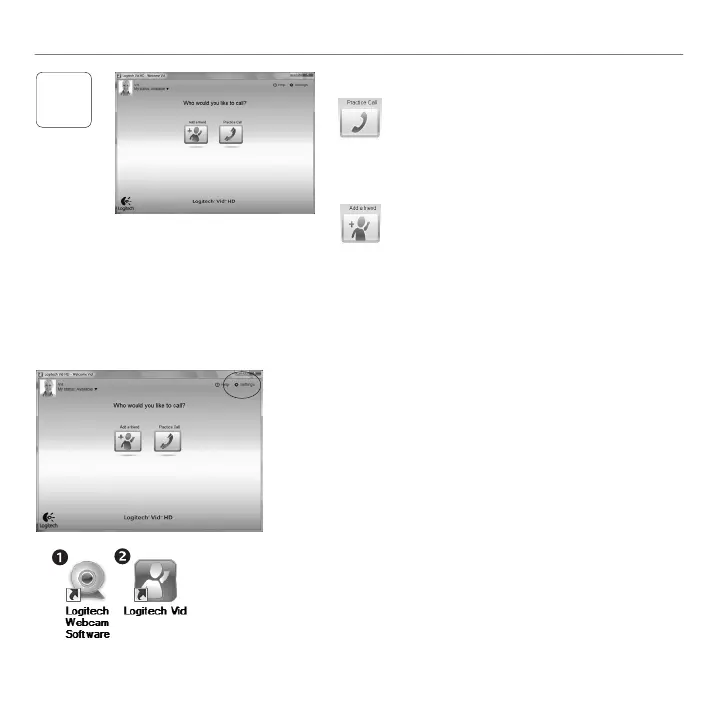
ClickonthePracticeCalltiletotest
yoursettings.
Tip: ThePracticeCalltileisalwaysavailable
onyourContactListsoyoucantest
yoursettings.
Toaddafriend,clickontheAddaFriend
tileandenteryourfriend’se-mailwhen
prompted.
Afteryourfriendhasacceptedyourinvitation,
clickonyourfriend’spicturetomakeacall.
Addafriendormakeapracticecall
Accessingaccountsettingsandstartingapplications
Logitechautomaticallydetectsandadjuststhebestsettings
foryourwebcam.Ifyouwouldliketore-takeyourprole
pictureorupdateanyofyoursettings,clicktheSettingsicon.
Double-clicktheiconstolaunchyourapplications.
LogitechWebcamSoftware1.
LogitechVidHD2.
Tip:TheLogitechVidHDiconisonlypresentifyouchose
toinstallLogitechVidHD.Tolearnaboutthird-party
videocalling,pleasevisit:
www.logitech.com/webcam_howto


 To Next Page