English 9
Logitech
®
WebcamC210
Capturingvideoandsnappingpictures
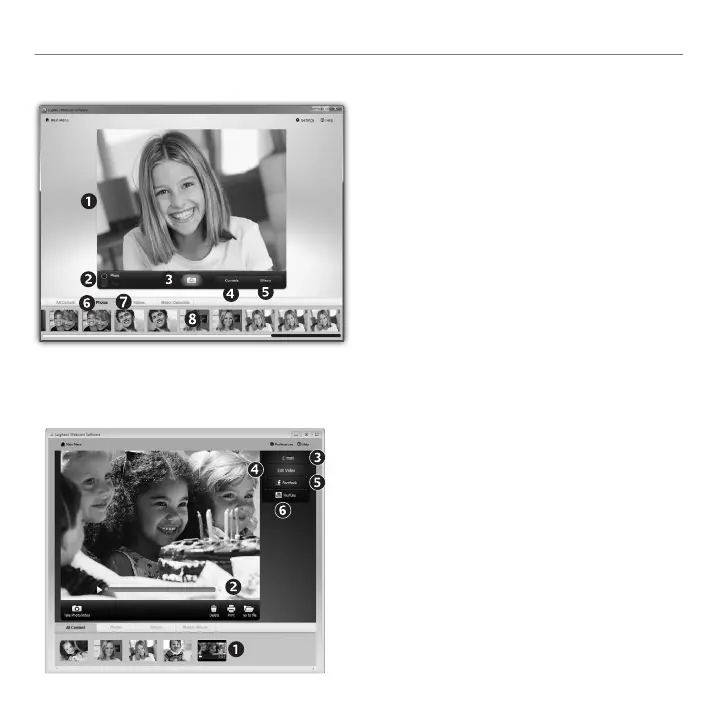
QuickCaptureallowsyoutotakephotosor
recordvideoseasily.
Youhaveeasyaccesstowebcamcontrolsand
settingsaswellasvideoeffectstopersonalize
yourimagesandrecordings.
Previewwindow1.
Capturemode:2.
photo/video
Capturebutton3.
Webcamcontrols4.
Videoeffects5.
andfunlters
(forwebcamsthat
supportthisfeature)
Photothumbnails6.
Videohumbnails7.
Clickathumb-nail8.
toenterthegallery
Thegallery:viewingandsharing
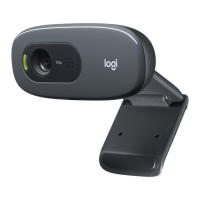
Clickingonanimagethumbnailinthegallery
(1)opensthevideoorphotointhereview
window(2).
Attachavideoorpictureletoane-mail(• 3)
Editaphotoorsplicetogethervideo(• 4)
UploadapictureorvideotoFacebook(• 5)
UploadavideotoYouTube(• 6)
Youmayalsodraganddropagalleryimageonto
oneofthefunctiontiles(items3-6)tolaunchan
editingapplicationortoattachorupload.


 To Next Page