6 English
Gettingstartedwith
1
2
SettingupLogitechVidHD
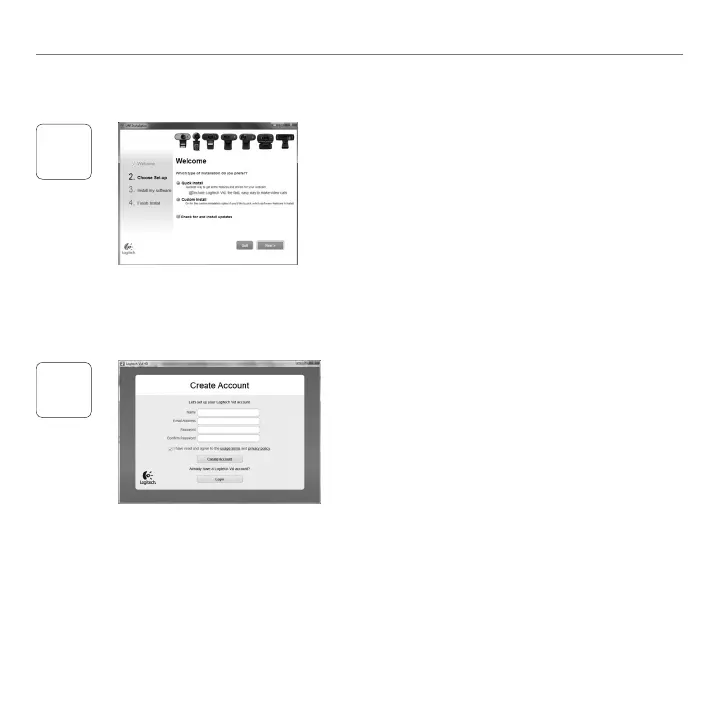
InstallLogitechVidHD
WerecommendthatyouinstallboththeLogitech
WebcamandLogitechVidHDsoftware
Tip:Ifyoupreferanothervideo-callingapplication,
youwillneedtodownloadandinstallthird-party
software
Learnmore:http://www.logitech.com/webcam_howto
Createanaccount
Followtheon-screeninstructionstocreate
yourLogitechVidHDaccountandtosetup
yourwebcamforvideocalling
Tomakevideocallswithanyapplication,
bothyouandthepersonyoucallmusthave:
Awebcam•
Acomputerwithspeakersand•
amicrophone(oraheadsetwith
amicrophone;manyLogitechwebcams
haveabuilt-inmicrophone)
AbroadbandInternetconnection•
(e g ,DSL,T1,orcable)
Thesamevideo-callingapplication•
(e g ,LogitechVidHD)
Videocallingaccounts•


 To Next Page