17 ENGLISH
Compatibility Mode
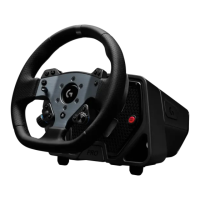
On PC especially, some racing titles won’t recognize the PRO Wheel
automatically. When this occurs, you can usually recongure
thecontrols of the game and assign the PRO Wheel so that itworks,
butinsome titles, you may nd it easier to enable the G923
compatibility mode.
When you choose the G923 option in the compatibility mode,
thewheel will restart and appear to the PC/console as if it is
theG923wheel. Those games which have native support for
theG923will therefore automatically set the wheel up so that it works
(it’salsoessential that you have a compatible set of pedals attached
tothe wheel as well).
In the G923 mode, many of the settings mentioned above are not
available. You will be able to adjust Strength, FFB Filter, Dampener
and Brake Force, but your only other option is the Compatibility Mode,
which you can use to switch the wheel back to its original PRO Wheel
mode. The Dual Clutch paddles will only function as Gas and Brake in
this mode. It is therefore recommended that you remain in PRO Wheel
mode whenever possible in order to always have access to the full
feature set of the wheel.
Platform
By default, your PRO Wheel will always prompt you to choose which
platform you wish to use when you power it on. If you wish to stop
thisfrom happening, then you can force the wheel to always start
inone mode (for example, you only play on PC). The Platform setting
has anumber of options:
– On Startup (default)
– Consoles (these will change, depending on which version of
thePROWheel you have)
– PC
Simply select the choice that you wish and the next time the wheel
ispowered on, it will choose that option for you automatically.





 To Next Page