
 Need help?
Do you have a question about the Logitech Performance Mouse MX M-R0007 and is the answer not in the manual?
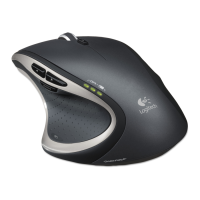
This document provides a comprehensive guide for the Logitech Performance Mouse MX, a wireless mouse designed for enhanced productivity and comfort.
The Logitech Performance Mouse MX is a high-performance wireless mouse that offers advanced tracking and customizable features. It is designed to provide a comfortable and efficient user experience for a wide range of tasks, from everyday computing to more demanding professional applications. The mouse utilizes Logitech's Darkfield Laser Tracking, which allows it to track on virtually any surface, including glass (minimum 4mm thick), where standard optical and laser mice typically fail. This makes it highly versatile for various work environments.
The mouse connects wirelessly to your computer via a Logitech Unifying receiver, a small USB dongle that can connect up to six compatible Logitech devices. This eliminates the need for multiple USB receivers, freeing up valuable USB ports. The wireless connection operates on the 2.4 GHz frequency, ensuring a reliable and lag-free experience.
Tracking Technology: Darkfield Laser Tracking. This advanced laser technology allows the mouse to track on virtually any surface, including glass (minimum 4mm thick). Wireless Connectivity: 2.4 GHz wireless technology via Logitech Unifying receiver. The Unifying receiver is a small USB dongle that can connect up to six compatible Logitech devices, such as keyboards and mice, to a single receiver. Power Source: The mouse is powered by a rechargeable AA NiMH battery. This battery can be recharged via a micro-USB cable, allowing for continuous use even while charging. The mouse can also be powered by a standard AA alkaline battery, though it will not recharge in the mouse. Rechargeable Battery: One AA NiMH battery (1800 mAh minimum). Charging: The mouse can be charged via a micro-USB cable. It can be used while charging, ensuring uninterrupted workflow. Compatibility:
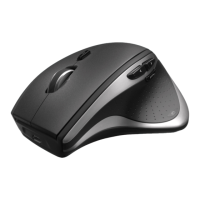
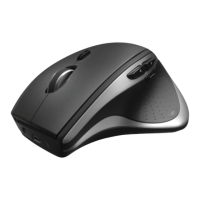
Ergonomic Design: The mouse features a sculpted, right-hand design that provides comfort and support for extended periods of use. Its shape is designed to fit naturally in the palm of your hand, reducing strain.
Customizable Buttons: The Logitech Performance Mouse MX comes with multiple programmable buttons, including a thumb button, which can be customized using Logitech software. These buttons can be assigned to various functions, such as launching applications, controlling media, or performing specific actions within software.
Hyper-Fast Scrolling: The mouse includes a dual-mode scroll wheel that allows for both hyper-fast scrolling and click-to-click precision scrolling. Hyper-fast scrolling enables users to fly through long documents and web pages with a flick of the wheel, while click-to-click mode provides precise control for navigating lists or images.
Thumb Button: A dedicated thumb button is available for quick access to frequently used functions. By default, this button might be configured for application switching or other common tasks, but it can be customized via software.
Unifying Receiver: The small USB Unifying receiver allows for a clean workspace by connecting up to six compatible Logitech devices to a single USB port. This is particularly useful for users with multiple Logitech peripherals.
On-the-Fly Charging: The mouse can be charged while in use. Simply connect the micro-USB cable to the mouse and a USB port on your computer or a wall adapter. This ensures that you never have to stop working due to a low battery.
Battery Status Indicator: The mouse features a battery status indicator, typically an LED, which provides visual feedback on the battery's charge level. This helps users anticipate when a recharge is needed.
Troubleshooting Wireless Connection:
Rechargeable Battery System: The mouse uses a rechargeable AA NiMH battery, which can be recharged directly within the mouse using a micro-USB cable. This eliminates the need for disposable batteries, reducing waste and long-term costs. The battery is user-replaceable, allowing for extended product life.
Software Updates: Logitech provides software updates for its Logitech Options, SetPoint, and Control Center software. These updates often include bug fixes, performance improvements, and new features, ensuring the mouse remains compatible with the latest operating systems and applications. Users are encouraged to download the latest software from the Logitech website.
Cleaning: While not explicitly detailed in the provided snippets, general mouse maintenance typically involves cleaning the exterior with a soft, damp cloth and ensuring the optical sensor (or laser lens) is free from dust and debris for optimal tracking performance.
Firmware Updates: Logitech may also release firmware updates for the mouse itself, which can be installed via the Logitech software. These updates can improve the mouse's functionality, power efficiency, and compatibility.
FCC Compliance: The device complies with Part 15 of the FCC Rules, indicating that it has been tested and found to comply with the limits for a Class B digital device. This ensures that the device operates without causing harmful interference to other electronic equipment and is designed to accept any interference received, including interference that may cause undesired operation. This regulatory compliance ensures safe and reliable operation.


 To Next Page
 General