Need help?
Do you have a question about the Logitech X100 and is the answer not in the manual?
Identifies the speaker, USB cable, and AUX cable included with the device.
Instructions for powering up the speaker by connecting it to a power source via USB.
Steps to connect the speaker to an audio source using the AUX cable.
First steps for establishing a wireless connection via Bluetooth.
Completes the process of pairing the speaker with a Bluetooth-enabled device.
 General
| Number of speakers | - |
|---|---|
| Audio output channels | - channels |
| Impedance | - Ω |
| Frequency range | - Hz |
| RMS rated power | - W |
| Bluetooth range | 9.14 m |
| USB charging port | Yes |
| Bluetooth profiles | HFP |
| Connectivity technology | Wireless |
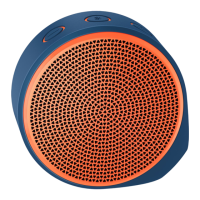
| Product color | Orange |
| Volume control | Digital |
| Built-in display | No |
| Recommended usage | Universal |
| Power source type | Battery |
| Battery life (max) | 5 h |

 To Next Page