English 9
1
2
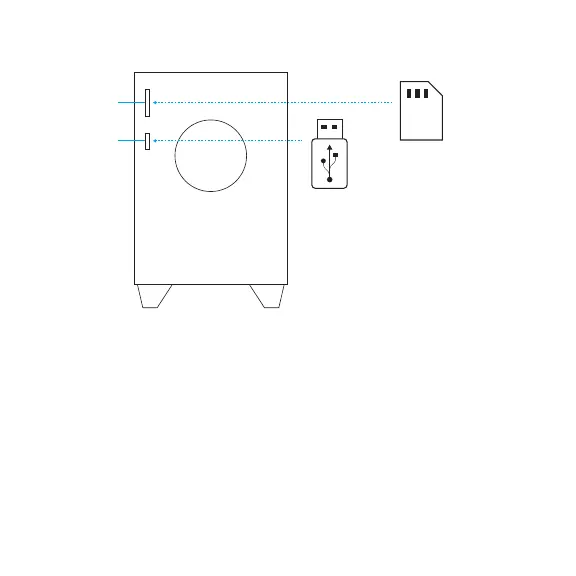
LOCAL AUDIO SOURCES
1. SD card slot 2. USB drive slot
i. To play audio fully insert SD card into
SD card slot and select SD/USB source
from either remote control or controls
on the subwoofer.
ii. To remove SD card simply pull it out
of the slot.
iii. Z607 supports up to 32GB SDHC
cards with the following audio
leformats: MP3, WMA, WAV,
APE,FLAC.
SD card not included
i. To play audio insert USB drive into
USB slot and select SD/USB source
from either remote control or controls
on the subwoofer.
ii. To remove USB drive simply pull it out
of the slot.
iii. Z607 supports up to 32GB USBdrives
formatted FAT16 or FAT32 with
thefollowing audio le formats:
MP3,WMA, WAV, APE, FLAC.
USB drive not included


 To Next Page