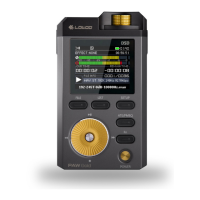
Need help?
Do you have a question about the LOTOO PAW 6000 and is the answer not in the manual?
Defines the physical buttons, ports, and indicators on the device's exterior.
Lists all items included in the product packaging for user verification.
Instructions for powering the device on, off, and managing the screen.
Details on charging the device, charging time, and playback during charging.
Guide on inserting, ejecting, and supported capacity of TF cards.
Information on headphone jacks, volume adjustment, and hearing safety.
Step-by-step guide for transferring files using the USB 3.0 port.
Instructions for pairing and connecting Bluetooth devices.
Explanation of icons and information displayed on the device's status bar.
How to access and utilize the device's drop-down menu and its icons.
Navigation options available on the home screen, including playlists and songs.
Information and controls displayed during music playback, such as album art and song info.
Guide on navigating, viewing, deleting, and playing files on the TF card.
Instructions for creating and managing favorite, recent, and all songs playlists.
Accessing setup menus for playback modes and sleep timer settings.
Configuration for LR balance, output type, and gain for audio outputs.
Device settings including LED, volume knob, power, and language preferences.
Settings for hardware decode, EQ, and ATE (Adaptive Transfer Equalizer).
Customization options for ATE modes and PCM/DSD sound filters.
Settings for Bluetooth DAC and TF card formatting.
Accessing device information, software, and hardware versions.
Step-by-step instructions for updating the device's firmware.
Solutions for frequent problems encountered with the device.
Important safety guidelines to prevent damage or injury during use.
Overview of the device's general technical specifications and features.
Detailed technical specifications for the 4.4mm balanced headphone output.
Detailed technical specifications for the 3.5mm unbalanced headphone output.
Detailed technical specifications for the 4.4mm balanced line output.
Detailed technical specifications for the 3.5mm unbalanced line output.
Regulatory information regarding FCC compliance for the device.
 General
| Brand | LOTOO |
|---|---|
| Model | PAW 6000 |
| Category | Media Player |
| Language | English |

 To Next Page