This document is a multi-language instruction manual for a Lotus Chronograph Calendar watch, model ILMOS20. It provides detailed instructions on how to operate and maintain the watch, covering functions such as time and date setting, chronograph usage, and resetting procedures. The manual is presented in five languages: Spanish, English, French, German, and Italian.
Function Description
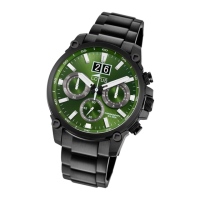
The Lotus Chronograph Calendar watch, model ILMOS20, is a quartz timepiece that combines standard timekeeping with chronograph and calendar functionalities. It features a main dial with hour, minute, and small second hands, a 24-hour hand, and a date display. The chronograph function allows for precise time measurement, while the calendar displays the current date.
Important Technical Specifications
- Time Measurement: The chronograph can measure and display time in 1/1 second units.
- Chronograph Capacity: It can measure up to a maximum of 59 minutes and 59 seconds.
- Continuous Operation: The chronograph second hand operates continuously for 59 minutes and 59 seconds after activation.
- Power Source: The watch is powered by a battery, with instructions provided for resetting the chronograph after battery replacement.
Usage Features
The watch offers several user-friendly features for setting and operating its various functions:
The watch face includes several hands and a calendar window, controlled by a crown and two buttons (A and B):
- Main Hands:
- Hour hand
- Minute hand
- Small second hand (continuously running seconds)
- Chronograph Hands:
- Chronograph second hand (measures 1/1 second units)
- Chronograph minute hand (measures up to 59 minutes)
- Additional Hand:
- Date Display:
- Controls:
- Crown: Has three positions:
- Normal position (pushed in)
- 1st position (pulled out once)
- 2nd position (pulled out twice)
- Button A: Used for starting/stopping the chronograph and for resetting the chronograph second hand during the reset procedure.
- Button B: Used for resetting the chronograph.
Setting the Time
- Pull the crown out to the 2nd position. This disengages the time-setting mechanism.
- Turn the crown to adjust the hour and minute hands to the desired time.
- Push the crown back to the normal position. The small second hand will begin to run, indicating that the time is set and the watch is operating.
Setting the Date
- Pull the crown out to the 1st position. This engages the date-setting mechanism.
- Turn the crown counter-clockwise to set the date.
- Important Note: If the date is set between approximately 9:00 PM and 1:00 AM, the date may not change on the following day. It is recommended to adjust the date outside of this window to ensure proper function.
- After the date has been set, push the crown back to the normal position.
Using the Chronograph
The chronograph function allows for precise time measurement:
- Starting and Stopping: Each press of Button A will alternate between starting and stopping the chronograph.
- Resetting: Pressing Button B will reset the chronograph. Both the chronograph second hand and the chronograph minute hand will return to the zero position.
Maintenance Features
The manual provides instructions for resetting the chronograph, which is particularly useful for maintenance or after specific events:
Chronograph Reset (including after replacing the battery)
This procedure is necessary if the chronograph second hand does not return to the zero position after a normal reset, or after the watch battery has been replaced.
- Pull the crown out to the 2nd position.
- Press Button A to set the chronograph second hand to the zero position.
- Continuous Pressing: Holding down Button A will cause the chronograph hand to advance rapidly, allowing for quicker adjustment to the zero position.
- Once the hand has been zeroed, return the crown to the normal position.
- Important Note: Do not push the crown to the normal position while the chronograph second hand is still returning to zero. If the crown is pushed in during this process, the hand will stop at its current position, and that position will be recognized as the new zero. Ensure the hand has fully returned to zero before pushing the crown back.
Environmental Considerations
The manual also includes important information regarding the disposal of the watch, in compliance with regulations concerning waste electrical and electronic equipment (WEEE).
- Selective Collection: Quartz watch products at the end of their useful life must be selectively collected for processing and recycling.
- Disposal Points: Users can dispose of their quartz watch products at authorized retail outlets or designated collection points.
- Environmental Protection: Selective collection, processing, valuation, and recycling contribute to safeguarding the environment and protecting human health.

 Need help?

 To Next Page
 General