EasyManua.ls Logo

LOUD Technologies CR3 - Front & Rear Panel Descriptions; Panel Controls and Connections

LOUD Technologies CR3
12 pages
Print Icon
To Next Page IconTo Next Page
To Previous Page IconTo Previous Page
Loading...
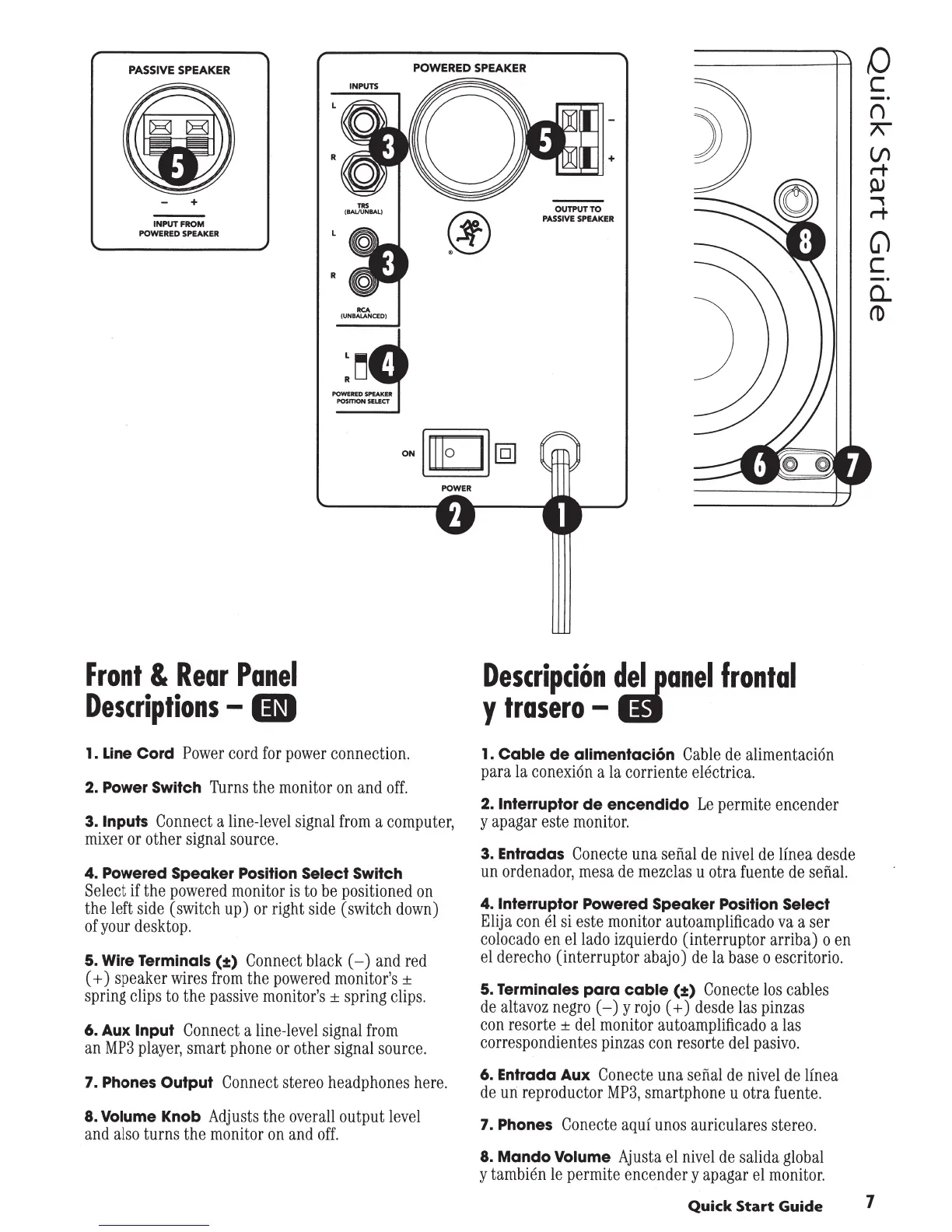
PASSIVE
SPEAKER
POWERED SPEAKER
0
+
INPUT
FROM
POWERED
SPEAKER
Front
&
Rear
Panel
Descriptions
-
01
R
POWERED
SPIAKEI
POSmON
SEUCT
1. Line
Cord
Power
cord
for
power
connection
.
2. Power Switch
Turns
the
monitor
on
and
off
.
3.
Inputs
Connect
a
line-level
signal
from
a
computer,
mixer
or
other
signal
source
.
4. Powered Speaker
Position
Select Switch
Select
if
the
powered
monitor
is
to
be
positioned
on
the
left
side
(switch
up)
or
right
side
(switch
down)
of
your
desktop.
5. Wire Terminals
(:!:)
Connect
black
(-)
and
red
( +)
speaker
wires
from
the
powered
monitor's
±
spring
clips
to
the
passive
monitor's
±
spring
clips.
6.
Aux
Input
Connect
a
line-level
signal
from
an
MP3
player,
smart
phone
or
other
signal
source.
7.
Phones
Output
Connect
stereo
headphones
here.
8.
Volume
Knob
Adjusts
the
overall
output
level
and
also
turns
the
monitor
on
and
off.
+
OUTPUT
TO
PASSIVE
SPEAKER
DescripciOn
~ilanel
frontal
y
trasero-
1.
Cable
de
alimentacion
Cable
de
alimentaci6n
para
la
conexi6n
ala corriente
electrica.
2.
lnterruptor
de
encendido
Le
permite
encender
y
apagar
este
monitor.
3. Entradas
Conecte
una
sefial
de
nivel
de
lfnea
desde
un
ordenador,
mesa
de
mezclas
u
otra
fuente
de
sefial.
4.
lnterruptor
Powered
Speaker
Position
Select
Elija
con
el
si
este
monitor
autoamplificado
va
a
ser
colocado
en
ellado
izquierdo
(interruptor arriba) o
en
el
derecho
(interruptor
abajo)
de
la
base
o
escritorio
.
5.
Terminales
para
cable
(:t)
Conecte
los
cables
de
altavoz
negro
(
-)
y
rojo
(
+)
desde
las
pinzas
con
resorte
±
del
monitor
autoamplificado
a
las
correspondientes
pinzas
con
resorte
del
pasivo
.
6. Entrada
Aux
Conecte
una
sefi.al
de
nivel
de
linea
de
un
reproductor
MP3,
smartphone
u
otra
fuente.
7.
Phones
Conecte
aquf
unos
auriculares
stereo
.
8.
Mando
Volume
Ajusta
el
nivel
de
salida
global
y
tam
bien
le
permite
encender
y
apagar
el
monitor
.
c
()
7\"
Vl
r-t
PJ
...,
r-t
G)
c
0...
ro
Quick
Start
Guide
1