Doc. AHIT101C0208.doc Date: 10/11/2009 P. 2 / 18
PROTOCOLLO MODBUS®
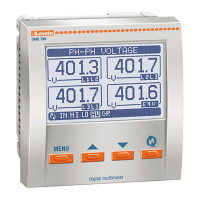
Il multimetro digitale DMG210 supporta i protocolli di
comunicazione Modbus RTU® e Modbus ASCII®
sulla porta seriale RS-485.
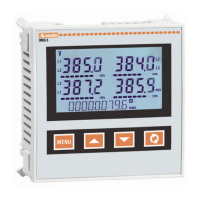
Il multimetro digitale DMG300 supporta i protocolli di
comunicazione Modbus RTU® e Modbus ASCII® sui
moduli di espansione:
• EXM 10 11 RS 232
• EXM 10 12 RS485
• EXM 10 20 RS 485 + 2 relè
• EXM 10 10 USB
• EXM 10 13 Ethernet
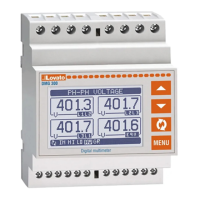
I multimetri digitali DMG700 e DMG800 supportano i
protocolli di comunicazione Modbus RTU® e Modbus
ASCII® sui moduli di espansione:
• EXP 10 USB
• EXP 11 RS232
• EXP 12 RS485
• EXP 13 Ethernet
Grazie a questa funzione e’ possibile leggere lo stato
degli apparecchi e controllare gli stessi tramite il
software di controllo remoto dedicato (DMK remote
control ), software di supervisione standard forniti da
terze parti (SCADA) oppure tramite apparecchiature
dotate di interfaccia Modbus® quali PLC e terminali
intelligenti.
IMPOSTAZIONE DEI PARAMETRI
Per configurare il protocollo Modbus®, accedere al
SETUP MENU e selezionare il menu M07.
Solo per i multimetri digitali DMG300,DMG700 e
DMG800 è possibile configurare 2 moduli di
espansione.
MENU P7 – COMUNICAZIONE SERIALE
Il primo valore della colonna PAR si riferisca al
DMG300, DMG700 e DMG800, il secondo valore al
DMG210.
PAR Funzione Range Default
P07.n.01
P07.01
Indirizzo 1 ..245 1
P07.n.02
P07.02
Velocità
RS-232
(baud)
1200
2400
4800
9600
19200
38400
9600
baud
P07.n.03
P07.03
Formato dati 8 bit Nessuna
8 bit Dispari
8 bit Pari
7 bit Dispari
7 bit Pari
8 bit
Nessuna
P07.n.04
P7.04
Stop bit 1
2
1
P7.n.05
P07.05
Protocollo Modbus RTU
Modbus ASCII
Modbus
RTU
Solo DMG 300, DMG700 e DMG800.
Per il modulo di espansione EXM 10 13 e EXP 13 (
Ethernet ) esistono altri tre menu.
PAR Funzione Range Default
P07.x.06
Indirizzo IP 000.000.000.000
255.255.255.255
000.000.000.000
P07.x.07
Subnet
MASK
000.000.000.000
255.255.255.255
000.000.000.000
P07.x.08
TCP-IP
Port
0 - 9999 1001
MODBUS® PROTOCOL
The digital multimeter DMG210 supports the
communication protocols Modbus RTU® and
Modbus ASCII® on the RS-485 serial port.
The digital multimeter DMG300 supports the
communication protocols Modbus RTU® and
Modbus ASCII® on the expansion modules:
• EXM 10 11 RS 232
• EXM 10 12 RS485
• EXM 10 20 RS 485 + 2 relè
• EXM 10 10 USB
• EXM 10 13 Ethernet
The digital multimeters DMG700 and DMG800
support the communication protocols Modbus
RTU® and Modbus ASCII® on the expansion
modules:
• EXP 10 USB
• EXP 11 RS232
• EXP 12 RS485
• EXP 13 Ethernet
Using this function it is possible to read the device
status and to control the units through the dedicated
Remote control software (DMK remote control),
third-party supervision software (SCADA) or through
other intelligent devices supporting Modbus®, like
PLCs.
PARAMETER SETTING
To configure the Modbus® protocol, enter SETUP
MENU and choose the M07 menu:
For digital multimeters DMG300, DMG700 and
DMG800 it is possible to configure 2 different
expansion modules.
MENU P7 – SERIAL COMMUNICATION
The first value of PAR column is for DMG300,
DMG700 and DMG800 the second value is for
DMG210.
PAR Function Range Default
P07.n.01
P07.01
Address 1 ..245 1
P07.n.02
P07.02
RS-232
Baud
Rate
1200
2400
4800
9600
19200
38400
9600
baud
P07.n.03
P07.03
Data
format
8 bit None
8 bit Odd
8 bit Even
7 bit Odd
7 bit Even
8 bit
None
P07.n.04
P07.04
Stop bit 1
2
1
P07.n.05
P07.05
Protocol Modbus RTU
Modbus ASCII
Modbus
RTU
ONLY DMG 300, DMG700 and DMG800
For expansion module EXM 10-13 and EXP 13
(Ethernet), there are another three menus.
PAR Function Range Default
P07.x.06
Address IP 000.000.000.000
255.255.255.255
000.000.000.000
P07.x.07
Subnet
MASK
000.000.000.000
255.255.255.255
000.000.000.000
P07.x.08
TCP-IP
Port
0 - 9999 1001


 To Next Page
 Loading...