QUICK START
Loxone Music Server 12 Zone powered by CasaTunes™
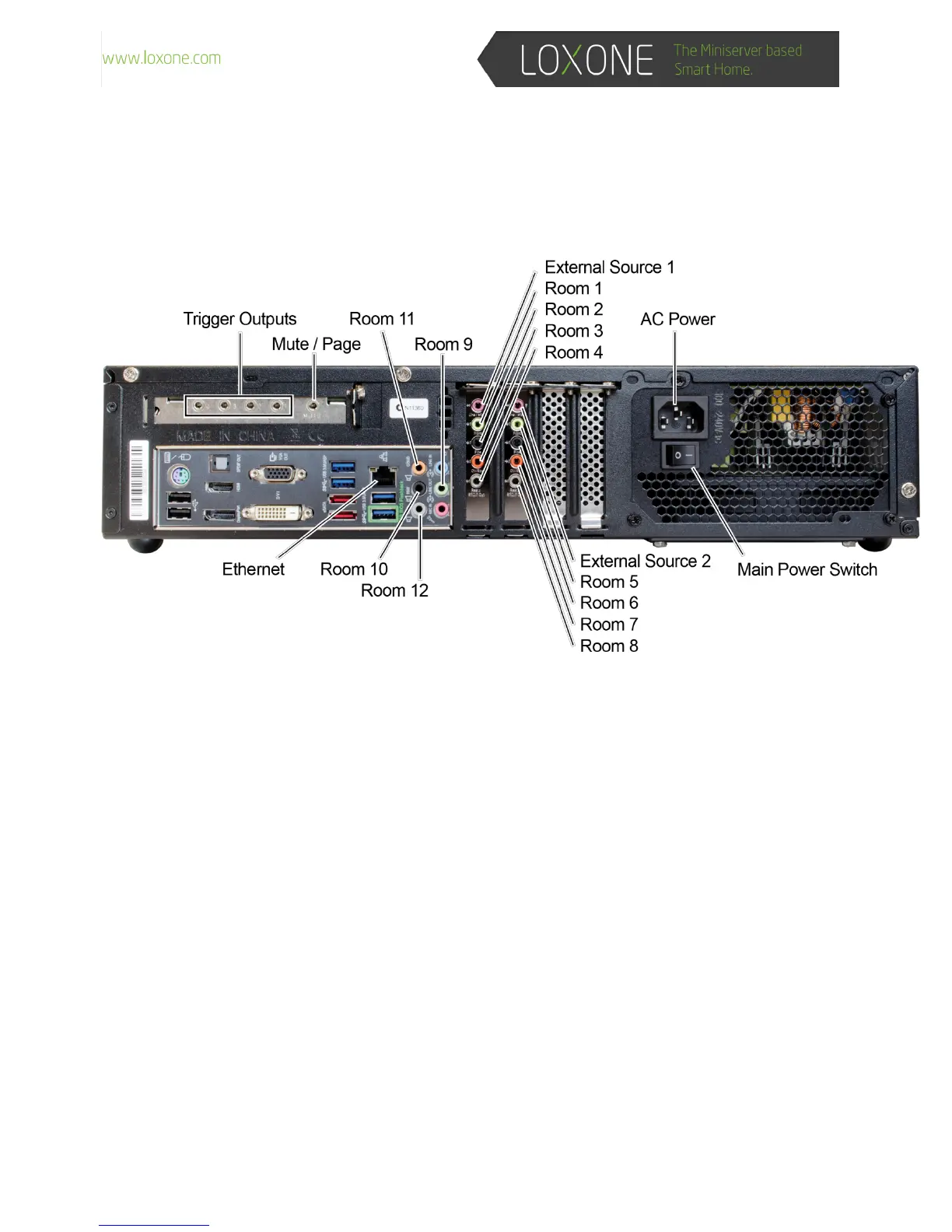
HardwareInstallation
1. Plug an Ethernet cable from your Local Area Network (LAN), with internet access, into the
“Ethernet”atthebackofthechassis.
2. For each room, plug one of the included audio cables between the Music Server and your
amplifiersorAVReceiverlineinput,ifyouarefeedingaHomeTheater.
● Room1=Green(LeftColumn,above)
● Room2=Black(LeftColumn,above)
● Room3=Orange(LeftColumn,above)
● Room4=Gray(LeftColumn,above)
● Room5=Green(2
nd
Column,above)
● Room6=Black(2
nd
Column,above)
● Room7=Orange(2
nd
Column,above)
● Room8=Gray(2
nd
Column,above)
● Room9=Green(onboardsound)
● Room10=Black(onboardsound)
● Room11=Orange(onboardsound)
● Room12=Gray(onboardsound)
3. For each external audio device, such as a tuners and CD changers, connect cables (not
supplied)fromyourexternalaudiodevice’soutputintooneoftheexternalsourceinputs.



 To Next Page