EasyManua.ls Logo

LPL 7452 - Connecting Power Supply and Cooling Fan

LPL 7452
16 pages
Print Icon
To Next Page IconTo Next Page
To Previous Page IconTo Previous Page
Loading...
ASSEMBLY
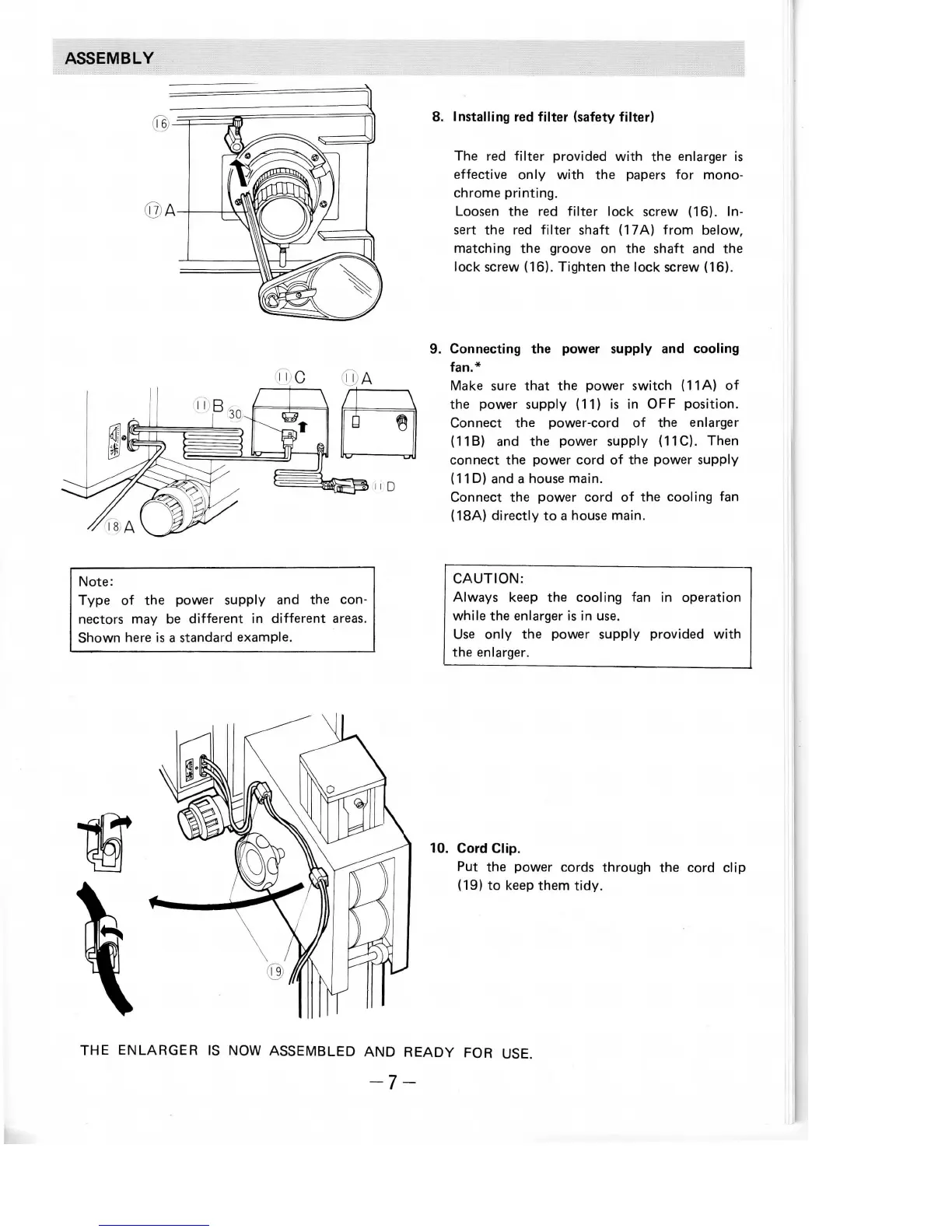
8.
Installing
red
filter
(safety
filter)
The red
filter
provided
with
the
enlarger
is
effective
only
with
the
papers
for
mono-
chrome
printing.
Loosen
the red
filter
lock
screw
(16).
In-
sert
the red
filter
shaft (17A) from below,
matching
the
groove
on the
shaft
and the
lock screw (16). Tighten
the
lock
screw (16).
9.
Connecting
the
power
supply
and
cooling
fan.*
Make
sure
that
the
power switch
(11
A) of
the
power supply (11)
is in OFF
position.
Connect
the
power-cord
of the
enlarger
(11B)
and the
power supply (11C). Then
connect
the
power cord
of the
power supply
(11D)
and a
house main.
Connect
the
power cord
of the
cooling
fan
(18A) directly
to a
house
main.
Note:
Type
of the
power supply
and the
con-
nectors
may be
different
in
different
areas.
Shown here
is a
standard example.
CAUTION:
Always
keep
the
cooling
fan in
operation
while
the
enlarger
is in
use.
Use
only
the
power supply provided
with
the
enlarger.
10.
Cord
Clip.
Put
the
power cords through
the
cord
clip
(19)
to
keep
them
tidy.
THE
ENLARGER
IS NOW
ASSEMBLED
AND
READY
FOR
USE.
-7-