EasyManua.ls Logo

LPL 7452 - Mounting the Enlarging Lens (Lensmount)

LPL 7452
16 pages
Print Icon
To Next Page IconTo Next Page
To Previous Page IconTo Previous Page
Loading...
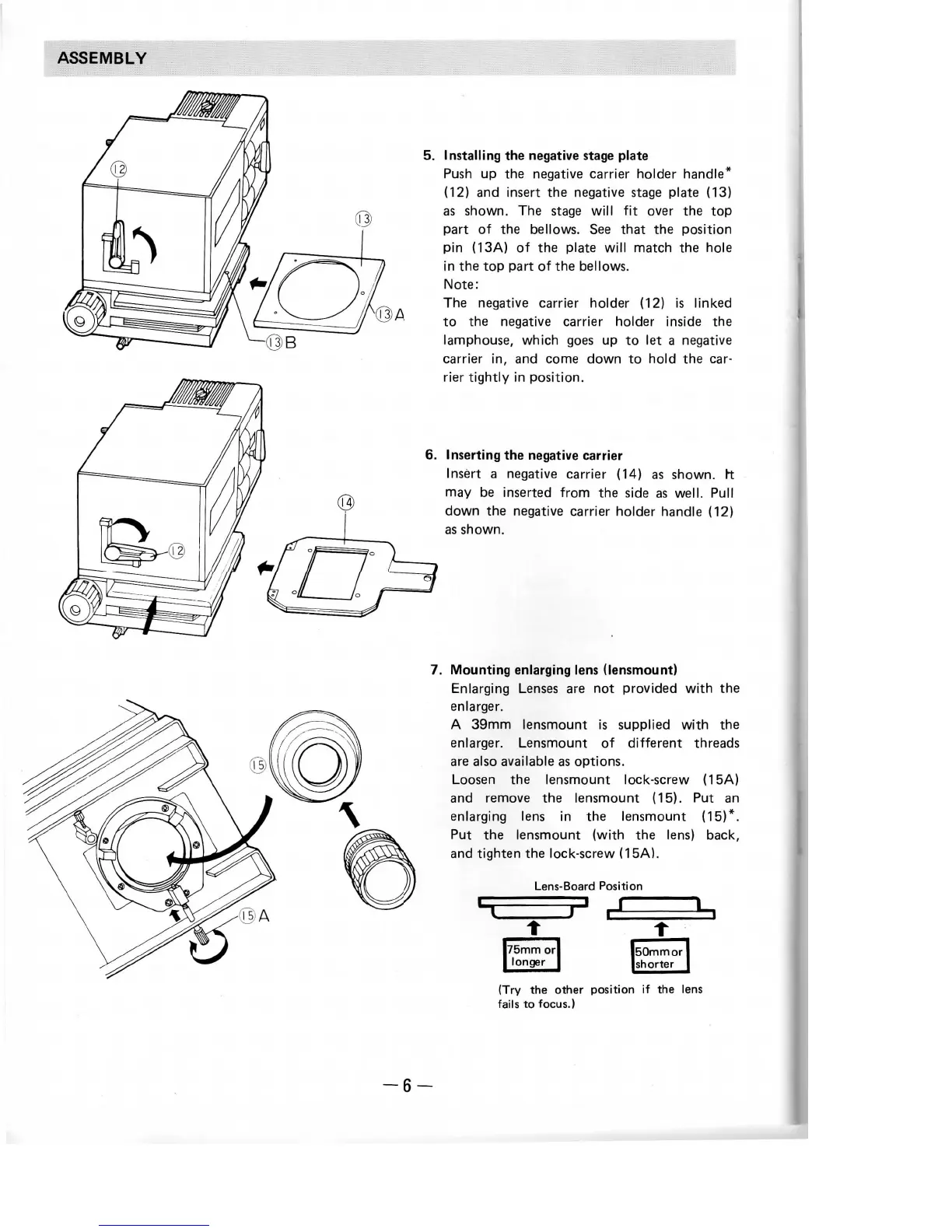
Installing
the
negative
stage
plate
Push
up the
negative
carrier
holder handle*
(12)
and
insert
the
negative
stage
plate (13)
as
shown.
The
stage
will
fit
over
the top
part
of the
bellows.
See
that
the
position
pin
(13A)
of the
plate
will
match
the
hole
in the top
part
of the
bellows.
Note:
The
negative carrier holder (12)
is
linked
to the
negative
carrier
holder inside
the
lamphouse, which
goes
up to let a
negative
carrier
in, and
come
down
to
hold
the
car-
rier
tightly
in
position.
6.
Inserting
the
negative
carrier
Insert
a
negative carrier (14)
as
shown,
rt
may be
inserted
from
the
side
as
well. Pull
down
the
negative carrier holder handle (12)
as
shown.
7.
Mounting
enlarging
lens
(lensmount)
Enlarging
Lenses
are not
provided
with
the
enlarger.
A
39mm
lensmount
is
supplied
with
the
enlarger.
Lensmount
of
different threads
are
also
available
as
options.
Loosen
the
lensmount lock-screw (15A)
and
remove
the
lensmount (15).
Put an
enlarging
lens
in the
lensmount
(15)*.
Put the
lensmount
(with
the
lens)
back,
and
tighten
the
lock-screw (15A).
Lens-Board
Position
_L
(Try
the
other
position
if the
lens
fails
to
focus.)
-6-