Chapter 5. Diagnostics
5-1
Chapter 5. Diagnostics
It describes the diagnosis function for XGT Panel’s communication terminal, screen and touch function.
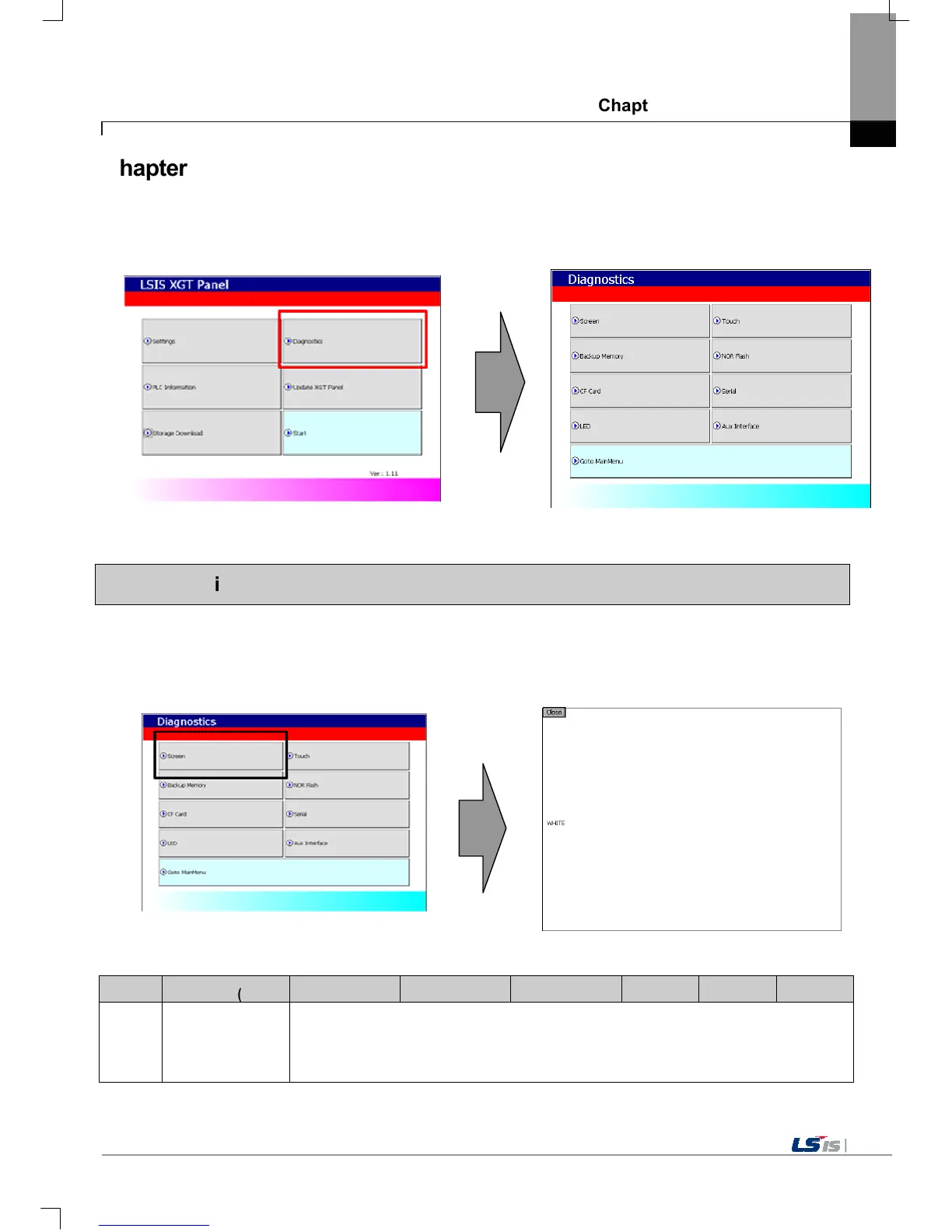
If you press [Diagnostics] button on the XGT Panel’s basic screen, the menu for diagnosis shows up.
5.1 Screen Diagnosis
If you press [Screen] button, screens continuously change into diverse color with buzzer. For XP30-BTA/DC product, screen
changes into 8 steps’ light. After all screen for diagnosis pass. Then, Close button shows up with white ground.
If you press Close button, the initial screen shows up.
Item XP30-BTA(BTE) XP30-TTA(TTE) XP40-TTA(TTE) XP50-TTA(TTE) XP70-TTA XP80-TTA XP90-TTA
Display
screen > WHITE
RED > GREEN > BLUE > BLACK > WHITE
XGT Panel’s basic screen
XGT Panel’s environment setting screen
XGT Panel’s XGT Panel diagnosis screen
Screen when XGT Panel’s screen diagnosis


 To Next Page