EasyManua.ls Logo

Ltech M Series - User Manual

Ltech M Series
2 pages
Print Icon
To Next Page IconTo Next Page
Loading...
Wireless Dimming Control
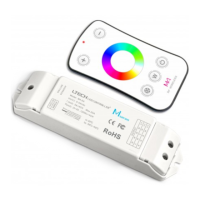
M1+M4-5A
Remote Distance: 131 feet - 164 feet
Working Temp.:
Weight(N.W.): 42g
175mm
44mm
170mm
-22ºF~131ºF
Model: M4-5A
Input Voltage: DC5V~DC24V
Max Current Load: 5A×4CH Max 20A
Max
Output Power: 100W/240W/480W(5V/12V/24V)
Gray
Scale Level : Max 4096×4096×4096×4096
Working Temp.:
Weight(N.W.): 125g
-4ºF~131ºF
Model: M1
Working Voltage: DC3V(battery CR2032)
Working Frequency: 433.92MHz
60mm
9mm
104mm
Power Input Socket
30mm
OUT
DC5V~24V
RF WIRELESS
1. Parameter:
CV Receiver(DIM):
Remote(DIM):
2. Product Size:
Receiver
Remote
Remote- h o l d e r
Attn: one receiver can be synced with 10 of the same or different kinds of remotes.
Learning ID:
Cancel ID: Long press of the ID learning button on the M4-5A receiver for 5 seconds.
3. The Learning ID Method of Remote Control:
4. Operating Instruction for Receiver
5. Operating Instruction for Remote Control :
Sleep Mode:
On/Off
Delay Off
Touch
Color Circle
Scene-mode I
Scene-mode
I I
Dimming
(Press 2S to save)
(Press 2S to save)
LED Lamps
Connection Socket
Running Light
ID Learning Button
warranty
5 years
The M series LED controller is compatible with 8 different kinds of remotes. The M4-5A receiver can
receive single color/CT dimming, RGB/RGBW control functions to meet a wide range of lighting
requirements. With the M series RF remotes, brightness, color as well as customizable color control
modes are easily achievable. Choose the remote that is right for your application.
The Remote control has been matched to the receiver before leaving the factory. If deleted
accidentally, you can re-learn the ID as follows.
With a short press of the ID learning button on the M4-5A receiver, the running light
will illuminate.Then press any key on the M1 remote control. The running light will
flash several times. The two should now be synced.
The remote goes into standby mode after
30 seconds of non-use to save power.
Press any key to resume operation.
Question and Answer IconNeed help?

Do you have a question about the Ltech M Series and is the answer not in the manual?

Summary

Product Specifications

M1 Remote Specifications

Details model, working voltage, frequency, distance, and temperature for the M1 remote control.

M4-5 A Receiver Specifications

Details input voltage, current load, output power, grayscale level, and temperature for the M4-5A receiver.

Product Dimensions

Remote Control ID Learning

Receiver Operating Instructions

Remote Control Operating Instructions

Wiring Diagram

Attention and Safety Precautions

Warranty Agreement

Overview

This document describes the M1+M4-5A Wireless Dimming Control system, which consists of an M1 remote control and an M4-5A CV receiver. This system is designed for wireless dimming control of LED lighting, offering compatibility with various LED types and control functions.

Function Description

The M1+M4-5A system provides wireless dimming control for LED lighting. The M4-5A receiver is compatible with 8 different types of M-series RF remotes, including the M1 remote control. It supports single color/CT dimming, and RGB/RGBW control functions, making it suitable for a wide range of lighting requirements. With the M-series RF remotes, users can easily achieve brightness adjustment, color control, and customizable color control modes.

The M1 remote control allows users to:

  • Turn On/Off the connected LED lights.
  • Dim the brightness of the lights.
  • Adjust color using a touch-sensitive color circle.
  • Save and recall two scene modes (Scene-mode I and Scene-mode II) by pressing the respective buttons for 2 seconds.
  • Set a delay off timer of 30 seconds.

The M4-5A receiver receives commands from the M1 remote control and translates them into appropriate signals to control the connected LED lights.

Important Technical Specifications

M1 Remote Control (DIM):

  • Model: M1
  • Working Voltage: DC3V (powered by a CR2032 battery)
  • Working Frequency: 433.92MHz
  • Remote Distance: 131 feet – 164 feet (approximately 40-50 meters)
  • Working Temperature: -4°F ~ 131°F (approximately -20°C ~ 55°C)
  • Weight (N.W.): 42g

M4-5A CV Receiver (DIM):

  • Model: M4-5A
  • Input Voltage: DC5V ~ DC24V
  • Max Current Load: 5A × 4CH (Total Max 20A)
  • Max Output Power:
    • 100W (at 5V input)
    • 240W (at 12V input)
    • 480W (at 24V input)
  • Gray Scale Level: Max 4096 × 4096 × 4096 × 4096
  • Working Temperature: -22°F ~ 131°F (approximately -30°C ~ 55°C)
  • Weight (N.W.): 125g
  • Dimensions: 175mm (length) × 30mm (width) × 60mm (height)

General System Specifications:

  • Compliance: ROHS, FC, CE (EMC, R&TTE)
  • Warranty: 5 years (for manufacturing faults)
  • Compatibility: The M4-5A receiver can be synced with up to 10 remotes of the same or different kinds.

Usage Features

Learning ID Method of Remote Control:

  • The remote control is pre-matched with the receiver from the factory.
  • To learn an ID:
    1. Short press the ID learning button on the M4-5A receiver; the running light will illuminate.
    2. Press any key on the M1 remote control; the running light will flash several times, indicating successful syncing.
  • To cancel an ID:
    1. Long press the ID learning button on the M4-5A receiver for 5 seconds.

Operating Instruction for Receiver:

  • The receiver has a "Running Light" indicator, an "ID Learning Button," and a "DC5V~24V Power Input Socket."
  • It also features "LED Lamps Connection Sockets" for connecting the LED lights.

Operating Instruction for Remote Control:

  • Sleep Mode: The M1 remote enters standby mode after 30 seconds of non-use to conserve power. Pressing any key will resume operation.
  • Scene Modes: Two scene modes can be saved and recalled. To save a scene, press the desired scene button (I or II) for 2 seconds.
  • Delay Off: A 30-second delay off function is available.
  • Dimming: The remote includes dedicated buttons for dimming control.
  • On/Off: A dedicated button for turning the lights on or off.
  • Color Adjustment: A touch-sensitive color circle allows for intuitive color selection.

Wiring Diagram:

  • The system uses a Constant Voltage (CV) Power Supply (100-240V AC input, DC12V output) connected to the M4-5A receiver.
  • The M4-5A receiver then connects to the LED Light Panels.
  • The maximum output for a 12V system is 60W. For higher power loads (up to 240W at 12V or 480W at 24V), ensure the power supply and wiring are appropriately sized.

Maintenance Features

Attention and Safety Guidelines:

  • Installation: Product must be installed and serviced by a qualified person.
  • Environment: The product is not waterproof. Avoid direct sun and rain. If installed outdoors, ensure it is in a waterproof enclosure.
  • Heat Dissipation: Good heat dissipation is crucial for prolonging the controller's working life. Ensure good ventilation.
  • Voltage Compatibility: Verify that the output voltage of the LED power supply matches the working voltage of the product.
  • Wiring:
    • Use adequately sized cables from the controller to the LED lights to carry the current.
    • Secure cables tightly in connectors to prevent overheating and poor contact.
    • Ensure all wire connections and polarities are correct before applying power to prevent damage to the LED lights.
  • Troubleshooting: If a fault occurs, return the product to your supplier. Do not attempt to fix it yourself.

Warranty Agreement:

  • Technical Assistance: Lifelong technical assistance is provided.
  • Warranty Period: A 5-year warranty is given from the date of purchase, covering manufacturing faults only.
  • Post-Warranty: For faults beyond the 5-year warranty, charges for time and parts may apply.
  • Warranty Exclusions: The warranty does not cover:
    • Man-made damages from improper operation, excess voltage, or overloading.
    • Excessive physical damage to the product.
    • Damage due to natural disasters or force majeure.
    • Damaged warranty labels, fragile labels, or unique barcode labels.
    • Products that have been replaced by a brand new product.
  • Remedy: Repair or replacement under warranty is the exclusive remedy. Evo-Lite and its suppliers are not liable for incidental or consequential damages.
  • Amendments: Any amendments or adjustments to the warranty must be approved in writing by Evo-Lite.
  • Disclaimer: This manual applies only to this model. Evo-Lite reserves the right to make changes without prior notice.

Ltech M Series Specifications

General IconGeneral
BrandLtech
ModelM Series
CategoryDimmer
LanguageEnglish