6
LR600
Operation of the LR600
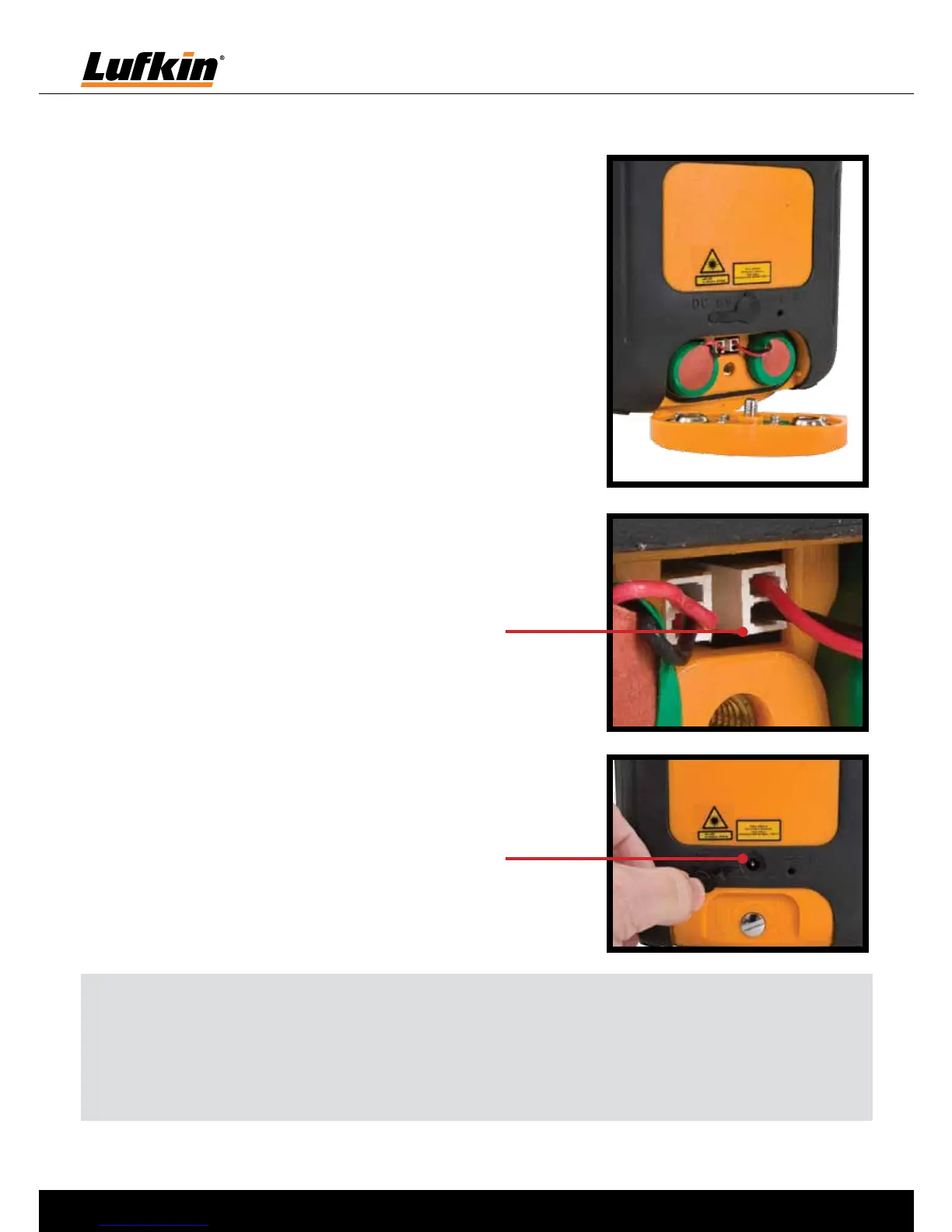
Charging the batteries
• BeforeusingtheLR600,fullychargethebatteries
• Openthebatterycompartment,insertthebatteries
and connect the plugs to the sockets. The plugs fit in
the sockets in one position only (see pictures on right).
close the battery compartment.
• Connectthebatterycharger/mainsunittoamains
source and plug into the socket. Please only use
the charger/mains unit supplied with the device. If a
different one is used, the warranty will become void.
• Thedevicecanalsobeoperatedwithstandardalkaline
batteries (4 x type C). Insert the batteries as shown by
the installation symbols. Ensure the polarity is correct.
• IftheLEDblinksconstantly,eitherthebatteriesmustbe
exchanged or recharged.
Note: Do not expose batteries to excessive heat such as sunshine, fire, etc. Dry batteries
must not be recharged. Used batteries must not be disposed of as household waste.
Please take them to a collection point for used batteries or for special waste. Ask your local
authority for further details.
Pull back rubber weather seal
to reveal charging socket
Plugs fit to sockets as shown


 To Next Page
 Loading...