
 Need help?
Do you have a question about the Lumen Dynamics Group OmniCure R2000 and is the answer not in the manual?
Summary of the R2000 Radiometer's features and their corresponding benefits.
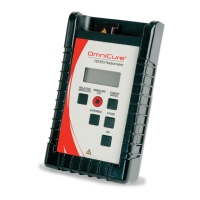
Identification and description of the R2000 Radiometer's physical components.
Detailed descriptions of the Light Guide Adapter, connectors, display, and keypad.
Explanation of the functions of the ON, RELATIVE/ABSOLUTE, CAL, POWER/IRRAD, EXTERNAL, and STORE buttons.
Information on the rubber boot and definitions of acronyms used in the manual.
Instructions for turning on the R2000 Radiometer and understanding calibration messages.
How to correctly insert and secure light guide adapters into the R2000 Radiometer.
Guidance for using non-standard size light guides with custom adapters.
Connecting to a light source and measuring irradiance or power.
How to perform measurements in Relative Mode as a percentage of a reference.
Using Absolute Mode and connecting external radiometer devices.
Understanding measurement modes when using external radiometer devices.
Procedure for storing measurement data into the R2000 Radiometer's data log.
Connecting the R2000 Radiometer to OmniCure systems via RS-232 for calibration.
Requirements for connecting the R2000 Radiometer to a PC and installing software.
Step-by-step guide for installing the R2000 Control Panel software.
Resolving common errors when connecting the R2000 Radiometer to a PC.
Overview of the R2000 Control Panel interface elements.
Explanation of the fields within the Optical Data section of the Control Panel.
Details on the Misc. frame and synchronizing the radiometer clock with PC.
Understanding the status indicators in the Control Panel's Status frame.
Understanding the Source frame and selecting display modes in the Control Panel.
Using the Lockout menu to disable keypad functions.
Using Get LGA and managing data logs within the Control Panel.
Sample screen shot of the R2000 Control Panel's Data Log.
How to use the Power Down menu option in the R2000 Control Panel.
Explanation of symbols and general cautionary notes for safe operation.
Important warnings regarding equipment usage, battery, and hot surfaces.
Resolving 'Adc' (internal problem) and 'BAT' (low battery) messages.
Resolving 'Cal' (calibration required) and 'Err' (function failure) messages.
Troubleshooting the 'LG' message indicating no light guide is detected.
Resolving 'LGA', 'Loc', and 'CLO' messages for adapter, lockout, and clock issues.
Details on wavelength range, maximum range, and resolution for optical measurements.
Specifications for electrical, mechanical, and RS-232 communication port.
Environmental operating conditions and regulatory compliance standards for the radiometer.
Information on electromagnetic compatibility standards and CE marking directives.
Substance information required by China RoHS regulations for the R2000.
Information on the WEEE Directive concerning product disposal and recycling.
FCC Class B compliance details and measures to correct radio interference.
Available replacement parts, battery, and light guide adapters with reorder numbers.
Description of optional adapters like Proximity Measurement and Lamp Output Adapters.
Details on the one-year warranty, claim procedure, and return authorization process.
Warranty limitations, user-serviceable parts, and contact information for service.
 General
| Wavelength Range | 320-500 nm |
|---|---|
| Power Supply | 100-240 V AC, 50/60 Hz |
| Power Requirements | 300 W |
| Light Delivery | Liquid light guide |
| Cooling Method | Air-cooled |
| Control Interface | RS-232 |
| Intensity Control | 0-100% |

 To Next Page