
 Need help?
Do you have a question about the Lumie Bodyclock Elite 300 and is the answer not in the manual?
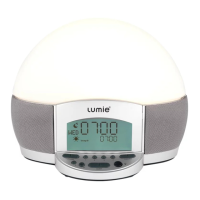
Introduces the Lumie Bodyclock Elite, explaining its sunrise and sunset features for better sleep.
Handle glass lamp cover with care when cold, avoid heat damage, and do not open the casing.
Keep away from water and damp, use indoors only, and adhere to bulb wattage limits.
Instructions for optimal bedside placement, removing the lamp cover, and installing the bulb.
Guides through the 5-step process for setting up the sunrise, alarm beep, and sunset functions.
Details on using the sunrise alarm for waking and sunset for sleeping daily.
Instructions for using the sunset feature without a sunrise alarm, ideal for weekends.
Explains choices for waking sounds: beep, audio, flash, or light only.
Setting up audio for waking, linking to DAWN CHORUS or PRESET 1.
Set the display language for the device. Options include English, French, German, and more.
Set the specific time for the alarm to sound. The sunrise will start before this time.
Set the current time of day on the device. Crucial for accurate alarm and sunrise timing.
Choose between 12-hour or 24-hour clock display. Pay attention to AM/PM indicators.
Set the current day of the week for accurate tracking and potential scheduling.
Automates volume fade-down for audio features to enhance sleep. Options for constant or auto-fade.
Adjusts display brightness to minimize sleep distractions. Options for auto-fade or constant brightness.
Select sunrise duration: 15, 30, 60, or 90 minutes for gradual light increase.
Select sunset duration: 15, 30, 60, or 90 minutes for gradual light dimming.
Set a continuous soft nightlight level after the sunset fades. Options: OFF, LOW, MED, HIGH.
Activates light on/off for random periods between 4-11pm to simulate presence when away.
Allows setting different alarm times for each day of the week, saving them separately.
Provides a few extra minutes in bed by temporarily pausing the alarm and light.
Details on AM/FM radio, Meditainment features, SD card, and external audio connections.
Instructions for adjusting the audible volume level for alarms and audio features.
Lists Meditainment audio options for waking up, including spoken wake-up calls.
Describes guided meditation audio for relaxation and sleep, with storylines and sound effects.
Provides solutions for common problems like quick light response or no light/clock function.
Covers the 24-month warranty against manufacturing defects and return procedures.
Lists technical details such as model, power requirements, and operating temperature.
Provides contact information for Lumie, including phone number, email, and address.
 General
| Type | Wake-up light |
|---|---|
| Bulb technology | Halogen |
| Light intensity | - lx |
| Replaceable lamp | Yes |
| Service life of lamp | - h |
| Wake-up light bulb | 42 W |
 Weight and Dimensions
| Depth | 180 mm |
|---|---|
| Width | 240 mm |
| Height | 200 mm |
| Weight | 1400 g |



 To Next Page