Page 5For technical questions, please call 1-888-866-5797.Item 56521
Installation
Read the ENTIRE IMPORTANT SAFETY INFORMATION section at the beginning of this
manual including all text under subheadings therein before set up or use of this product.
TO PREVENT SERIOUS INJURY FROM ACCIDENTAL OPERATION:
Do not plug Power Cord/Controller into AC outlet until installation is complete.
Note: Attachment hardware, such as hooks or nylon cable ties, sold separately.
1. If attaching to GUIDE WIRE, attach the ring at the back of every bulb holder
to the guide wire using a S-hook or nylon tie (sold separately).
Guide Wire
Anchor guide
wire to structure
Anchor guide
wire to structure
Attach using S-hooks
or cable ties
2. If a guide wire is not used, connect securely to STRUCTURE at the beginning and
the end of EACH String Light using screw hooks (sold separately).
Structure
Support
24 feet
(minimum)
24 feet
(minimum)
Structure
Support
Structure
Support
Screw
Hook
Structure
Support
Connecting Controller and Multiple String Lights
Operation
1. Check that the Power Cord / Controller is connected
to the String Lights then connect to 120 VAC outlet.
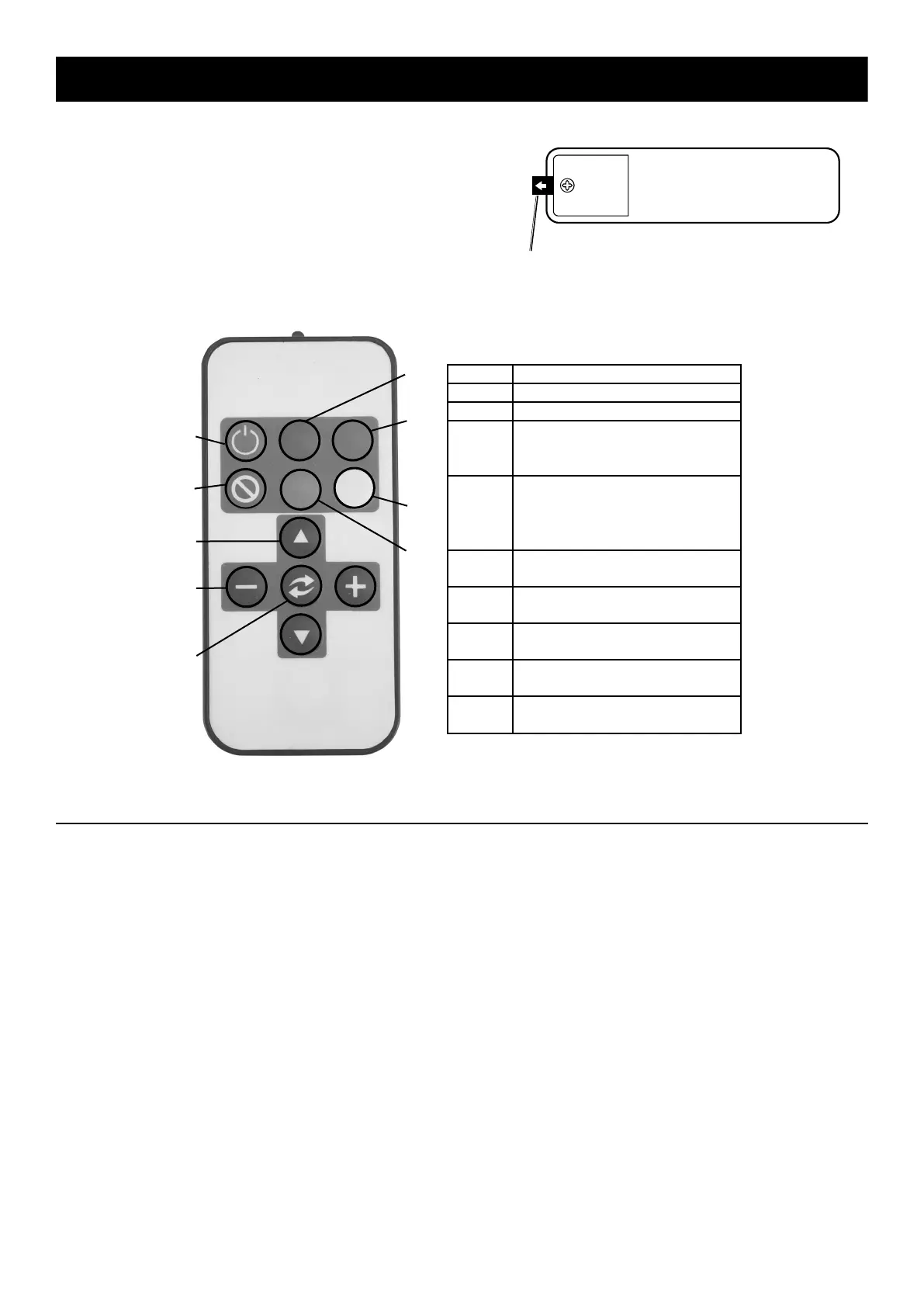
2. Use the Remote Control to turn the lights on/off.
Also use it to select color and mode changes.
3. On the Remote Control, remove the pull-
out Tab to activate the battery.
4. Point the Remote Control at Controller and
press selection buttons as desired.
Pull out Tab to activate battery.
Back of
Remote
Control
Button Selection
1 ON: Turns lights on.
2
OFF: Turns lights off.
3
BRIGHTNESS: Press ▲ / ▼
to choose brightness level (only
works in single color mode).
4
SPEED: Press – / + to
decrease or increase color
changing speed (only works
in color combination mode).
5
MODE: Press to select
a color combination.
6
RED: Press to change
light color to red.
7
GREEN: Press to change
light color to green.
8
BLUE: Press to change
light color to blue.
9
WHITE: Press to change
light color to white.
1
2
3
4
5
6
7
8
9
Programming and Resetting the Remote Control
1. Reset the Remote Control if it is not working
properly or has been replaced.
2. To Reset, turn power OFF by unplugging
the Power Cord / Controller.
3. Press and hold the Remote Control’s ON button.
4. While holding down the ON button, plug
power cord back into the outlet and point
the Remote Control at the Controller.
5. The String Light’s bulbs should flash 3
times signifying the Remote Control has
been successfully reprogrammed.
6. Release the On button.


 To Next Page