
 Need help?
Do you have a question about the Lumo back and is the answer not in the manual?
Download the LUMOback app from the official website and follow setup instructions.
Place a reminder sticker to encourage daily use of LUMOback for posture improvement.
Position the LUMOback sensor centered on the lower back, directly on skin, and fasten the strap snugly.
Sit back in the chair, on sit bones, with knees below hips for optimal sitting posture.
Stand with feet shoulder-width apart, equal weight, and head aligned as if pulled by a string.
Understand the meaning of the indicator light for charging and device connection status.
Learn how to use the touch button to check battery status.
Product is warranted against defects for 90 days from purchase, excluding improper use or wear.
Return product and receipt to point of sale for repair, replacement, or refund at sole discretion.
Product sold 'AS IS', liability limited to purchase price; some rights may vary by jurisdiction.
Device complies with FCC Rules and Industry Canada standards, subject to interference conditions.
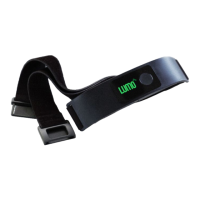
The LUMOback is a posture-monitoring device designed to help users improve their posture while sitting and standing. It consists of a sensor unit and an adjustable strap, which is worn around the waist. The device connects wirelessly to a companion app on an iPhone or iPad, providing real-time feedback and guidance on posture.
The primary function of the LUMOback is to detect and provide feedback on the user's posture. When worn, the sensor continuously monitors the curvature of the lower back. If the user slouches or adopts an unhealthy posture, the device provides a gentle vibration or notification through the app to remind them to correct their position. This immediate feedback helps users develop better postural habits over time. The device is intended to be worn directly on the skin for optimal performance, centered on the lower back, just above the hip bones.
The LUMOback system includes a mobile application that serves as the main interface for the user. This app, available for download, guides the user through the initial setup process, including pairing the device and calibrating it for individual use. The app also provides a visual representation of the user's posture, tracks progress over time, and offers tips and exercises to further improve posture. The goal is to make users more aware of their body's alignment and encourage them to maintain an upright and healthy posture throughout the day.
The LUMOback device features an indicator light that communicates its status:
A short press of the touch button on the device allows users to check the battery status:
The manual does not explicitly detail maintenance features such as cleaning instructions or battery replacement procedures. However, the warranty information implies that proper use and handling are crucial for the device's longevity.
LUMO BodyTech, Inc. provides a limited warranty for the LUMOback product, covering defects in material and workmanship for a period of ninety (90) days from the original purchase date. This warranty is extended only to the original purchaser.
The warranty does not cover damage resulting from:
In case of a covered defect, the user must return the product and the purchase receipt to the point of sale to obtain warranty coverage. LUMO BodyTech, Inc. will, at its sole discretion, repair, replace the defective product, or issue a refund. The warranty applies only to authentic LUMOback products manufactured by LUMO BodyTech, Inc.
The product is sold "AS IS WITH ALL FAULTS." LUMO BodyTech, Inc. disclaims all other express or implied warranties. Any implied warranty imposed by law is limited to the ninety-day term of the limited warranty. The company's liability for direct, indirect, consequential, or incidental damages is limited to the original purchase price of the product. The terms of this limited warranty cannot be changed or expanded by any person. Some jurisdictions may not allow limitations on implied warranties or damages, so these limitations may not apply to all users.
The device complies with FCC Rules (Part 15) and Industry Canada licence-exempt RSS standards, meaning it will not cause harmful interference and must accept any interference received. Users are cautioned that changes or modifications not expressly approved by the responsible party could void their authority to operate the equipment.
For further support or inquiries, users can visit the LUMOback website or contact customer support via email. Regulatory compliance statements are also available on the company's website.
 General
| Connectivity | Bluetooth |
|---|---|
| Battery Life | Up to 5 days |
| Charging Time | 2 hours |
| Compatibility | iOS and Android |
| Sensors | Accelerometer |
| Water Resistance | Splash resistant |
| Type | Posture Coach |
| Weight | 1 ounce |

 To Next Page