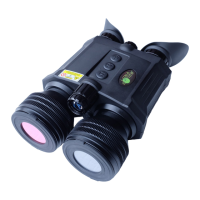
The LUNA OPTICS LN-G3-B50-PRO is a Gen-3 HD Digital Technology Day & Night Binocular (6.5-39x50) designed for quality viewing even in the dark. It operates with batteries and utilizes a digital binocular vision device that projects the image onto an OLED display screen. The device offers both day and night viewing capabilities, with the Image Sensor and OLED display being crucial components for image quality. The unit is designed for ease of use, with controls and parts clearly identified for operation.
Function Description:
The LN-G3-B50-PRO functions as a day and night binocular, allowing users to observe objects in various light conditions. It employs a digital image sensor to capture light and an OLED display to present the image to the user. The device is capable of projecting a clear image even in low light or complete darkness, making it suitable for a wide range of applications such as surveillance, wildlife observation, and outdoor activities. The digital viewer is safe to operate during daylight and nighttime hours. It is not safe for your eyes to look directly at the sun through this product. The device also features a digital viewer that can be used to reduce the brightness level of the unit to prevent the image from becoming totally washed out. It can also utilize Color Enhancing Filter, supplied with the unit for daylight operation in order to view more vibrant colors.
Important Technical Specifications:
- Image Sensor Resolution / Sensitivity: Quad-HD 2560x1440 / 0.002lux
- Image Display: Dual 0.38" HD AMOLED-Q 1280x720
- Still Image Resolution: 5360x3008 (16.1MP) JPEG
- Video Resolution (signal): Quad-HD AVI
- Video Recording options: QHD(30fps); 3MHD(30fps); FHD(60/30fps); HD(30fps)
- Image Magnification: 6.5x-39x
- Objective Lens: F1.0/50mm
- Ocular Diopter Range: +/-5
- Inter-Pupillary Distance: 59mm - 71mm
- Focusing Distance: 80cm (2.6ft) - ∞
- Viewing Distance (daylight, 6x): 2000m (2180yds)
- Viewing Distance (IR complete darkness): 600m (654yds)
- IR Illuminator: Class 3R, 850nm, 1W
- Laser Rangefinder Maximum Distance (large reflective targets): 1500m (1635yds)
- Laser Rangefinder: Class-1 905nm
- Field Of View: 10°
- Memory: Micro SD card (up to 128GB)
- Wi-Fi: Android/iOS
- Battery Power: 4 x 3V Lithium (CR123)
- External Power: 5V/2A micro-USB-C
- Operating Time (4xCR123A batteries, IR off, no video/Wi-Fi): 4.5hrs
- External outputs: micro-USB-C / RCA-V
- Dimensions: 190mm x 126mm x 76mm (7.5"x4.9"x2.9")
- Weight: 980g (2.2lbs)
- Warranty: 2yrs
Usage Features:
The device is equipped with a Super Controller (8) for navigating menus and adjusting functions. It features an objective lens focusing ring (1), IR illuminator focusing wheel (2), IMAGE button (3), CAMERA/LRF button (4), POWER/IR button (5), and ocular focusing rings (6). The rangefinder lens (7) is also a key component. The device includes folding eyecups (10) for comfortable viewing.
- Turning the Unit ON/OFF: Press the POWER Button (5) momentarily. The LED Power Indicator (10) located on the back of the unit should light up in green color. To turn the unit OFF, press and hold the POWER Button for 2 seconds.
- Focusing: Rotate the Objective Lens Focusing Wheel (1) focusing on the object until the image is at its best. To adjust the eyepieces, rotate the front objective lens to adjust the distance to the object you are viewing.
- Daylight Color Enhancing Filter: The binocular is equipped with a unique daytime color enhancing filter, which provides vibrant and accurate colors rendition. The filter is embedded into the objective lens cover (11-a) and is recommended to be kept on during daytime use to enjoy vibrant daytime color images.
- IR Illuminator: The digital viewer is equipped with a built-in powerful Infrared illuminator light (2). This light operates in a spectrum, which is normally invisible to a human eye, however with the help of the Image Sensor, located inside the binocular, you will see a beam of light when looking though the ocular lens. The IR illuminator is a Class-3R laser product. Do not look directly into the IR illuminator lens while the illuminator is ON!
- Menu Navigation: The Super Controller (8) allows scrolling through menu contents by rotating it, selecting and confirming functions by short-pressing, returning from selected functions to Main Menu by pressing and holding, and exiting the Main Menu by pressing and holding for 2 seconds.
- Image Color Options: The binocular has 5 distinct image colors: Daytime Color, B&W Monochrome, NV Green Phosphor, NV White Phosphor, and Amber. These options cater to various viewing conditions and preferences.
- Brightness Adjustment: The digital viewer is equipped with dual image brightness control. An automatic picture optimization sensor adjusts the image according to the available ambient and artificial light. Manual Image Brightness Button (3) allows fine-tuning.
- Laser Rangefinder: The binocular is equipped with a built-in and fully integrated Laser Rangefinder (LRF), allowing quick target distance measurements up to 1500m. Manual mode gives you the option of measuring the distance to the object only when you want it done, while automatic mode allows for continuous distance measurement.
- Electronic Image Stabilizer (EIS): The binocular is equipped with an Electronic Image Stabilizer (EIS), which helps compensate some shake during video recording. EIS is activated image Zoom will no longer be possible and system will be fixed on 6.5x optical magnification.
- Recording Pictures and Videos: The digital viewer can take High-Resolution pictures and record HD videos onto the external Micro-SD card. 16GB card is included with your unit and it is already installed into the SD-card slot. The Micro-SD card can be upgraded to 128GB.
- SD-Card Removal, Data Viewing and Transfer Options: Images and videos can be viewed and accessed directly on the unit’s micro-display. To transfer data, remove the micro-SD card and insert it into a USB flash drive adapter to transfer data to your computer.
- Connecting to External Video Source: The device can connect to a TV or a video monitor via the RCA video cable (included).
- Wi-Fi Link and Operation Instructions: Download “ROADCAM” App on your Android phone/tablet or on iPhone/iPad. The device’s Wi-Fi signal can be found and selected on your phone.
Maintenance Features:
- Battery Installation: The device operates on four 3V Lithium type batteries, known as CR123A type. It is important to use rechargeable batteries (CR123R) but please make sure each battery peak voltage is equal to or less than 4.2V. Furthermore, rechargeable batteries are not recommended due to significantly shorter operating time. To install batteries, remove the battery cover, located on the bottom of the binocular by gently pressing onto the cover and at the same time sliding it in the direction shown by arrow on the cover.
- Battery Warning: If batteries supplied with the unit – they are not rechargeable – do not charge or recharge these batteries!
- Important: In order to preserve the set date/time do not remove the dead batteries from the unit until you are ready to replace them with the new set, then replace the old batteries with new set as quickly as possible and the date/time will be preserved.
- Troubleshooting: The manual provides solutions for common issues such as the unit not turning on, batteries being fresh but the unit not turning on, the light indicator not working, and inability to obtain sharp and clear images.
- Firmware Updates: The device supports software version updates.
- SD Card Formatting: The manual provides instructions for re-formatting 64GB & 128GB micro-SD cards to FAT32 format.
WARNING! NEVER ATTEMPT THE FOLLOWING:
- NEVER try to disassemble the unit by yourself or by anyone who is not our authorized technician! Doing so may result in injury and will void any warranty claims!
- NEVER charge batteries included with the unit – they are not rechargeable!
- NEVER submerge the unit into water or use it during heavy rain!
- NEVER look directly at the sun through this device!
- NEVER Look directly into the IR Illuminator lens while IR is ON!

 Need help?
 General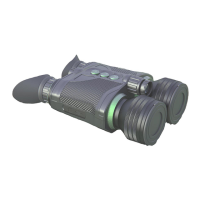

 To Next Page