EasyManua.ls Logo

LUNA OPTICS LN-G3-M44 - User Manual

LUNA OPTICS LN-G3-M44
16 pages
Print Icon
To Next Page IconTo Next Page
Loading...
1
LN-G3-M44
GEN-3 HD DIGITAL TECHNOLOGY
DAY & NIGHT MONOCULAR 5-30x44
INSTRUCTION MANUAL
SOFTWARE VERSION M5/2021/06/17
IMPORTANT: Please read this manual in its entirety
prior to using this device!
Question and Answer IconNeed help?

Do you have a question about the LUNA OPTICS LN-G3-M44 and is the answer not in the manual?

Summary

Installation and Initial Setup

Core Operations and Controls

Turning the Unit On and Off

Instructions for powering the device on and off using the power button.

Focusing the Image

Procedure for adjusting ocular and objective lenses for a sharp image.

Super Controller and Menu Navigation

Explains how to use the Super Controller for menu functions and navigation.

Advanced Features and Settings

Using the Infrared Illuminator

Guide to activating and adjusting the IR illuminator for enhanced night vision.

Recording, Data Management, and Connectivity

Capturing Images and Videos

Instructions for taking photos and recording videos.

Wi-Fi Connectivity and App Usage

Steps for connecting to a smartphone via Wi-Fi and using the companion app.

Troubleshooting and Safety Information

Critical Safety Precautions

Essential warnings to prevent damage, injury, and warranty voiding.

Overview

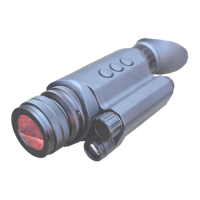
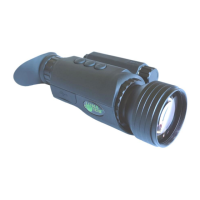
The Luna Optics LN-G3-M44 is a Gen-3 HD Digital Technology Day & Night Monocular, offering 5-30x44 magnification. This device functions as a digital night vision viewer, utilizing an image sensor and an OLED display screen to project images. Unlike traditional daylight binoculars, which rely on light passing through glass and prisms, the LN-G3-M44 converts ambient light into an image displayed on a screen. The optical components gather light into the image sensor and then project the image from the OLED screen to your eye. It's important to note that, like any display screen, it has a limited resolution and may not provide the same crystal-clear image as daylight binoculars.

Function Description:

The monocular operates on two 3V Lithium CR123A type batteries. It supports both full-color and monochrome (night vision green and black & white) imaging. Full-color is ideal for daylight, while monochrome options are more effective in low-light conditions. Night vision green enhances detail, and black & white is useful for reading text or signs at night. The device is safe for both daylight and nighttime use, though direct viewing of the sun is cautioned against. In daylight, brightness may need to be reduced, and a Color Enhancing Filter (attached to the front lens) is recommended for vibrant colors.

The LN-G3-M44 includes a built-in powerful Infrared (IR) illuminator (7) for use in low-light conditions. This IR light operates in a spectrum invisible to the human eye but is detected by the image sensor. The IR illuminator can be activated and its intensity adjusted through three power levels by momentary presses of the Power & IR Button (4). The IR icon on the display changes color (pink to orange to red) to indicate the power level.

The device is capable of taking high-resolution pictures (4032x3024, 12.2MP JPEG) and recording HD videos (Full-HD 1080p AVI, 1080p/720p/WVGA/VGA options) onto an external Micro-SD card (8GB card included, upgradeable to 128GB). Date and time are automatically stamped onto all recordings.

Usage Features:

  • Turning On/Off: A momentary press of the POWER Button (4) turns the unit ON, indicated by a green LED Power Indicator (10). A long-press (2 seconds) of the POWER Button (4) turns the unit OFF.
  • Focusing: To achieve a sharp image, first rotate the Ocular (Eyepiece) Focusing Ring (5) until on-screen display icons are clear. Then, rotate the Objective Lens Focusing Wheel (1) to focus on the desired object.
  • Menu Navigation (Super Controller 9): The Super Controller (9) is a user-friendly adjustment for menu functions. A long-press (approx. 2 seconds) activates the Main Menu. Scrolling through menu items is done by rotating the Super Controller, and selection is confirmed with a short-press. Returning to the Main Menu or exiting it is done with a long-press (2 seconds).
  • Image Color Selection: Image color can be quickly changed by short-pressing the Menu Controller (9) during Video or Photo mode. Options include Normal (Full-Color), B&W, Green (traditional night vision), and Amber (for extra contrast and glare minimization).
  • Electronic Image Magnification Zoom: The device features an electronic zoom function, allowing magnification from 5x to 30x. Rotating the Super Controller (9) clockwise increases magnification, while counter-clockwise rotation decreases it. The current magnification level is displayed on the bottom left corner of the image.
  • Shortcuts:
    • POWER & IR Button (4): Short-press to turn ON, then subsequent short-presses cycle through three IR illuminator power levels. A fourth short-press turns the IR illuminator OFF. Long-press to turn the unit OFF.
    • CAMERA Button (3): In factory default (VIDEO) mode, a short-press activates video recording. A long-press activates Mode selection (VIDEO/PHOTO/PLAYBACK). Once a mode is selected, a short-press activates its function (recording, capture, or playback).
    • IMAGE Button (2): Short-presses increase the OLED display brightness through seven levels.
  • Date/Time Setup: Access the Date/Time function in the Main Menu. Rotate the Super Controller to adjust numbers and short-press to switch between segments (year, month, day, hour, minute). Date format can also be selected.
  • Data Viewing and Transfer: Images and videos can be viewed directly on the unit's micro-display by entering "Playback" mode via the Main Menu. Data can be transferred to a computer by connecting the unit via the micro-USB connector (11-b) or by removing the micro-SD card (11-a) and using the included USB flash drive adapter.
  • External Video Output: The device can connect to an HDTV or monitor via the micro-HDMI output (11-c) using the included HDMI cable.
  • Wi-Fi Link: The monocular can connect to a smartphone/tablet via the "ROADCAM" App. Activate Wi-Fi in the Main Menu, then connect your mobile device to the displayed Wi-Fi signal using the provided password. The app allows for remote control and viewing.

Maintenance Features:

  • Battery Installation: Unscrew the battery compartment cover (6), insert two CR123A batteries positive (+) end first, and replace the cover.
  • Color Enhancing Filter: The filter is pre-installed for daylight use to enhance colors. It should be removed for nighttime operation to prevent blocking IR light. Store it in the carrying case when removed.
  • SD Card Formatting: For 64GB and 128GB micro-SD cards, re-formatting to FAT32 format is required using a third-party disk partition tool (e.g., Disk Partition) on a computer, followed by an in-device format.
  • Power Bank Operation: The device can be powered by a 5V USB Power Bank (at least 2A output) connected to the Micro-USB connector (11-b).
  • Troubleshooting: The manual provides guidance for common issues such as the unit not turning on, no image display, blurry images, accidental menu activation during zoom, and IR illuminator issues.
  • Preserving Date/Time: To preserve the set date/time, replace dead batteries with new ones as quickly as possible.

Important Warnings:

  • Never attempt to disassemble the unit, as this voids the warranty.
  • Do not charge the included batteries, as they are non-rechargeable.
  • Do not submerge the unit in water or use it during heavy rain.
  • Never look directly at the sun through the device.

LUNA OPTICS LN-G3-M44 Specifications

Camera and Display IconCamera and Display
image sensor resolutionFull-HD 1920x1080
image display resolution1280x720
still image resolution4032x3024 (12.2MP)
Video IconVideo
video resolutionFull-HD 1080p AVI (NTSC / PAL)
video recording options1080p / 720p / WVGA / VGA
image magnification5x-30x
Optics IconOptics
objective lensF1.0/44mm
focusing distance80cm (2.6ft) - ∞
field of view12°
Viewing Distance IconViewing Distance
viewing distance (daylight, 5x)900m (980yds)
viewing distance (IR complete darkness)200m (218yds)
operating time (battery power)3-3.5hrs
Memory and Connectivity IconMemory and Connectivity
memoryMicro SD card (up to 128GB)
wi-fi compatibilityAndroid/iOS
external outputsmicro-HDMI / micro-USB
Power IconPower
battery power2 x 3V Lithium (CR123)
external power5V/2A micro-USB
operating time (battery power)3-3.5hrs
Weight and Dimensions IconWeight and Dimensions
dimensions165mm x 80mm x 63mm (6.5”x3.1”x2.5”)
weight500g (17 Oz)
warranty1yr

Related product manuals