III. OPERATIONS
3.1. Understanding the drill controller
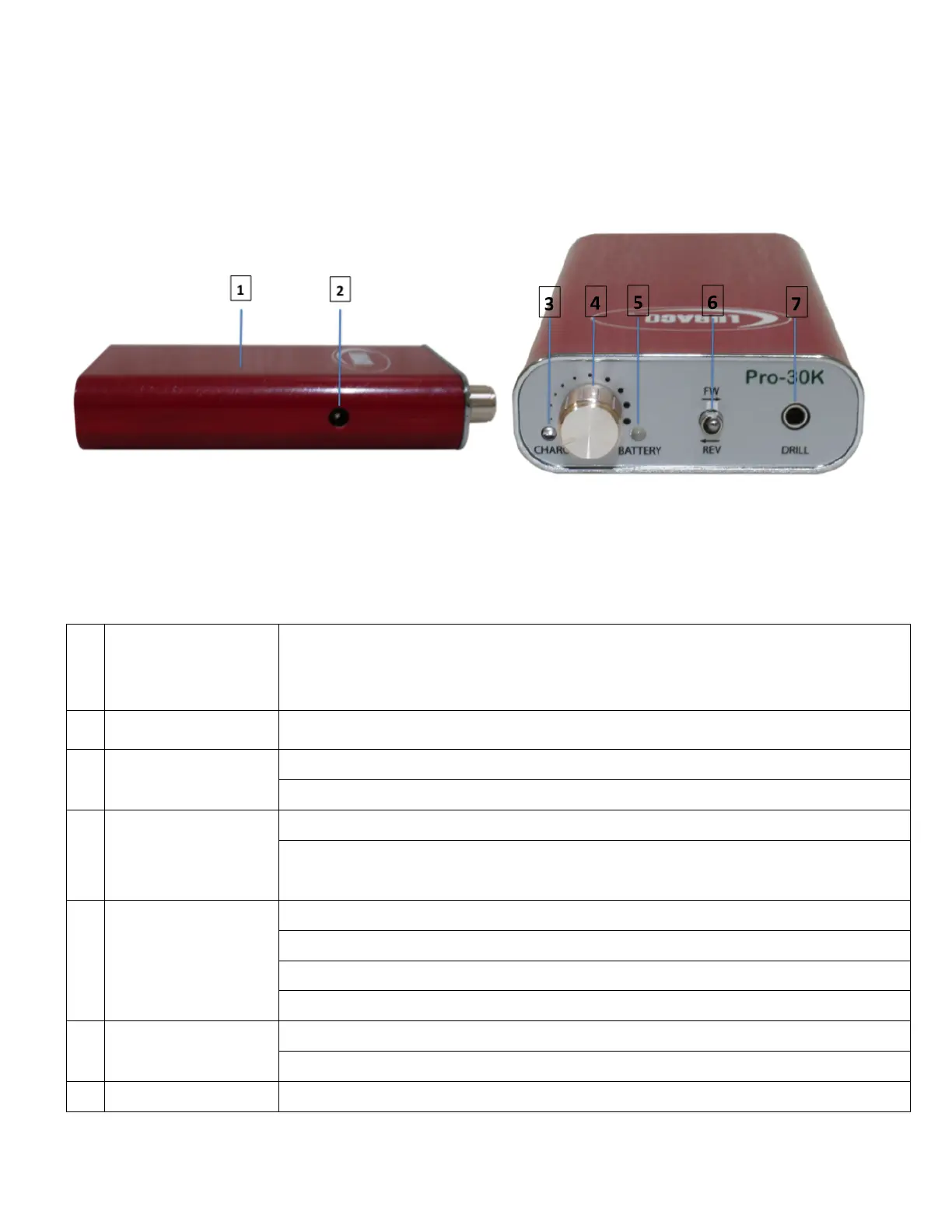
Side View Front View
The Side and Front View of Drill Controller
The drill controller is the heart of the system and houses the control electronics
and the battery.
When the power cord is plugged in, the unit will charge automatically.
Illumined - Indicates the drill controller is being charged.
Off - The unit is not receiving external power.
Power Switch &
Speed Control
Turn the knob counter-clockwise to the end to turn off the unit.
Turn the knob clockwise to turn on the unit and increase the speed. Turn the
knob counter-clockwise to decrease speed.
Flashing red and green – Drill Control shuts down due to drill overload current.
Flashing red – Battery is almost depleted.
Solid red – Battery is severely depleted and must be recharged.
Up (Forward) the spindle will rotate in the forward direction.
Down (Reverse) the spindle will rotate in the reverse direction.
Drill connects/disconnects.


 To Next Page