5
Names and Functions
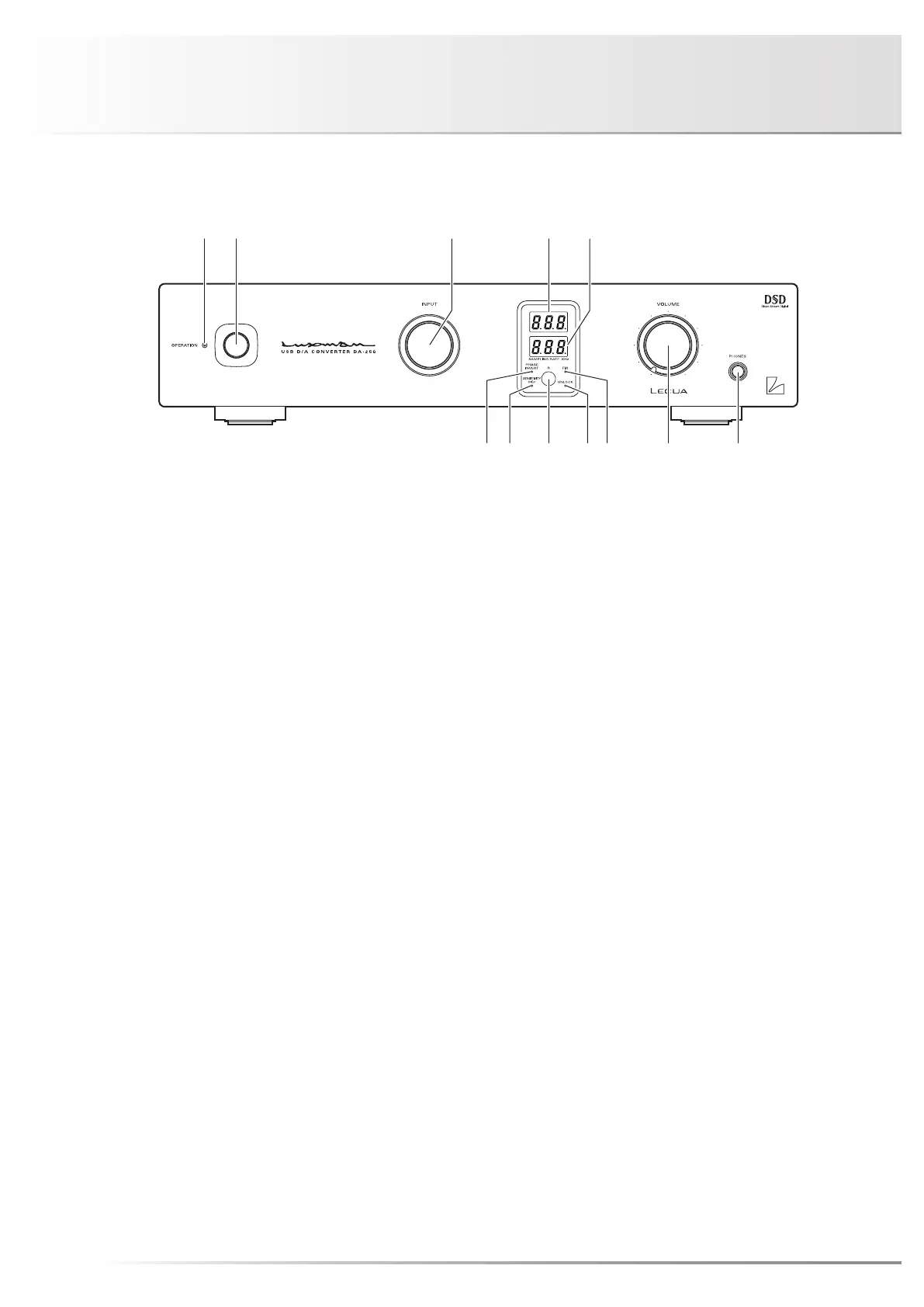
1. Operation switch (OPERATION)
This switch turns on and off the power.
When wiring or connection is performed, be sure to turn off
this switch.
2. Operation indicator (OPERATION)
Blinks in the time of muting mode when the operation
switch is turned on and lights up when the operation state
is activated afterward.
3. Input selector (INPUT)
Selects an input device connected to each input terminal.
Input transition goes as follows by clockwise rotation:
USB → COAX → OPT 1 → OPT 2 → LINE → USB ...
Input transition goes as follows by counterclockwise rotation:
USB → LINE → OPT 2 → OPT 1 → COAX → USB ...
Input: Digital output from a PC/Mac, a CD player,
an SACD player, a DVD player, and other such
devices (USB/COAX/OPT 1/OPT 2)
Analog line output from a CD player, an SACD
player, a tuner, a DVD player, a TV, and other such
devices (LINE)
4. Input selector display LED
Displays the input terminal selected with the input selector.
The input terminals are shown as follows:
USB input: USb
COAX input: COA
OPT 1 input: OP1
OPT 2 input: OP2
LINE input: LIn
5. Sampling frequency/volume level
display LED
(SAMPLING RATE/VOLUME)
Displays the sampling frequency of the digital signal con-
nected to the input terminal (USB/COAX/OPT 1/OPT 2)
selected with the input selector. When a digital input is
selected from USB/COAX/OPT 1/OPT 2 with the input se-
lector and the digital input signal from the digital device is
synchronized with this unit, the sampling frequency of the
digital signal is displayed on this LED.
When no digital signal is input or no synchronization is es-
tablished even with a digital signal input, the digital signal
unlock indicator lights up, and the sampling frequency is not
displayed on the LED.
When playback from a PC/Mac is stopped, the sampling
frequency disappears and the unlock indicator stays off.
This phenomenon indicates that communication with the
PC/Mac stays active.
Front panel


 To Next Page
 Loading...