EasyManua.ls Logo

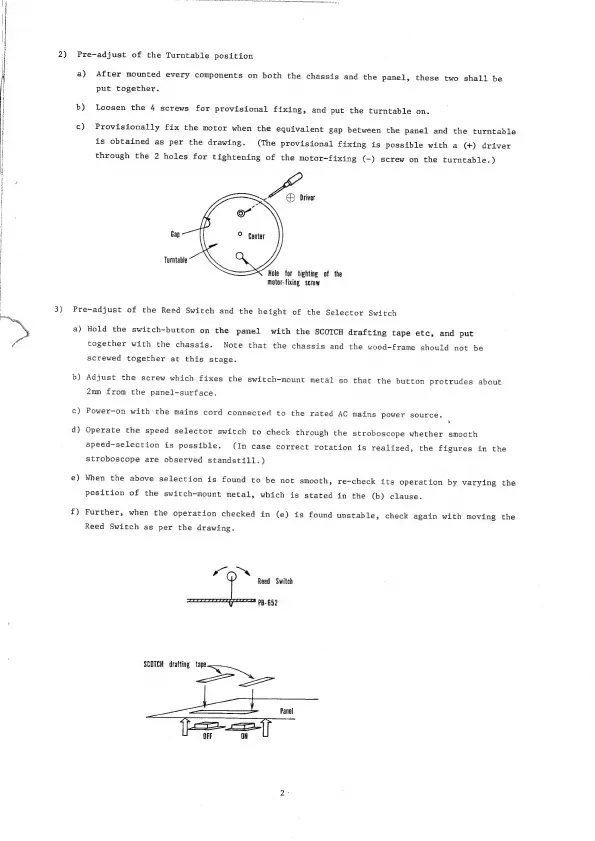
Luxman PD-121 - Turntable Position Pre-adjustment; Reed Switch and Selector Switch Height Pre-adjustment

Luxman PD-121
9 pages
Print Icon
To Next Page IconTo Next Page
To Previous Page IconTo Previous Page
Loading...
Re
2)
3)
Pre-adjust
of
the
Turntable
position
a)
b)
c)
After
mounted
every
components
on
both
the
chassis
and
the
panel,
these
two
shall
be
put
together.
Loosen
the
4
screws
for
provisional
fixing,
and
put
the
turntable
on.
Provisionally
fix
the
motor
when
the
equivalent
gap
between
the
panel
and
the
turntable
is
obtained
as
per
the
drawing.
(The
provisional
fixing
is
possible
with
a
(+)
driver
through
the
2
holes
for
tightening
of
the
motor-fixing
(-)
screw
on
the
turntable.)
Poo:
Gap
Turntable
Hole
for
tighting
of
the
Motor-fixing
screw
Pre-adjust
of
the
Reed
Switch
and
the
height
of
the
Selector
Switch
a)
b)
c)
d)
e)
f£)
Hold
the
switch-button
on
the
panel
with
the
SCOTCH
drafting
tape
etc,
and
put
together
with
the
chassis.
Note
that
the
chassis
and
the
wood-frame
should
not
be
screwed
together
at
this
stage.
Adjust
the
screw
which
fixes
the
switch-mount
metal
so
that
the
button
protrudes
about
2mm
from
the
panel-surface.
Power-on
with
the
mains
cord
connected
to
the
rated
AC
mains
power
source.
4
Operate
the
speed
selector
switch
to
check
through
the
stroboscope
whether
smooth
speed-selection
is
possible.
(In
case
correct
rotation
is
realized,
the
figures
in
the
stroboscope
are
observed
standstill.)
When
the
above
selection
is
found
to
be
not
smooth,
re-check
its
operation
by
varying
the
position
of
the
switch-mount
metal,
which
is
stated
in
the
(b)
clause.
Further,
when
the
operation
checked
in
(e)
is
found
unstable,
check
again
with
moving
the
Reed
Switch
as
per
the
drawing.
Kas
Reed
Switch
PB-652
SCOTCH
drafting
tape
a
i
Panel
Li
OFF
ON

Related product manuals