Need help?
Do you have a question about the Luxor LA65BL750 and is the answer not in the manual?
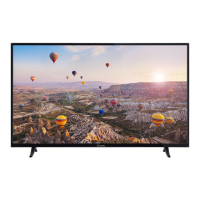
This document describes the Luxor LA65BL750, a remote-controlled color TV featuring the Android™ operating system, Google Cast, and optional Voice Search. It integrates digital terrestrial/cable/satellite TV (DVB-T-T2/C/S-S2) and supports Ultra HD (4K) resolution, providing 3840 x 2160 pixels, which is four times the resolution of Full HD TV. The TV also supports High Dynamic Range (HDR) / Hybrid Log-Gamma (HLG) and Dolby Vision™ for enhanced picture quality with greater luminosity, contrast, and color.
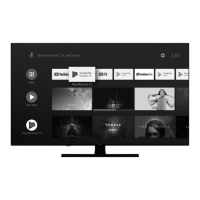
The Luxor LA65BL750 offers a comprehensive range of functionalities for a modern entertainment experience. It operates on Android TV, providing access to a wide array of applications through the Google Play Store. Users can navigate the interface using a remote control, which includes numeric buttons for channel selection, directional buttons for menu navigation, and dedicated buttons for popular streaming services like Netflix, YouTube, and Amazon Prime Video. Voice search is also an optional feature.
The TV supports various input sources, including multiple HDMI inputs for connecting external devices, USB inputs for media playback and recording, and a headphone connection. It features an automatic programming system for easy channel setup and manual tuning options. Other convenient features include a sleep timer, on/off timer, and a "picture off" function to turn off the screen while audio continues. The TV also has an automatic power-off function when no signal is detected.
For internet connectivity, the TV includes an Ethernet (LAN) port and built-in 802.11 a/b/g/n/ac WLAN support, enabling access to internet services and HbbTV content. The Google Cast technology allows users to cast content from mobile devices directly to the TV screen, including screen mirroring from Android devices and casting from Cast-enabled mobile applications.
The TV is designed for ease of use, starting with an initial setup wizard that guides users through language selection, region/country settings, accessory pairing, and channel installation. Users can choose between "Home" and "Store" TV modes, with "Home" recommended for domestic use.
The Android TV home screen provides quick access to installed apps, streaming services, and input sources. Users can customize the home screen by organizing apps and games, and enabling/disabling video and audio previews. Notifications, input selection, network status, and current time are displayed on the upper right.
Channel management features include skipping, swapping, moving, editing, and deleting channels from the channel list. Users can create up to four favorite channel lists. The Electronic Programme Guide (EPG) allows browsing of broadcast schedules and setting reminders or record timers.
USB recording functionality requires connecting a USB storage device (HDD recommended for long durations) to the TV while it's off, then turning the TV on. Instant recording and timeshift recording are supported. The TV also offers a USB Auto Play feature to automatically play media content from a connected USB device.
Picture and sound settings are highly customizable. Picture modes include Standard, Vivid, Sport, Movie, and Game, with specific Dolby Vision modes (Bright, Dark, Vivid) available for Dolby Vision content. Advanced video settings include Dynamic Noise Reduction (DNR), MPEG Noise Reduction, Max Vivid, Adaptive Luma Control, Local Contrast Control, Flesh Tone adjustment, DI Film Mode, Blue Stretch, Game Mode, ALLM (Auto Low Latency Mode), PC Mode, De-Contour, HDMI RGB Range, Low Blue Light, and Colour Space. Sound settings include various sound styles (User, Standard, Vivid, Sports, Movie, Music, News), balance, surround sound, equalizer, speaker delay, eARC, digital output preferences, and automatic volume control. Dolby Audio Processing and DTS Virtual:X enhance the audio experience.
The TV supports automatic software updates via the internet, ensuring the system is always up-to-date with the latest features and improvements. Users can manually check for updates through the "Settings > Device Preferences > About > System update" menu.
Troubleshooting tips are provided for common issues such as the TV not switching on, remote control unresponsiveness, no channels, or no/distorted picture/sound. These tips include checking power connections, remote control functionality (using a mobile phone camera to detect IR signals), antenna connections, input source selection, and picture/sound settings.
For USB storage devices, it is recommended to format new devices using the TV's "Format" option in the "Record > Device Info" menu. This ensures compatibility and optimal performance. Users are advised to back up data before formatting, as it will erase all content. The "Eject" option should be used to safely disconnect USB devices to prevent data corruption.
The TV is designed for use in dry locations at altitudes less than 5000 meters, with moderate or tropical climates. Proper ventilation is crucial, requiring at least 5cm of free space around the TV. The power cord should be easily accessible and handled with care to prevent damage. Batteries for the remote control should be replaced with the same or equivalent type, ensuring correct polarity. The TV is a Class 1 laser product, safe under reasonably foreseeable conditions.
For wall mounting, users should follow the provided instructions, use specified screws, and ensure the TV is securely fastened. All cables should be connected before mounting the TV on the wall. The CI module should only be inserted or removed when the TV is switched off. High-speed shielded HDMI cables with ferrites are recommended for 4K content to ensure signal integrity.

 To Next Page
 General