
 Need help?
Do you have a question about the LV switch SIP-T780 and is the answer not in the manual?
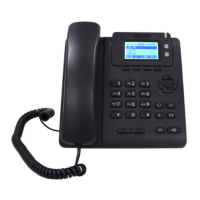
Provides an overview of the physical components of the T780 IP phone, detailing each part and its function.
Explains the meaning of various icons displayed on the T780 IP phone's screen to convey status and information.
Details the status and meaning of the T780 IP phone's indicator lights, including breathing lights and account line lights.
Outlines the different methods available for configuring the T780 IP phone, such as LCD, web, and QR code interfaces.
Lists the available technical support manuals for the T780 IP phone, including quick start guides and detailed user guides.
Details the accessories included in the T780 IP phone package, listing each item with its quantity and photo.
Provides step-by-step instructions for installing the T780 IP phone, including base setup and connections.
Guides the user through the initial startup and network acquisition process after the T780 IP phone is powered on.
Describes the T780 IP phone's standby interface, including displayed information and soft key functions.
Explains how to check the T780 IP phone's status, including network, account, and device information.
Details how to configure network settings for the T780 IP phone, including IP modes and static IP configuration.
Outlines the methods for registering SIP accounts on the T780 IP phone, including manual and batch configuration.
Explains the different input methods supported by the T780 IP phone for data entry and character input.
Covers essential basic settings for the T780 IP phone, including language, time & date, and call out button configuration.
Explains how to customize various sound-related settings on the T780 IP phone, such as volume, ringtone, key tone, and signal tone.
Details how to manage contacts on the T780 IP phone, including local contacts, blacklists, and LDAP integration.
Describes how to manage call history records on the T780 IP phone, allowing viewing, deletion, and contact adding.
Covers the customization and use of accessories for the T780 IP phone, such as headsets and extension modules.
Explains system-level customization options for the T780 IP phone, focusing on account management.
Details how to configure programmable keys on the T780 IP phone, including account keys and function keys for expansion modules.
Explains how to set up dial plans for convenient dialing, including syntax, rules, area codes, and outgoing call restrictions.
Provides instructions on various methods for making calls using the T780 IP phone, including handle, headset, and hands-free options.
Details how to answer incoming calls on the T780 IP phone using the handle, headset, or hands-free mode.
Explains the procedures for ending a call on the T780 IP phone using different methods.
Describes how to redial the last call or any call using the T780 IP phone's redial function.
Explains how to set the Do Not Disturb (DND) mode on the T780 IP phone to manage incoming calls.
Guides on setting up call forwarding features on the T780 IP phone, including unconditional, busy, and no-answer forwarding.
Details the different types of call transfer (blind and inquiry) on the T780 IP phone and their operation processes.
Explains how to configure the auto-answer function on the T780 IP phone to automatically answer incoming calls.
Describes how to enable and configure the anonymous call rejection feature on the T780 IP phone.
Explains how to set up frequently dialed numbers as hotlines for quick dialing on the T780 IP phone.
Introduces the QR code feature for configuring the T780 IP phone via a smartphone.
Details how to initiate and manage three-party conference calls on the T780 IP phone.
Provides instructions on how to upgrade the firmware version of the T780 IP phone via the web interface.
Explains how to upload custom ringtones to the T780 IP phone via the web interface.
Explains the Busy Lamp Field (BLF) function for monitoring the status of other users' accounts on the T780 IP phone.
Details how to set up and use the intercom function on the T780 IP phone for quick communication within an office.
Covers multicast configuration and usage on the T780 IP phone for sending time-sensitive announcements to groups.
Explains how to send and receive text messages (SMS) and manage voice messages on the T780 IP phone.
Introduces TR069 as a protocol for managing the T780 IP phone's CPE and ACS communication.
Describes how to export and import phone configurations (BIN and CFG files) for backup and deployment on the T780 IP phone.
Details the process of automatically provisioning multiple T780 IP phones using boot files and configuration files.
Explains SIP session timers (T1, T2, T4) and local SIP port/TLS SIP port configurations for the T780 IP phone.
Covers the Action URL function for reporting phone events to a server and variable descriptions.

 To Next Page

 General