SIP-T780 IP Phone User Manual
Handle placed/hookswitch pressed——hang up
Handle lift/hookswitch bounce——pick up
Pak hook ——Flash operation
Used to fix the handle
When the phone is wall-mounted, put the hook
protruding position upward
The phone outputs audio during a hands-free
call
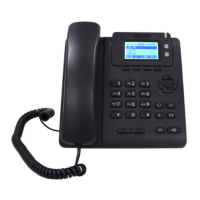
Display the information of the phone:
-Register account information(Display
name,display number)
- Time and date
- Reminder icon(For details, please refer to
the display icon description)
- Messages(Incoming call, missed call, email
message)
- Operation prompt
- Call reminder breathing light》Fast flashing
- Message reminder breathing light》slow
flashing
For details, please refer to the indicator
description
- shift the account
- Intercom button
- Caller ID call account light
4 soft keys
(below the LCD)
Corresponding to the four function names at the
bottom of the display(For example, there are 4
soft key functions displayed on the main
interface: History,Dir,DND,Menu)
These four soft keys will change with the
operation of the phone keys. In the function
description below, the soft keys refer to these
four keys. The soft key functions correspond to
the text at the bottom of the display screen.
Provide number input, uppercase and lowercase
letter input, punctuation input(* # . :)
Up, down, left
and right buttons


 To Next Page