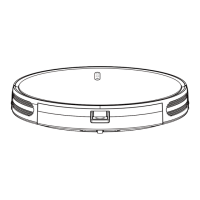
The Lydsto Window Cleaning Robot is an automated device designed to clean windows efficiently and safely. This instruction manual provides comprehensive details on its operation, maintenance, and safety precautions.
Function Description
The Lydsto Window Cleaning Robot is designed for both wet and dry wiping of glass surfaces. It features an intelligent path planning system that allows it to clean windows in an S-shaped curve from top to bottom, ensuring thorough coverage. The robot is equipped with a water spray function, with nozzles that spray water depending on the direction of movement (right nozzle for rightward movement, left nozzle for leftward movement). For heavily soiled windows, it is recommended to perform a dry wipe first to remove sand and dust, preventing scratches. For general dirt, the water spray function can be used directly. The robot also has a "spot cleaning" function for stubborn stains.
The device is equipped with a safety cable that must be securely fastened to a stable object before operation, especially when working at height. It includes power outage protection, allowing the robot to remain adsorbed to the glass for approximately 20 minutes using its internal battery in case of accidental power disconnection, accompanied by an audible and visual alarm.
The robot can be controlled via a remote control or through the Lydsto APP. The remote control offers various functions including start/pause/continue, moving the robot to top/bottom/left/right, stopping at the end of the glass, small and large water spray, water spray on/off, spot cleaning, and cleaning twice. The Bluetooth reset function allows for resetting the Bluetooth connection by long-pressing the power/start button for more than 8 seconds after disconnecting and reconnecting the DC power supply.
Important Technical Specifications
- Model: XD-CCJQR03A
- Voltage: 24V
- Wattage: 90W
- Decibels: Approximately 70dB
- Size: 278*140*80mm
- Current: 300mA
- Capacity: 650mAh
- UPS Battery Using Time: Approximately 40 minutes (remaining power of the built-in battery will affect the time)
- Suction Power: 2200-3200pa
- Minimum Using Area: 300*300mm
The robot is equipped with an internal battery for power outage protection, which can sustain operation for about 20 minutes. The light indicator shows the robot's status: green for normal operation, green with a triple long beep for completed window cleaning, red for insufficient battery (requiring 15 minutes of charging before use), red flashing for host disconnection, insufficient suction, air leakage, or glass friction issues, and alternating red and green for abnormal machine operation requiring customer service.
Usage Features
-
Installation:
- Ensure the safety cable is fully tightened to the frame and buckled to a strong, immovable object.
- Attach the mop holders with mops. If there is sand or dust on the glass, it's recommended to clean it manually first or turn off the water spray and use dry mops.
- Fill the water tank with water. Concentrated cleaning liquid is strictly prohibited to prevent nozzle blockage.
- Ensure the mop holder is properly installed to prevent air leakage.
- Connect the power cord to the adapter and then to the socket.
- Long-press the power button (more than 3 seconds) to turn on the robot. Attach it to the glass far from the window frame. If it doesn't suck, check for air leakage from the holder.
-
Working Environment Inspection:
- Ensure the glass surface is dry. Do not use in rain or foggy conditions.
- Avoid using on broken or cracked glass.
- When working at height, set up ground safety warnings.
- Do not use on glass with stickers or oil to prevent slipping.
-
Start and Operation:
- Ensure power cord and plug are connected.
- Long-press the Start/Power button (more than 3 seconds) to turn on.
- Attach the robot to the glass far from the window frame after the fan starts running.
- Short-press the power button to start cleaning.
- The robot will automatically plan its path, moving upward, then right, to the top right corner, and then clean in an S-shaped curve.
- After cleaning, it returns near the origin for easy removal.
-
Removing the Robot:
- While running, hold the safety cable with one hand, short-press to stop, and take it down with the other hand.
- If unreachable, drag the safety rope slowly to bring the robot within reach, then remove it after powering off.
- Long-press the power button (more than 3 seconds) to turn it off after removal.
-
Power Outage Protection:
- The internal battery provides about 20 minutes of power, accompanied by an audible and visual alarm. Remove the robot as soon as possible.
- If the light indicator is red before turning on, the battery is too low. Charge until the red light turns off.
-
APP Connection:
- Download and install the Lydsto APP by scanning the provided QR code.
Maintenance Features
-
Water Tank Maintenance:
- Prevent water or solution from spilling out of the tank. If spilled, dry immediately to avoid damage.
- When not in use, ensure no residual liquid is left in the tank.
- If cleaning solution was used, empty it, then fill with a little freshwater to rinse, and then empty the freshwater.
- Ensure no impurities are in the added solution to prevent nozzle and pump blockage.
-
Troubleshooting:
- Red indicator flashing with continuous and short sounds: Check power cord, plug, glass impurities, mop holder installation, air leakage, glass friction, and suction port blockage.
- Red and green alternating with alarming sound: Contact customer service.
- Robot not walking freely: Change mop, inspect screws on cleaning roller, ensure they are not loosened.
- Robot shakes too strong: Check if wipe cloth is too wet, replace with dry cloth.
- Delayed water spraying: This is normal.
- "Di Di Di Di" 5 alarms every 5 seconds: Shortage of solution in water tank.
- Residual round marks on glass: Change to a new mop.
- Robot stops automatically after cleaning: Press Pause Button and take it down.
- Bug occurs occasionally: Restart the robot.
- Downward sliding: Check if the cloth is too wet or dirty, if the robot resumes work after a while, replace the wipe cloth, or if the robot cannot suck due to cause slips, turn on the water spray function to moisten the wipe cloth, then the robot can resume work.
- Air Leakage: Mop holder installed correctly, wipe cloth installation for flatness, surface of glass or other targeted surface are curved or covered with an uneven-surfaces such as stickers, robot goes to the window frame, the mop holder will be warped to produce a wide range of air leakage.
-
Safety:
- Regularly inspect the safety cable for damage and ensure it's securely buckled.
- Do not spray water into the product or use on cracked glass.
- Turn off the product when cleaning its external surface.
- Avoid touching rotating parts or openings.
- Do not repair without authorization.
- Use only in a home environment.
- Do not use third-party chargers or remove frame, battery, and charger without authorization.
- If damaged, stop use and contact customer service.
- Keep charger away from heat sources.
- For transport, use original packaging and turn off the product.
- For long-term storage, fully charge, turn off, and store in a cool, dry place. Charge every three months to prevent battery damage.
- Operate only between 32°F-108°F (0°C-40°C). Use anti-freeze glass water in lower temperatures.
- Store in a dry place, away from direct light, oil, gas, or flammable items.
- Keep out of reach of children.
- Do not disassemble or modify the battery and adapter.
- Place the adapter away from heat sources.
- For shipping, use original packaging with the robot turned off.

 Need help?
 General

 To Next Page