Page 33
Section 8 – Extending the System
A number of accessories are available to
extend your system to suit your exact
requirements.
Wireless Movement Detector/PIR – easy to
install, one unit protects a large area.
Two-wire Movement Detector/PIR – easy to
install, covers a large area and does not
require batteries.
Wired Movement Detector/PIR – covers a
large area, does not require batteries.
Wireless Door/Window Contact Detector –
easy to fit, detects opening of a door or
window, can be extended by the addition of
wired magnetic contact.
Wire Door/Window Contact Detector –
small, robust and reliable.
Remote Control – can be used to arm, part
set or disarm; as well as a personal attack
button; up to 4 remote controls can be used on
one system.
Section 9 – Radio Interference
The unit equipped with the latest type of radio
receiver and will not normally suffer from
problems caused by interference. However, if
interference is present nearby, an indicator
light on the control unit will illuminate. It will
do this even when the alarm is not set.
If the alarm is set, any criminal attempt to
prevent (or jam) the detector transmissions,
will be picked up as interference and will
trigger alarm. If the alarm is frequently
triggered by interference, it is likely there are
high levels of unusual radio signals in your
area. Some electronic equipment (e.g.
cordless doorbells, garage door openers, PCs
and fax machines) can generate interference.
If you have such equipment and experience
problem with interference, try moving the
equipment as far away from the control unit
as possible.
If the problem remains, it is recommended
that you:
1) Turn off the mains power to the control
unit and disconnect the rechargeable
battery.
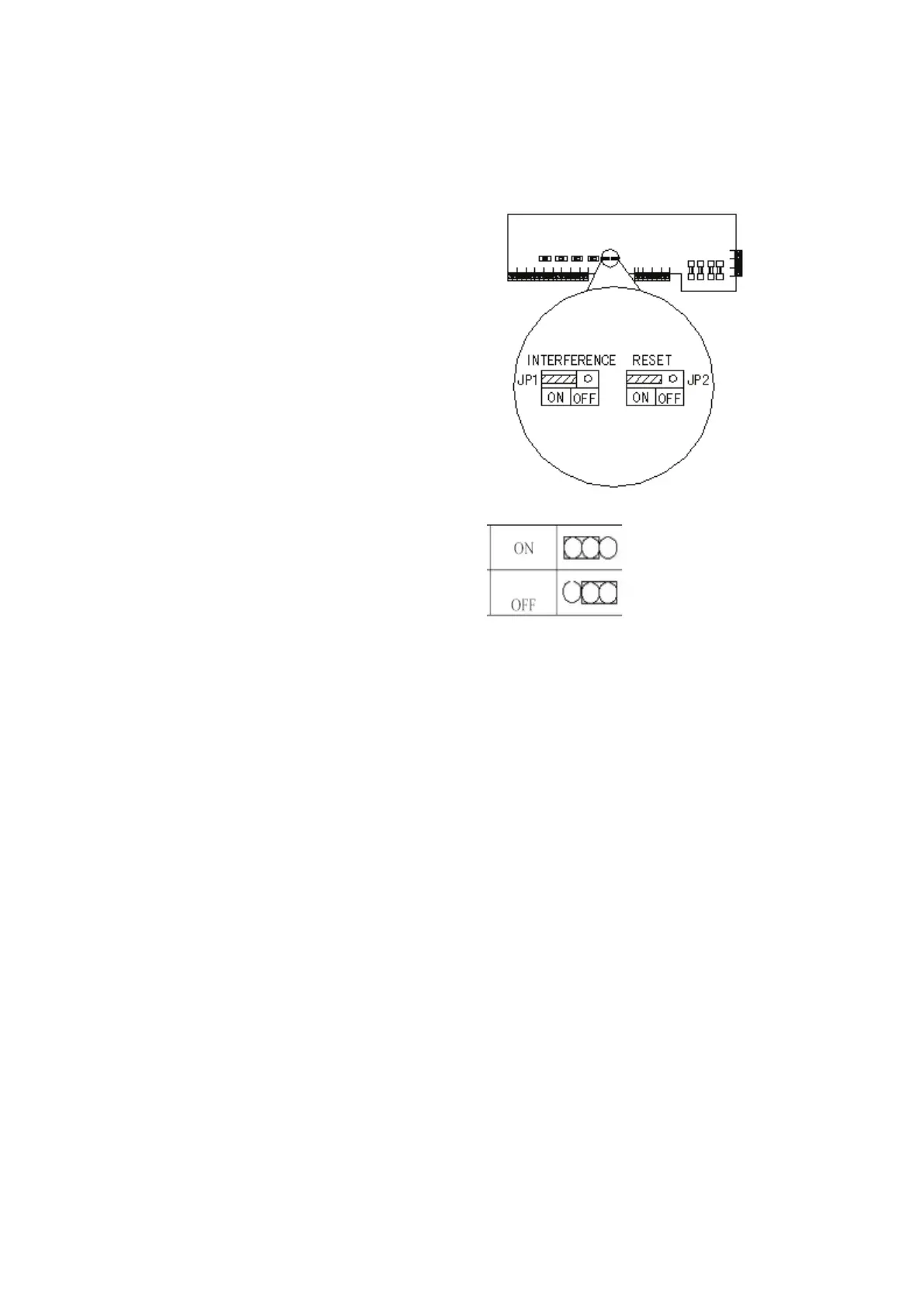
2) Prevent the control unit from triggering the
alarm through interference by opening the
front cover (after disconnecting the mains)
and moving the push on link marked
“INTERFERENCE” on the circuit board
from ON to OFF.
3) Use wired detectors in this area/zone.
If you require further assistance, contact
the installer.
Interference ON
Interference OFF
(Factory Default)


 To Next Page
 Loading...