

EasyManua.ls Logo

LYZRC L800 PRO 2 - User Manual

LYZRC L800 PRO 2
8 pages
Print Icon
To Next Page IconTo Next Page
Loading...
AGE:14+
Safety precautions:
1 in order to ensure the electromagnetic environment requirements of aviation radio station (station), it is prohibited to use various model
remote controllers in the area with the center point of airport runway as the center point and the radius of 5000M. During the period
when the relevant departments of the state issue radio control orders and regional areas, the use of model remote controllers shall be
stopped as required. Please fly in warm, clear, windless weather. Do not fly in severe weather conditions such as overheating,
overheating, strong wind, rainstorm, etc. Please choose indoor or outdoor open area, and keep a safe distance from people, pets,
empty overhead wires and other obstacles. Make sure that no other uses the same frequency. Do not let the aircraft out of sight.
2 after the aircraft is started, please do not contact the high-speed rotating part of the aircraft and keep a distance from the high-speed
rotating propeller to avoid the risk of strangulation. (Including gears, rotors, etc.)
4.During and after the use of the aircraft, the battery and motor will generate high temperature. Please do not touch it to avoid the risk
of scalding.
4 do not look directly at the light beam of the LED to avoid affecting the eyes.
Warm Tip: It is suggested that beginners practice flying at low altitude in an open and unmanned place for
about 3 days, and then fly to high altitude after being familiar with flying
3-AXIS GIMBAL GPS AERIAL DRONE
OPERATING INSTRUCTIONS
Question and Answer IconNeed help?

Do you have a question about the LYZRC L800 PRO 2 and is the answer not in the manual?

Summary

Safety Precautions

General Safety and Operational Warnings

Key safety guidelines for drone operation, including environmental, physical, and visual precautions.

Beginner Flying Tips

Recommendations for novice pilots to practice flying at low altitudes before advancing.

Pre-flight Preparation

Flight Environment Guidelines

Guidance on selecting suitable indoor and outdoor environments for safe and effective drone flights.

Remote Control Overview

Function Key and Display

Detailed explanation of the remote control's buttons, indicators, and liquid crystal display functions.

Handle and Mobile Phone Rack Setup

Instructions on how to correctly set up and use the remote control's handle and mobile phone rack.

Charging Instructions

Controller and Battery Charging

Procedure for charging the remote controller and drone battery, including safety warnings.

Selecting a Suitable Flying Environment

Guidance on choosing safe and appropriate indoor or outdoor locations for drone operation.

UAV Flight Tutorial

Calibration Procedures

Step-by-step guide for frequency, gimbal, geomagnetic, and gyroscope calibration.

GPS Signal Acquisition

Process for obtaining a successful GPS signal for stable flight and navigation.

Drone Operation

Manipulation Methods

Explanation of how to control the drone's movement using the remote control levers.

Remote Control Functions

Guide to operating key functions like unlock, speed gear, camera angle, and headless mode.

Advanced Flight Features

One-Press Return Function

How to initiate an automatic return to the take-off location.

Obstacle Avoidance System

Instructions for installing, using, and understanding the obstacle avoidance function.

Troubleshooting and Accessories

Common Problem Resolution

Guide to identifying and resolving common issues encountered during drone operation.

Included Accessories

List and visual identification of all components and accessories provided with the drone.

Overview

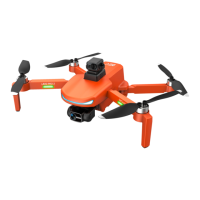
This document describes the L800 PRO 2, a 3-axis gimbal GPS aerial drone.

Function Description

The L800 PRO 2 is a GPS-enabled aerial drone designed for flight and aerial photography/videography. It features a 3-axis gimbal for stable camera operation and GPS for precise positioning and navigation. The drone is controlled via a remote controller, which includes a liquid crystal display for flight information and various control buttons. Key functions include one-key return, GPS switching, and headless mode. The drone supports both indoor and outdoor flight, with specific environmental recommendations for safe operation. An optional obstacle avoidance function enhances flight safety.
Important Technical Specifications

  • Drone Type: 3-axis gimbal GPS aerial drone.
  • Age Recommendation: 14+.
  • Flight Environment: Suitable for warm, clear, windless weather; indoor or outdoor open areas. Avoid severe weather (overheating, strong wind, rainstorm) and extreme environments (heat, cold).
  • Radio Control Range: Prohibited within 5000M radius of airport runways.
  • Battery Charging (Controller): Approximately 60 minutes using a 5V 1-2A power adapter.
  • Battery Charging (Drone): Approximately 120 minutes using the original charging cable and a 5V 1-2A power adapter.
  • Obstacle Avoidance (Optional): 360° obstacle avoidance function with an effective scanning range of 20 meters.
  • Speed Modes: Defaults to slow gear (50%), adjustable to second gear and third gear high-speed mode (100%).
  • Return Function: Automatic return to take-off location from a height of 50 meters.
  • Camera: Adjustable angle via remote control knob.
  • Propellers: Fan blade A rotates clockwise, fan blade B rotates counterclockwise.
  • Sensors: Triaxial acceleration sensor, gyroscope, GPS.

Usage Features

  • Pre-flight Preparation:
    • Flight Environment: Choose spacious indoor areas away from obstacles, crowds, or pets, or sunny, windy outdoor areas. Maintain line of sight and keep away from high-voltage cables, trees, and personnel.
    • Blade Replacement: Ensure fan blades A and B are installed in their corresponding positions; incorrect installation will prevent control.
  • Remote Control Operation:
    • Mobile Phone Rack: Lift the rack in the middle of the remote controller and stretch upward to place the mobile phone.
    • Handle: Pull the bottom handle down from the middle position and rotate it into place.
    • GPS Switch: Press and hold for 3 seconds to turn off GPS if satellites cannot be found, allowing the aircraft to start.
    • Unlocking: Press the "unlock" button to start the propellers.
    • Left-handed Switching: Long press the "left-handed switching key" to switch between left-handed and right-handed throttle.
  • Flight Operations:
    • UAV Frequency and Gimbal Calibration: Place the drone on horizontal ground, power on the drone and remote control. Push up the left joystick and pull down to initiate pairing. After successful pairing, the gimbal will automatically calibrate.
    • Geomagnetic Calibration: Essential for first-time use or when flying in new regions. Hold the UAV, press the calibration button for 3 seconds, and rotate clockwise horizontally for 3 turns, then vertically (nose downward) for 3 turns.
    • Gyroscope Calibration: Place the UAV horizontally, press and hold the "gyroscope calibration" button for 3 seconds.
    • GPS Signal Search: After successful calibration, place the UAV horizontally outdoors for about 30 seconds until the green indicator light becomes constant and the remote controller indicates more than 8 satellites.
    • Take-off: Press the "unlock button" after GPS signal acquisition.
    • Basic Maneuvers:
      • Altitude: Left lever up/down increases/decreases speed of main wind blade.
      • Yaw: Left lever left/right turns the aircraft head.
      • Forward/Backward: Right lever up/down moves the aircraft forward/backward.
      • Left/Right Flight: Right lever left/right moves the aircraft left/right.
    • Ground Effect Reaction: Be aware of instability when the drone is within 30 cm of the ground due to blade eddy current.
    • Speed Gear Adjustment: Adjust speed using the knob during flight.
    • Camera Angle Adjustment: Adjust camera angle using the knob during flight.
    • Headless Mode: Press the headless mode button during flight. The UAV will move relative to the operator's direction, regardless of the drone's orientation.
    • One-press Return: Press the function button to automatically return to the take-off location.
    • Obstacle Avoidance (Optional): If installed, the drone will avoid obstacles within a 20-meter scanning range. It will stop flying in the direction of an obstacle and can be redirected.
  • Video/Photo: Use the remote control video key to take photos (gentle press) or record video (long press).

Maintenance Features

  • Battery Care:
    • Charge and store the battery after each flight.
    • Charge the battery at least once every 3 months to prevent over-discharging.
    • Do not short-circuit, disassemble, or throw batteries into fire.
    • Avoid high temperatures.
    • Supervise children during charging.
  • Charger Inspection: Regularly check the charger's wires, plugs, shells, and other parts for damage. Discontinue use if damaged until repaired.
  • Troubleshooting:
    • Drone indicator flashing, no response: Unsuccessful GPS souxing or low battery. Solutions: Move to an empty place for souxing, charge battery.
    • Blades turn, but can't fly: Low battery or blade deformation. Solutions: Charge battery, replace blade.
    • Drone badly shaken: Blade deformation. Solution: Replace blade.
    • Drone unsteady after fine-tuning: Blade deformation or poor motor. Solutions: Replace blade, replace motor.
    • Uncontrolled flying after impact: Triaxial acceleration sensor overbalances. Solution: Keep drone standstill for 5-10 seconds.
  • Product Integrity: Do not disassemble the product yourself to avoid damage and voiding manufacturer responsibility.

LYZRC L800 PRO 2 Specifications

General IconGeneral
BrandLYZRC
ModelL800 PRO 2
CategoryDrones
LanguageEnglish