5
Pro Keys 88 • User Guide
English
Minimum System Requirements
The ProKeys 88 is a stand-alone premium stage piano, which is also capable of being used as a MIDI controller with your compatible
computer software.I
If you are using your ProKeys 88 with a computer the following minimum system requirements apply:
PC: Mac:
< USB 1.0 port < USB 1.0 port
< 16-bit onboard sound chip or PCI sound card < 16-bit onboard sound chip or PCI sound card
< Pentium processor or better < G3 or better
< Windows 98, ME, 2000 or XP < 256MB RAM
< 64MB RAM
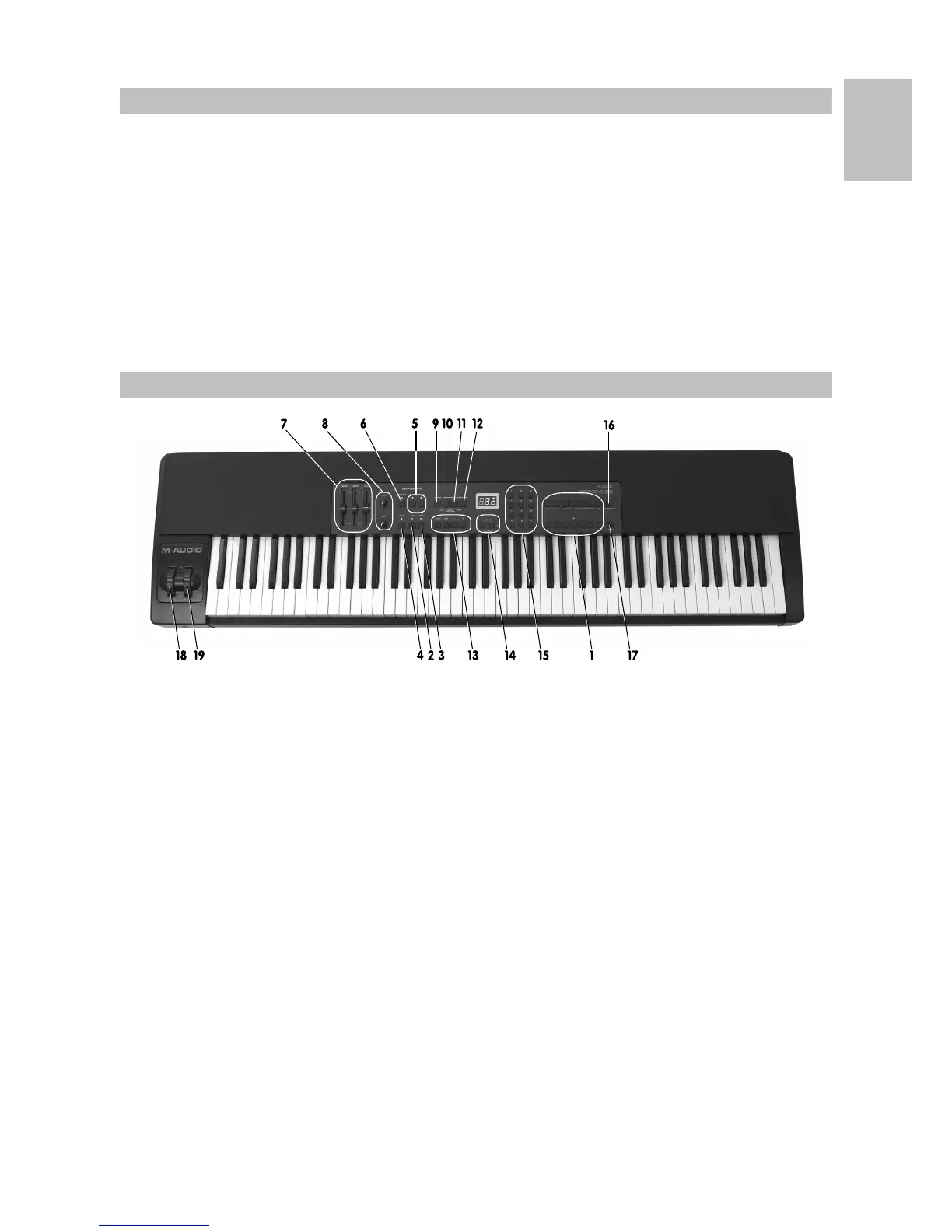
Controls and Connectors
1 Instrument Buttons 11 MIDI Bank LSB Button
2 Split Button 12 MIDI Bank MSB Button
3 Layer Button 13 MIDI Clock Sequencer Control Buttons
4 Demo Button 14 Transpose Buttons
5 Digital Effect Buttons 15 Numerical Data Entry Keypad
6 Velocity Curve Select Button 16 Grand Piano Button
7 Volume Control Faders (Independent control of Main,
Split and Layer Instruments)
17 Jazz Ride Button
8 EQ Control Rotary Pots – Bass and Treble 18 Pitch Bend Wheel
9 MIDI Channel Button 19 Modulation Wheel
10 MIDI Program Button



 To Next Page