SCREEN AREA CARE AND MAINTENANCE
• Cleaning: ONLY use household glass cleaner. Do not wipe with an abrasive object.
• Always use a Screen Protector to reduce wear and tear that could eventually
reduce visibility.
• Make sure the Screen Protector (included) is correctly installed. If bubbles are forming
or it is peeling we recommend replacing the Screen Protector.
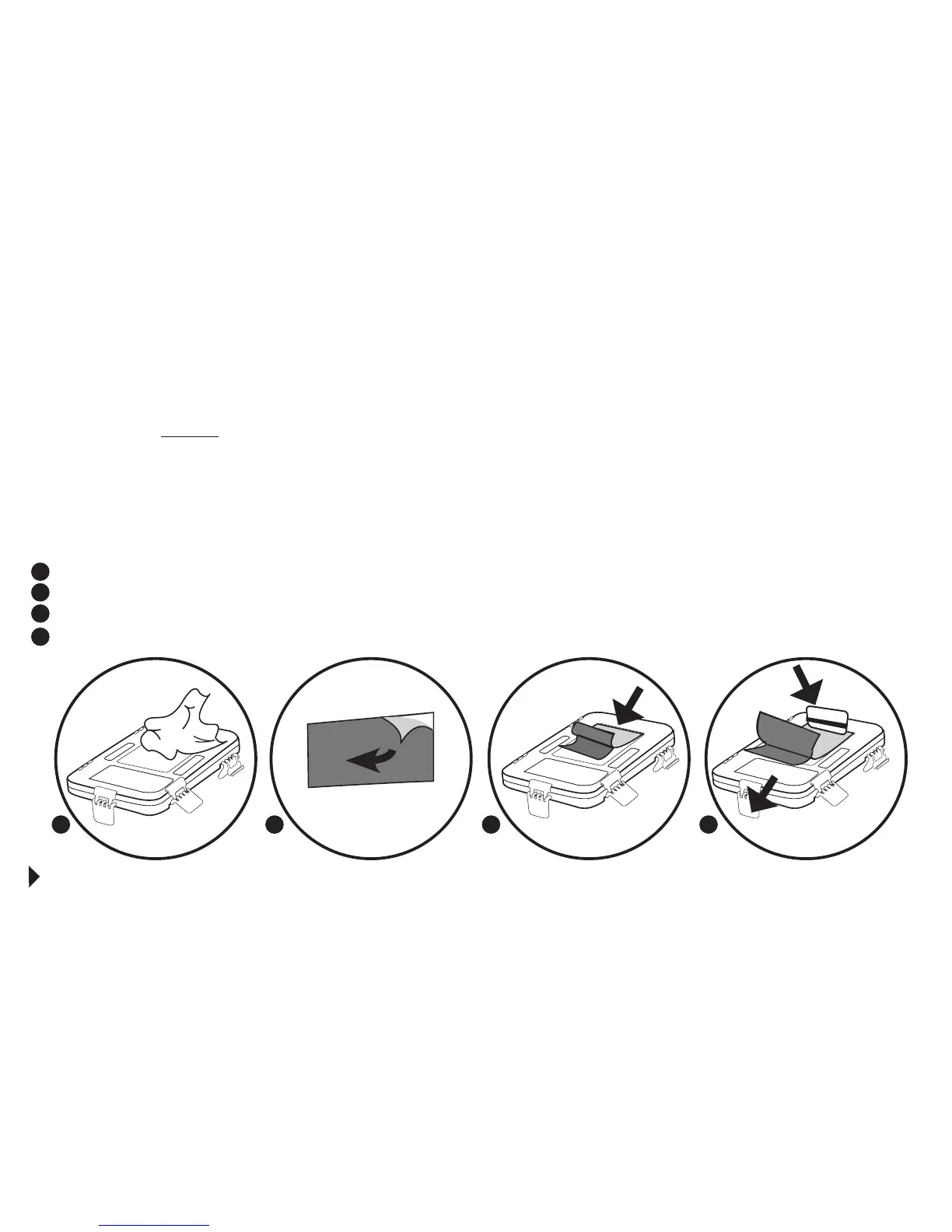
SCREEN PROTECTOR INSTALLATION:
Use a lint-free cloth to thoroughly clean the Screen Area of the Case Front.
Pull tab to begin peeling liner away from film to expose adhesive.
Apply Screen Protector by positioning film, adhesive side down, on the screen.
Use credit card to squeegee film in place as you continue to pull liner down.
1
2
3
4
STEPS AND PROCEDURES FOR GUARDIAN CASE ACCESSORIES
CONTINUED ON NEXT PAGE
1 2
3
4
SECTION III



 To Next Page