Need help?
Do you have a question about the M-system M5 Series and is the answer not in the manual?
Describes product capabilities like isolated DC signal and high-density mounting.
Details on specifying the model code for input, output, power, and options.
Covers construction, connection, housing, isolation, and adjustments.
Details specific parameters for DC current/voltage inputs and outputs.
Details power usage for AC and DC inputs.
Covers operating temperature and humidity limits.
Outlines accuracy, temp coefficient, and voltage effects.
Lists CE conformity and relevant EMC standards.
Provides physical dimensions in mm and inches.
Illustrates wiring for input, output, and power.
Advises checking package contents and contacting support if needed.
Highlights EC directives, power input, general precautions, environment, and wiring.
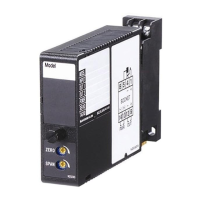
Identifies key parts of the unit like body, LED, and adjustments.
Explains how to mount and remove the unit from a DIN rail.
Shows how to connect the unit via terminal blocks.
Outlines steps to verify wiring, power, input, and output.
Details how to calibrate zero and span settings.
Explains calibration, warranty terms, and contact information.
The M5MV is a super-mini terminal block signal conditioner designed to convert narrow span inputs (≤ 100 mV DC) into an isolated DC signal. This device is characterized by its high-density mounting capability, a power LED indicator, and CE marking for 24 V DC power, making it suitable for various industrial applications requiring precise signal conditioning in a compact form factor.
The M5MV model is specified using a series of codes: M5MV-[1][2]-[3][4].
[1] Input:
K: 0 – 100 μA DC (Input resistance 1000 Ω)Z: Specify current (refer to INPUT SPECIFICATIONS for details).1: 0 – 10 mV DC (Input resistance 10 KΩ min.)15: 0 – 50 mV DC (Input resistance 10 KΩ min.)0: Specify voltage (refer to INPUT SPECIFICATIONS for details).[2] Output:
A: 4 – 20 mA DC (Load resistance 550 Ω max.)Z: Specify current (refer to OUTPUT SPECIFICATIONS for details).18: 0 – 80 mV DC (Load resistance 100 KΩ min.) (CE not available)4: 0 – 10 V DC (Load resistance 1000 Ω min.)5: 0 – 5 V DC (Load resistance 500 Ω min.)6: 1 – 5 V DC (Load resistance 500 Ω min.)4W: -10 – +10 V DC (Load resistance 8000 Ω min.)5W: -5 – +5 V DC (Load resistance 4000 Ω min.)0: Specify voltage (refer to OUTPUT SPECIFICATIONS for details).[3] Power Input:
M: 85 – 264 V AC (Operational voltage range 85 – 264 V, 47 – 66 Hz) (CE not available)R: 24 V DC (Operational voltage range 24 V ±10%, ripple 10 %p-p max.)[4] Options (multiple selections):
blank: Standard (≤ 0.5 sec.)/K: Fast Response (Approx. 25 msec.)blank: none/Q: Option other than the above (specify the specification)For detailed information on coating, refer to M-System's website.
/C01: Silicone coating/C02: Polyurethane coating/C03: Rubber coatingThe front panel features:
The device includes an input section with a low drift amplifier, an isolation barrier, and an output driver. Power is supplied to terminals 7 (U+) and 8 (V-). Input signals connect to terminals 3 (+) and 4 (-), while output signals connect to terminals 5 (+) and 6 (-). An input shunt resistor is incorporated for current input.
Set the unit so that its DIN rail adapter is at the bottom.
Mounting the Unit on a DIN Rail:
Removing the Unit:
The unit is factory calibrated to meet ordered specifications, so calibration is usually not needed. For matching the signal to a receiving instrument or for regular calibration, adjust the output as explained below.
How to Calibrate the Output Signal: Use a signal source and measuring instruments of sufficient accuracy. Turn on the power supply and warm up for more than 20 minutes.
Calibration: Warm up the unit for at least 20 minutes. Apply 0%, 25%, 50%, 75%, and 100% input signal. Check that the output signal for the respective input signal remains within the accuracy described in the data sheet. If the output is out of tolerance, recalibrate the unit according to the "ADJUSTMENT PROCEDURE" explained above.
M-System warrants new products to be free from defects in materials and workmanship for 36 months from the original purchase date, provided normal operating conditions and proper maintenance. M-System's sole liability and purchaser's exclusive remedies are, at M-System's option, repair, replacement, or refund of the purchase price of any defective product. To claim under this warranty, the purchaser must return the defective product, at its expense, to the specified address with a copy of the original sales invoice. This warranty is exclusive and in lieu of all other warranties, express or implied, including any implied warranties of merchantability or fitness for a particular purpose. M-System shall have no liability for consequential, incidental, or special damages of any kind.
 General
| Brand | M-system |
|---|---|
| Model | M5 Series |
| Category | Transmitter |
| Language | English |

 To Next Page