When an unexpected error occurs while using
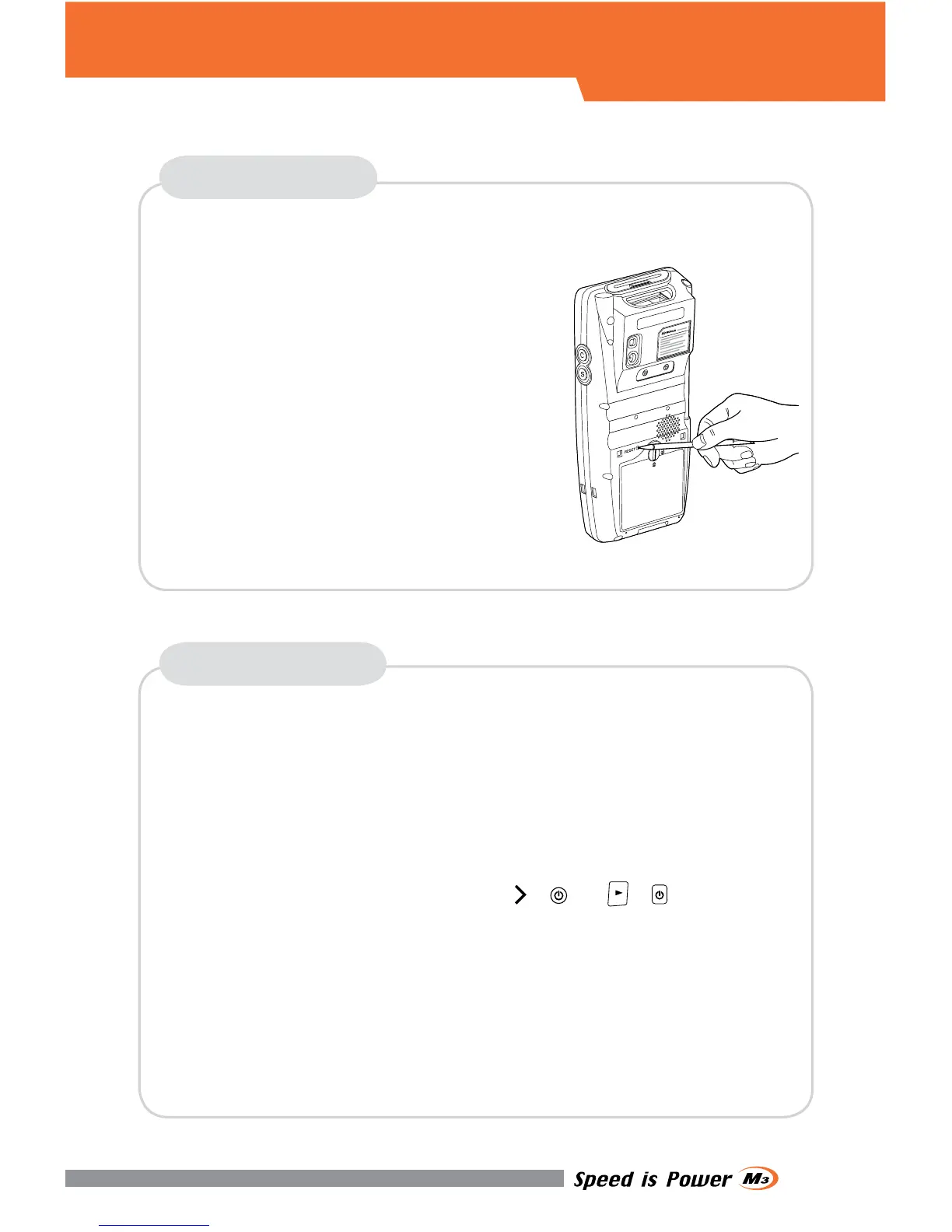
the device, SOFT RESET allows your device
to restart, similar to rebooting a computer.
It will adjust memory allocation - all records
and entries are retained after soft reset but
unsaved data or files may be lost.
When an unexpected error cannot be solved with SOFT RESET,
perform CLEAN BOOT to restart the system.
It will erase all data stored in the device except in Flash Disk and return
to its default settings.
▪ Press the RESET BUTTON briefly.
Follow below steps to CLEAN BOOT.
(
+
or
+
)
▪ Press the POWER BUTTON more than 10 seconds.
▪ Press and hold the <RIGHT NAVIGATION> button then press the
POWER button briefly.
▪ When Boot Menu will be displayed on the screen, press “3” to
proceed CLEAN BOOT.
SOFT RESET
CLEAN BOOT
RESET


 To Next Page